English
 Español
 Português
 Français
 Русский язык
 Italiano
 Deutsch
 Nederlands
 لعربية
 한국어
한국어 Japanese
 ภาษาไทย
 Türkçe
 Tiếng Việt
 Bahasa Indonesia
 Hindi
Hindi kazakh
 Uzbek
Uzbek Thai
Thai Farsi
Farsi
Qunmao Conference Tablet Video Conferencing Guide
 2026-08-17
 1575
1575




2026-08-17
1575
Hardware, Software and Accessory Reference For Business Meeting Deployments
You source conference tablets for company meeting rooms. You want to run video calls directly on the device. Many buyers ask one common question. Can video conferencing work on an Android‑powered conference tablet? Do you have to buy extra external cameras and microphones before you start your first meeting?
Qunmao conference tablet ships with built‑in remote conference video capability. Audio signals transmit over regular office network links. You get real‑time audio flow with very little lag for daily business calls. Team members can join meetings from different cities or cross‑border locations without complex setup work. Real‑time remote screen sharing works right out of the box. It works with most mainstream video meeting software available for enterprise users.
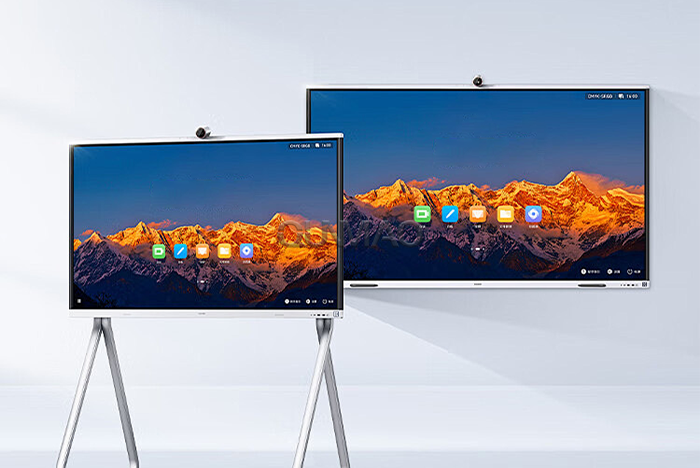
The built‑in interactive whiteboard supports screen mirroring and remote control from other devices. You launch video calls, push shared screens, and write notes together online all within the whiteboard interface. Multiple remote participants can add text or graphic marks on the same canvas during active sessions. This cuts down switching between separate apps during live meetings.
You do not need to install special custom firmware. Open the pre‑loaded app store on the Qunmao conference tablet. Search for your target meeting software, download and install it. You can launch video calls within minutes. The hardware handles audio input, video feed and network data transmission locally on the tablet.
Tencent Meeting: Complete support for video calls, screen push and remote participant annotation.
WEBEX: Runs on Android, covers cross‑regional corporate meeting workflows.
Microsoft Teams: Usable for daily team check‑ins and client‑facing conference sessions.
DingTalk: Fits companies already running DingTalk for internal office workflows.
Huawei Video Software: Works for enterprise sites built around Huawei office hardware.
Haoshitong and Xiaoyu Yilian: Supports domestic enterprise meeting platforms widely used across local business clients.
Keep one point in mind. Some software releases have Android‑specific version limits. You should download the Android‑optimized build, not the Windows desktop installer. Desktop APK packages will fail to run on your conference tablet hardware.
A lot of system integrators wonder whether you must add an OPS computer module to hold video meetings. The short answer is no. The native Android operating system can run Tencent Meeting, Haoshitong, DingTalk and other meeting apps. You set up remote collaboration without adding extra OPS hardware. That saves you material cost and installation labor for small‑to‑mid‑size meeting‑room projects.
Windows mode brings its own set of advantages. When you fit an OPS module and switch to Windows, you unlock a wider pool of desktop applications. Some specialized industry meeting tools only offer Windows‑based clients. If your end‑users rely on those niche software tools, OPS becomes a necessary upgrade for your deployment.
Built‑in camera and microphone modules come fitted on most Qunmao conference tablet units. These built‑in components handle small meeting rooms with 3‑6 people comfortably. You will see clear video capture and usable voice pickup within 3 meters of the screen.
Larger meeting spaces change these requirements. If your meeting room holds 10 or more people, built‑in hardware hits limits. Voices from far seating positions will sound faint. Camera view cannot capture all participants across a wide conference table. In these cases, you connect external USB cameras and array microphones to the tablet’s available USB ports.
Small meeting rooms (2‑6 participants): Use factory‑fitted onboard camera and microphone, no extra accessories needed.
Mid‑size meeting rooms (7‑12 participants): Add external USB array microphone for better voice pickup range.
Large conference halls (13+ participants): Pair external wide‑angle camera plus multi‑channel microphone array for full‑room coverage.
You do not need special driver software for most standard USB video and audio peripherals. Plug‑and‑play works for most common USB cameras and microphones sold on the commercial market. Check hardware compatibility before bulk purchase for large‑scale projects.
Video conferencing performance ties closely to your local network. Poor network creates frozen video frames, broken audio or dropped meeting connections. You plan network specs before you roll out conference tablets across office sites.
For 1080P video calls, reserve 4‑6 Mbps upload speed for each conference tablet location.
Wired ethernet connection delivers more steady performance than Wi‑Fi for long‑hour important business meetings.
Wi‑Fi works for casual daily meetings. Avoid crowded 2.4GHz bands. Connect to 5GHz Wi‑Fi access points for lower latency.
Close background downloading apps when you run critical video conferences. These services eat up available network bandwidth.
| Evaluation Item | Native Android Mode | OPS Windows Module Mode |
|---|---|---|
| Video Conference Software Support | Tencent Meeting, Teams, WEBEX, DingTalk and other Android‑based meeting clients | All Android‑supported software plus full desktop‑only meeting applications |
| Need OPS Hardware | No extra OPS module required | Must install compatible OPS computer module |
| Whiteboard & Screen Sharing | Built‑in, direct launch within tablet system | Works, requires separate software operation under Windows |
| Cost Of Deployment | Lower, no additional computing hardware purchase | Higher, includes OPS hardware and installation work |
| External Peripheral Compatibility | Most standard USB cameras and microphones work | Broader peripheral compatibility for industry‑grade accessories |
| Typical Suitable Scenarios | Small and medium meeting rooms, daily internal team meetings | Large conference halls, sites requiring Windows‑only specialized software |
| System Boot Time | Fast cold start and wake‑up from standby | Longer boot sequence, matches regular Windows PC behavior |
Attempt to install Windows‑desktop‑exclusive software installation packages on Android system. These files cannot execute on the tablet.
Rely only on built‑in microphones for large meeting rooms. Remote participants struggle to hear people sitting far away.
Run high‑bandwidth background downloads while running important video conferences. This triggers stuttering audio and frozen video frames.
Ignore upload bandwidth requirements. Most site admins focus only on download speed, yet video conferencing consumes heavy upload capacity.
Buy OPS modules blindly for every project. You add unnecessary hardware cost when Android meets your meeting requirements.
Q1: Can I run video conferencing without buying an OPS computer module?
Yes. The Android system built into Qunmao conference tablet supports mainstream meeting applications. You complete video calls without OPS hardware. You only add OPS when your project needs Windows‑only desktop software.
Q2: Must I purchase external cameras and microphones for video meetings?
Not for small‑size meeting rooms. Onboard camera and microphone work fine for groups of 2‑6 people. Larger rooms need external USB cameras and microphones to capture audio and video across the whole meeting space.
Q3: Can I switch between whiteboard and video conference during an active call?
You can switch between these two functions. The native interface lets you launch video calls and open whiteboard content. You push whiteboard pages to remote participants and take shared notes during ongoing conference sessions.
Q4: What network speed do I need for smooth 1080P Android‑based video calls?
Plan for 4‑6 Mbps stable upload bandwidth for each conference tablet. Wired ethernet gives you more stable performance than Wi‑Fi for formal business meetings.
Q5: Can I install custom third‑party APK files that are not listed inside the official app store?
The system supports manual APK installation after you turn on corresponding permission switches. Be careful with untrusted APK sources. Bad software may cause crashes or audio‑video hardware access failures.
Q6: Will external USB cameras and microphones conflict with built‑in audio‑video hardware?
You select active input device inside your meeting software settings. You pick external camera or microphone to replace onboard hardware. No hardware conflict occurs when you complete correct software‑side selection.
Q7: Which meeting software will not work on Android mode conference tablet?
Software released only for Windows desktop will not run under Android. Before you place bulk orders, verify your required meeting tool provides an official Android client release.
Figure out average participant count for each meeting room, confirm whether external cameras or microphones are needed.
Check your required meeting software has official Android client releases before hardware ordering.
Decide whether Windows‑only software will be used. Confirm if OPS module purchase becomes necessary.
Test upload bandwidth at each installation site. Prioritize wired network access for high‑priority meeting spaces.
Confirm USB port quantity, make sure you have available ports for external audio‑video peripherals.
Train on‑site operators to switch input devices inside meeting software when external accessories connect.
Android‑based Qunmao conference tablets deliver capable video‑meeting performance for most business scenarios. You avoid extra OPS costs for many projects. Match hardware configuration to your actual room size and software requirements. You get stable remote‑meeting experience without unnecessary over‑spec purchasing.


 Floor 6, Building A, No. 3, North District, Shangxue Science and Technology City, Xinxue Community, Bantian Street, Longgang District, Shenzhen City
 info@szqunmao.com
 +86 15920011166
 +86 15920011166