English
 Español
 Português
 Français
 Русский язык
 Italiano
 Deutsch
 Nederlands
 لعربية
 한국어
한국어 Japanese
 ภาษาไทย
 Türkçe
 Tiếng Việt
 Bahasa Indonesia
 Hindi
Hindi kazakh
 Uzbek
Uzbek Thai
Thai Farsi
Farsi
Qunmao LCD Video Wall Project: Wuzhou People's Hospital New Campus 4×5 55‑inch Splicing Screen
 2026-08-19
 958
958



2026-08-19
958
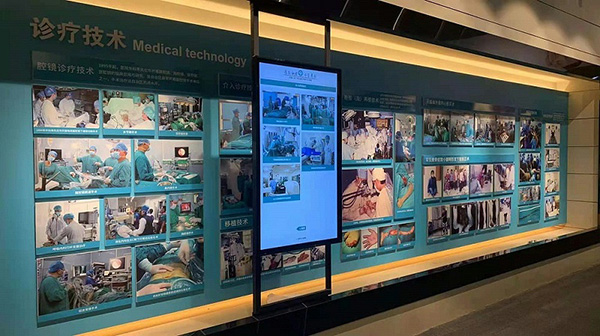
Modern public hospitals handle large volumes of data every single day. Bed occupancy numbers, patient flow statistics, consultation schedules, medical imaging feeds and public notice content need clear visual output for internal staff and visiting patients. Old‑style display hardware often cannot handle multiple signal inputs at once. Separate small monitors spread across walls create fragmented information, and staff spend extra time switching between different devices to get complete data. Wuzhou People’s Hospital built its new campus to expand local medical service capacity. The hospital management team wanted a unified large‑screen display system to support daily administrative work, medical resource coordination and public information release. Qunmao took charge of this full‑scale LCD splicing screen project.
Our on‑site installation team completed hardware assembly, wiring work and system configuration. After rounds of functional and stability testing, the whole system passed acceptance and entered regular daily operation. This 4‑row × 5‑column splicing wall delivers flexible display modes. You can run content on one single panel, or spread material across multiple combined panels. It pulls different medical data sources onto one unified display platform, and helps hospital staff organize scattered medical resources with less manual work.
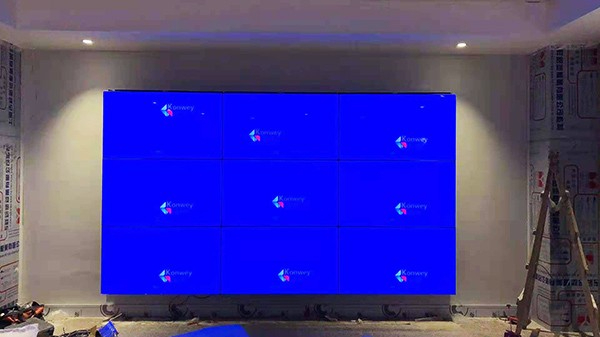
The new campus of Wuzhou People’s Hospital covers expanded service zones for outpatient departments, inpatient wards, administrative command rooms and staff meeting spaces. Hospital administrators listed practical requirements before project kick‑off. Every requirement tied directly to real‑world hospital workflows.
Set up a large continuous display surface inside the hospital command‑control room. Staff need to check hospital‑wide operational data from one viewing position.
Support single‑screen and multi‑screen mixed display. Different signal sources should run independently without signal conflicts.
Integrate scattered medical resources. Connect hospital management systems, monitoring cameras, meeting hosts and public‑notice playback devices into one display system.
Adapt to two core usage modes: internal staff monitoring work and hospital‑wide briefings. Quick mode switching saves preparation time for shift hand‑over meetings.
Hardware must sustain long running hours. The hospital needs screen equipment to stay active through most of each working day.
Engineers finish full‑site installation, cable arrangement and system debugging. The hospital technical team receives simple operation guidance for daily use.
Later maintenance steps stay simple. In‑house IT staff should complete routine checks without heavy specialized training.
Qunmao technical staff visited the new campus site. They measured wall dimensions, checked wall load‑bearing capacity, counted available signal interfaces and mapped out daily usage scenarios. The team locked in a 4 rows × 5 columns layout, using twenty‑unit 55‑inch LCD splicing panels. Matching splicing processor, signal access modules, power distribution hardware and heavy‑duty mounting frame ship as one complete solution.
| Configuration Item | Specific Parameter | Actual Value In This Hospital Deployment |
|---|---|---|
| Panel Layout & Quantity | 4 rows × 5 columns, total 20 units, 55‑inch each panel | Fits command‑control room wall dimension. Provides wide horizontal display space for multi‑group medical data. |
| Bezel Width | Bilateral 3.5mm | Reduces visual breaks when showing hospital‑wide floor maps and large statistical charts. |
| Single‑panel Resolution | 1920 × 1080 | Delivers sharp text for bed‑status tables, patient‑flow reports and surveillance camera feeds. |
| Panel Brightness | 500 cd/m² | Guarantees readable screen content under normal indoor hospital lighting, no glare for long‑time viewing. |
| Video Splicing Processor | Multi‑channel input industrial‑grade processor | Enables single‑screen output, multi‑window split display, window floating and window position adjustment. |
| Installation Structure | Wall‑mount heavy‑duty metal frame | Secure wall fixation, reserves rear gap for heat dissipation and cable maintenance access. |
| Supported Signal Input | HDMI, VGA, network signal, local media playback | Connect hospital management host, monitoring NVR, meeting PC and local advertisement‑playback equipment. |
Our field engineers follow standardized work steps for medical‑facility projects. Medical sites have stricter requirements for neat wiring and stable hardware performance compared with ordinary office buildings.
Site re‑verification: Re‑measure wall size, test wall load‑bearing, confirm reserved power sockets and pre‑buried signal cable positions. Clear surrounding area for safe installation work.
Hardware arrival inspection: Check every LCD panel, processor and accessories for transport scratches or damage before mounting work starts.
Mounting frame installation: Fix wall‑mount frame and adjust flatness. Frame flatness directly controls final gap consistency across all panels.
Panel mounting: Install twenty‑five‑inch panels one by one. Fine‑tune each unit to keep uniform gaps between adjacent screens.
Cable organization: Arrange power lines and signal cables neatly inside rear maintenance space. Avoid tangled wiring that blocks heat flow.
Processor hardware debugging: Complete all signal‑line connections, set output resolution, configure each signal input channel and test signal switching response speed.
Multi‑item function test: Run single‑screen display test, open multiple split windows, drag and resize windows, switch different signal sources repeatedly, check color consistency across the whole wall.
Customer acceptance: Hospital representatives verify picture quality, display modes and continuous running performance. The whole system passes acceptance and starts official daily operation.
After deployment, this splicing wall serves two major work scenarios inside the hospital: daily operational monitoring and internal staff meetings. Each usable feature solves real pain‑points for hospital management teams.
Single‑screen independent display. You assign one panel to show one set of data. For example, one panel shows real‑time bed occupancy, another panel shows outpatient queue statistics, and a third plays public‑health education video materials.
Multi‑panel combined display. Merge multiple panels or the full 20‑panel wall into one large screen. Hospital staff use this mode for internal briefing meetings, playing hospital overview maps and work‑report slides.
Flexible multi‑window floating display. Multiple signal sources run on separate resizable windows on the same video wall. Staff observe patient‑flow data, surveillance feeds and meeting presentation content side‑by‑side, without frequent full‑screen signal switching.
Centralized medical‑resource integration. Data from different hospital subsystems feed onto this unified display platform. Administrators do not need to walk between scattered monitors to collect cross‑department information.
Stable long‑hour operation. The hardware holds steady during long working shifts. Color shift and screen flicker do not appear under normal daily‑usage conditions.
Replaces scattered small monitors with one unified large‑format display surface inside the command‑control room.
Single‑screen and multi‑screen mixed modes match both monitoring work and staff meeting demands.
Centralized display reduces time spent gathering cross‑department medical data for management teams.
Neat on‑site installation leaves clean surroundings, which fits strict environmental standards for medical‑building interiors.
Professional on‑site debugging plus simple operation training lowers technical barriers for hospital IT personnel.
Different hospital departments need different video‑wall sizes. Your wall‑space size, number of signal sources and main usage purposes decide which layout fits your facility best. Below table lists typical layout choices for medical‑industry buyers.
| Splicing Layout | Common Panel Size | Best‑Fit Hospital Scenarios | Key Practical Reminders |
|---|---|---|---|
| 2×3 | 49‑inch /55‑inch | Small department monitoring room, internal small meeting room | Works for limited wall area, fewer simultaneous signal sources. |
| 3×4 | 55‑inch | Medium‑size hospital command room, medical teaching demonstration room | Balanced total display area, widely adopted for general hospital projects. |
| 4×5 (This real‑world case) | 55‑inch | New‑campus general command‑control room, large‑scale staff briefing hall | Large horizontal display space, handles many parallel signal sources for hospital‑wide data monitoring. |
| 5×5 and above | 55‑inch | Regional medical center command hub, large‑scale medical teaching base | Requires strict wall load‑bearing evaluation, higher‑grade video processor for multi‑signal processing. |
Q1: What site preparation should our hospital finish before installation engineers arrive?
A1: Confirm wall load‑bearing meets frame weight requirements. Reserve stable power supply sockets near installation location. Pre‑embed signal cables if possible. Clear surrounding space for engineers to work. Qunmao can send you a pre‑installation checklist for your hospital IT team.
Q2: Can LCD splicing walls connect with existing hospital HIS or monitoring NVR systems?
A2: Yes. The splicing processor accepts HDMI, network and other mainstream signal types. You need to confirm signal output interfaces from your existing hospital systems during early‑stage communication. We match proper access modules for your current hardware environment.
Q3: Can hospital staff switch between single‑screen mode and combined multi‑panel mode quickly?
A3: Yes. You can save preset layout profiles inside the processor. One click switches to single‑screen monitoring layout or full‑screen meeting layout. Ordinary staff can complete these operations after short‑term hands‑on training.
Q4: How many independent signal windows can this 4×5 hospital‑grade splicing system open at the same time?
A4: Window quantity depends on processor hardware capacity. The processor selected for this Wuzhou hospital case supports multiple parallel windows. Tell our sales team how many signal devices you plan to connect, we assign matching processor specifications for your project.
Q5: Is wall‑mount installation suitable for hospital command‑control rooms? What about cabinet‑type installation?
A5: Wall‑mount saves front‑back space, but your wall must carry total equipment weight. Cabinet‑type structures integrate frame, power and cooling components, and place lower requirements on wall strength, yet take up more room depth. This hospital project chooses wall‑mount according to actual site measurement results.
Q6: One panel fails, do we need to replace the whole 20‑unit splicing wall?
A6: No. Each LCD panel runs as an independent unit. If one single unit breaks down, you only replace that faulty panel. Remaining panels keep working normally. This cuts later‑stage repair costs for public‑institution clients such as hospitals.
Q7: What daily maintenance work should hospital IT teams carry out for LCD splicing walls?
A7: Keep room environment dry and reduce dust accumulation. Do not spray liquid cleaner directly on screen surfaces. Check power supply and cable connections periodically. Follow standard power‑on and power‑off sequences. Avoid keeping one static still picture displayed for many continuous hours.
Q8: Can this kind of splicing wall be used for medical imaging display such as CT scan pictures?
A8: General‑purpose LCD splicing panels fit overview display for management staff. For precise clinical diagnosis reading of medical images, you need display hardware with DICOM‑calibrated medical‑grade panels. Clarify your core usage purpose when you start project communication with us.
Q9: What factors create color inconsistency across different panels on a splicing wall?
A9: Uneven original panel brightness, improper installation and long‑time usage can bring color difference. Our engineers complete brightness and color calibration during on‑site debugging. You can schedule periodic recalibration after one or two years of continuous use.
Q10: Do you provide on‑site installation service for overseas medical‑facility buyers?
A10: For domestic projects inside China, our own engineers finish on‑site installation and debugging. For overseas customers, we supply detailed installation documents and remote technical guidance. You arrange local construction personnel to complete physical installation work on‑site.
This real‑world project at Wuzhou People’s Hospital new campus shows how LCD splicing walls deliver practical value for modern‑hospital construction. Flexible single‑screen and multi‑screen display modes, multi‑source signal integration and stable long‑time running match the complex daily workflows of public‑medical institutions. If your medical facility plans to procure similar video‑wall systems, send us your wall dimension data, expected layout and list of signal‑source devices. Our technical team can work out targeted configuration suggestions and project reference materials for you.


 Floor 6, Building A, No. 3, North District, Shangxue Science and Technology City, Xinxue Community, Bantian Street, Longgang District, Shenzhen City
 info@szqunmao.com
 +86 15920011166
 +86 15920011166