English
 Español
 Português
 Français
 Русский язык
 Italiano
 Deutsch
 Nederlands
 لعربية
 한국어
 Japanese
 ภาษาไทย
 Türkçe
 Tiếng Việt
 Bahasa Indonesia
 Hindi
 kazakh
 Uzbek
 Thai
 Farsi

Mall Digital Signage: Vertical Touch Kiosk vs Wall Display
 2026-11-18
 35



2026-11-18
35
Mall digital signage is not a single product category. It covers several physical formats — vertical floor-standing kiosks, wall-mounted displays, and hanging screens — and the right choice depends on the installation position and whether the screen needs to accept touch input. This guide compares the two most common formats in retail environments and explains what B2B buyers should confirm before ordering a digital kiosk touch screen for a mall project.
Most mall signage projects end up choosing between two physical formats, and they solve different problems:
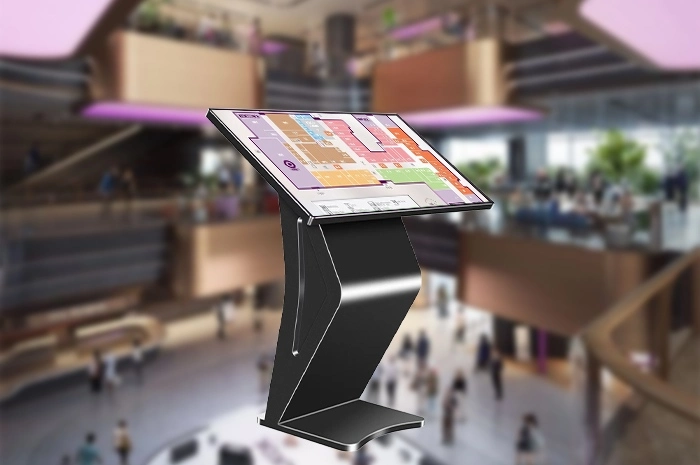
A floor-standing unit with a large vertical display, used where the screen needs to be interactive — wayfinding, store directories, interactive promotion, or self-service information. The 85-inch model listed on the product page is a vertical touch screen kiosk with 20-point infrared touch, a 4K UHD display, and a choice of Windows 10/11 or Android 13.
A screen fixed to a wall or suspended from above, used for advertising and information where the viewer does not need to touch the screen. These are typically smaller than a floor-standing kiosk and are specified by the wall position rather than by the floor footprint.
The choice between the two is driven by one question: does the project need touch interaction at this position, or only display? If the answer is display only, a wall-mounted screen is usually simpler and cheaper. If the answer is interaction, a kiosk is the closer fit.
The position needs interaction. Wayfinding, store directories, and interactive promotion require touch input, which a wall-mounted advertising display does not provide.
The position has floor space. A floor-standing kiosk occupies a footprint on the floor. The 85-inch model has a base size of 1155×450×60mm, which should be checked against the available floor area.
The position benefits from visual presence. An 85-inch vertical screen is a large object in a mall environment and works as a landmark as well as a display.
The project wants advertising and information in one unit. A touch kiosk can run promotional content and switch to an interactive directory or information screen on the same display.
| Specification | 85-inch model (product page) | Why it matters in a mall |
|---|---|---|
| Display | 85 inch, 3840×2160, ≥450cd/m², 3000:1 contrast | Readable at a distance and under mall lighting |
| Touch | Infrared touch, 20 points, ≤2mm accuracy, 4mm tempered glass (Mohs 7) | Reliable public interaction and durability in high-traffic areas |
| System | Windows 10/11 (Intel i5/i7, 4/8/16GB RAM, 128/256/512GB SSD) or Android 13 | Matches the project’s wayfinding or content software |
| Installation | Floor-standing vertical, indoor | Fits entrance, atrium, and directory positions |
| Weight | Net 89KG, gross 94KG | Floor loading and delivery planning |
| Packing size | 2217×225×1275mm | Freight and on-site handling |
Specifications above are taken from the 85-inch vertical IR touch kiosk product page at the time of writing. Confirm current parameters and options with the supplier before finalizing an order.
The 85-inch kiosk supports both a Windows configuration and an Android configuration, and the choice affects what software the project can run:
Windows. The Windows 10/11 configuration with Intel i5/i7, 4/8/16GB RAM, and 128/256/512GB SSD is the fit when the project’s wayfinding or content software is a Windows application.
Android. The Android 13 configuration with a T972 quad-core processor is the fit for lighter deployments, such as content playback or a web-based directory.
Confirm the software environment before the order, not after. If the kiosk configuration does not support the software the project already uses, the problem surfaces at deployment.
Confirm the system and software before the order. A mall wayfinding or directory project depends on software that is often specified before the hardware is ordered. Matching the kiosk’s system configuration to that software is a quotation-stage decision, not an installation-stage fix.
Position and format. Confirm which positions need a touch kiosk and which only need a display, rather than ordering the same format for the whole project.
Floor space and base size. The base size is 1155×450×60mm; confirm the floor area and traffic flow around the unit.
System and software. Confirm Windows or Android against the project’s wayfinding or content software.
Touch technology. This model uses infrared touch with 20 points; confirm whether the project needs IR or capacitive touch based on the expected use.
Weight and installation. Net weight is 89KG; confirm floor loading and delivery access, especially in a mall where delivery routes and lifts may be restricted.
OEM and branding. For distributors and integrators, confirm logo, boot animation, packaging, and pre-installed software requirements at quotation stage; OEM and ODM services are available.
Certifications and spares. Request current certificates for the ordered configuration, and confirm the spare-parts policy and warranty terms in writing.
Supply and lead time. The product page lists 3,000–5,000 units in stock per month; confirm lead time for the specific configuration before committing to a project date.
Position-by-position format decided: touch kiosk or display-only screen
Floor space and base size (1155×450×60mm) checked
System choice confirmed: Windows 10/11 or Android 13
Wayfinding or content software compatibility confirmed
Touch technology confirmed: IR or capacitive
Net weight (89KG) and delivery access checked
OEM branding, boot animation, and packaging requirements defined
Current certificates, spare-parts policy, and warranty confirmed in writing
Sourcing mall digital signage for a project or distribution order?
Send your installation positions, floor plan, software environment, and OEM needs — we will confirm the kiosk configuration, installation requirements, lead time, and wholesale pricing.


 Floor 6, Building A, No. 3, North District, Shangxue Science and Technology City, Xinxue Community, Bantian Street, Longgang District, Shenzhen City
 info@szqunmao.com
 +86 13148726043
 +86 13148726043