English
 Español
 Português
 Français
 Русский язык
 Italiano
 Deutsch
 Nederlands
 لعربية
 한국어
한국어 Japanese
 ภาษาไทย
 Türkçe
 Tiếng Việt
 Bahasa Indonesia
 Hindi
Hindi kazakh
 Uzbek
Uzbek Thai
Thai Farsi
Farsi
Interactive Flat Panel | 4K Touch Smart Board For Classroom & Corporate Meeting Rooms
 2026-08-13
 1167
1167




2026-08-13
1167
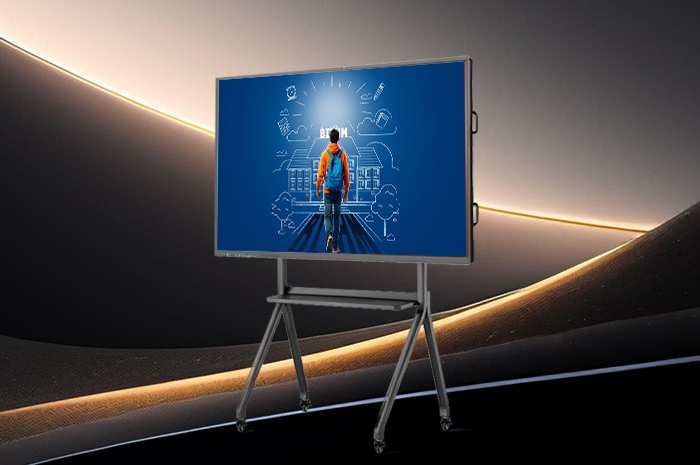
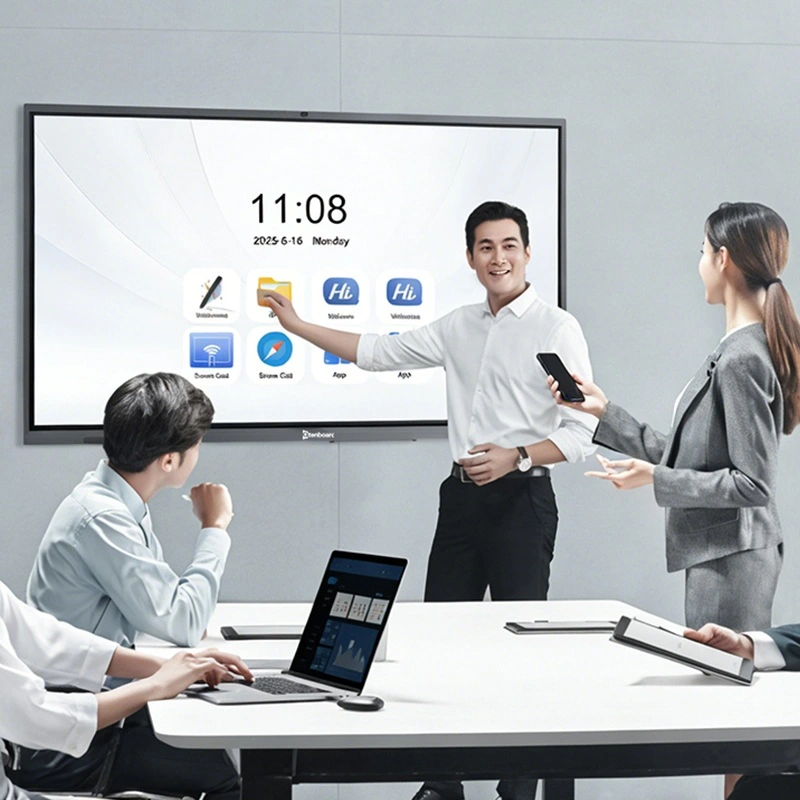
Classrooms still rely on chalkboards that fill rooms with dust. Office meetings struggle with small projector screens, tangled casting cables and flimsy temporary displays. Old conference equipment slows lesson progress and team discussions alike. Our interactive flat panel packs six core practical functions into one single unit. It replaces chalkboards, projectors, external cameras and separate conference equipment for schools, training centers and corporate offices of all sizes. Every detail gets tuned to fix the common troubles you face during daily classes and meetings.
Most low-cost interactive screens use ordinary thin glass panels that scratch easily. Long hours staring at low-quality panels leads to dry eyes and blurred vision for teachers and office staff who use displays all day. This interactive panel adopts genuine 4K resolution (3840 × 2160) high-definition screen matched with thickened reinforced tempered glass on the front layer.
True 4K ultra-clear visual presentationFine text, complex charts, engineering diagrams and detailed teaching pictures all render with sharp clarity. You read tiny annotation text clearly from the back of a classroom or the far end of a meeting room. Color calibration gets adjusted to avoid oversaturation, which eases eye strain after four to six hours of continuous viewing each day.
Impact-resistant toughened glass for heavy daily useThe surface undergoes professional tempering treatment. Accidental knocks from hands, teaching pointers, styluses or small stationery items will not leave permanent scratches or cracks. In busy classrooms and open office meeting areas, frequent bumps happen daily. This sturdy glass structure withstands regular physical contact without screen damage.
Anti-glare coating cuts indoor light reflectionIndoor ceiling lights and exterior window sunlight often create reflective spots on flat screens. The built-in anti-glare layer weakens ambient light reflection greatly. You view screen content steadily without tilting blinds or adjusting room lighting repeatedly during lessons or conference sessions.
Traditional chalkboards require chalk and erasers that produce dust residue everywhere. Single-point touch screens only let one person write at a time, which slows group brainstorming and classroom group assignments. Our infrared touch system rewrites the whole writing experience for collective work.
20-point infrared multi-touch responseUp to twenty users can draw, annotate and write notes on the screen surface side by side without lag or misrecognition. Group students complete collaborative assignments together in class. Multiple team members mark up project plans simultaneously during internal meetings. No one needs to wait for their turn to add content.
Rich embedded multimedia editing toolsWhile annotating on the digital whiteboard, you insert local pictures, short teaching videos, geometric shapes, flowcharts and formula templates with simple taps. Teachers embed experimental video clips right into course notes. Office teams attach product renderings beside text discussion points to make explanations more intuitive.
Dust-free operation replaces chalk entirelyYou discard chalk, chalk dust, blackboard erasers and cleaning cloths completely. The digital board gets wiped clean with one tap on the screen menu. Classrooms stay tidy, and teachers no longer inhale chalk dust for years on end.
Old casting solutions force users to download dedicated software or plug in lengthy HDMI cables before sharing screens. Traveling staff often forget adapter cables when visiting branch offices or off-site meetings. Our casting function removes all these cumbersome preparation steps.
Local wireless casting without application installationLaptops, iPhones and Android phones connect to the same local WiFi network as the panel. You activate the native screen mirroring function built into your device system directly. No extra programs need downloading. Content streams to the large display within two seconds.
Cross-region cloud casting accessIf you stay outside the local network range, you open the exclusive casting webpage on your mobile phone or notebook browser. Input the matching verification code shown on the interactive panel. Your document slides, videos and pictures transfer to the screen remotely. Business representatives deliver presentations to indoor meeting rooms while waiting outside venues easily.
Multi-device casting switching supportYou switch screen sources between different participants swiftly during group meetings. Presenters take turns sharing materials without unplugging wires or adjusting device settings repeatedly.
After classes or meetings finish, attendees used to copy notes down on paper quickly before whiteboard content gets erased. Important discussion points and teaching knowledge often get recorded incompletely. The QR code storage function solves this note-taking trouble entirely.
Instant content generation via QR codeOnce teaching notes, meeting agendas and annotated project plans finish editing, you tap the save button on the panel. A unique QR code pops up on the screen instantly. Every participant opens the camera app on their smartphone and scans the code.
Digital files replace paper notebooksAll handwriting, inserted images and video attachments compile into complete digital documents. Files save to mobile phones directly. Students review course knowledge after class anytime. Employees sort meeting records and submit work summaries without manual transcription. Paper consumption drops noticeably for schools and enterprises.
Batch saving and archive managementYou store multiple rounds of class notes or meeting records inside the device memory. Historical files can be regenerated into QR codes for secondary sharing when needed later.
Many meeting rooms purchase external webcams and separate microphones for online conferences. Extra devices take up space, require repeated wiring and deliver unstable audio and video effects. This panel integrates all conference hardware inside the body for stable remote communication.
High-resolution built-in camera captures full room scenesThe integrated high-definition camera frames the whole meeting table or classroom area clearly. Remote participants see facial expressions, gestures and screen annotations of on-site attendees without blurred edges.
8-unit microphone array picks up sound evenlyEight built-in microphones collect voices from every corner of the meeting room. Voice signals get optimized to cut background noise such as air conditioner hum and indoor ambient chatter. Distant colleagues hear every discussion word distinctly.
Full compatibility with mainstream global conference softwareGoogle Play Store comes pre-installed on the system. You download Google Meet, Zoom, Microsoft Teams and other widely used meeting applications with a few taps. The camera and microphone pair automatically with each software program, no complicated driver setup required.
Single-system interactive panels often lag when running large teaching resources, multi-page slide packs and heavy design files. Insufficient storage space forces users to delete old files frequently to free up room. The dual-system architecture balances lightweight daily use and high-load complex tasks perfectly.
One-click seamless system switchingToggle between Android and Windows systems through the main menu bar in seconds. The Android system runs lightweight tasks including whiteboard writing, quick screen casting and daily small class teaching. The Windows system handles massive PPT files, design software, video editing and long-duration online conferences.
Ample storage space prevents system lagExpanded memory and internal hard drive capacity support storing thousands of courseware packages, meeting records, video materials and project documents. You no longer encounter system freezes or slowdowns caused by file overload during peak usage hours.
Adapt to diversified teaching and office demandsTeachers run educational apps under Android and launch professional teaching software under Windows alternately. Corporate teams browse cloud documents lightly on Android and operate business office suites fully under Windows mode.
| Comparison Item | Chalkboard + Projector | Single-System Touch Screen | Separate Camera + Microphone Setup | Our Dual-System Interactive Flat Panel |
|---|---|---|---|---|
| Display Effect & Eye Comfort | Dim projection, severe light reflection, easy eye fatigue | Clear screen, ordinary glass with no anti-glare treatment | Depends on projector quality, unstable brightness | 4K resolution + anti-glare tempered glass, long-hour viewing friendly |
| Simultaneous Multi-Person Writing | Only one person writes at once, dusty operation | 2-10 point touch only, limited collaborative efficiency | No touch writing capability | 20-point IR touch, multiple users annotate together freely |
| Screen Casting Mode | Reliant on HDMI cables, complicated wiring | Local wireless casting only, no remote cloud casting | Cable connection mandatory | No-app local cast + cross-region cloud web casting dual modes |
| Content Saving Method | Manual paper transcription, easy content omission | Save to USB drive only, inconvenient mobile access | No automatic saving function | QR code one-click scan, direct mobile file acquisition |
| Remote Conference Hardware | Need extra purchase of camera and microphones | No built-in conference audio & video hardware | Scattered devices, messy wiring, noise interference | Built-in HD camera + 8-microphone array, ready for video calls instantly |
| Operating System | No intelligent operating system | Single Android system, insufficient storage for large files | No integrated intelligent system | Android + Windows dual system, ample storage, no lag under heavy loads |
| Daily Maintenance Cost | Continuous spending on chalk, erasers and cleaning supplies | Low daily cost, limited functional coverage | High maintenance for multiple separate devices | Zero consumable cost, long service life with simple cleaning only |
Q1: Will the infrared touch screen be affected by strong indoor light or sunlight coming through windows?
The infrared sensing module adopts anti-interference optical components. Normal indoor lighting and moderate natural sunlight will not cause touch misjudgment or failed recognition. Direct intense sunlight shining onto the screen surface for long hours may slightly weaken touch sensitivity. You can adjust window blinds appropriately under extreme lighting conditions to maintain stable writing experience.
Q2: Can QR code saved whiteboard files be edited again after downloading to mobile phones?
Files obtained via QR code save handwriting, inserted images and videos in complete format. You can view the full content directly on mobile devices. For secondary editing work, you import the files back to the interactive panel or open compatible office applications on your laptop to continue annotation and revision.
Q3: How long does system switching between Android and Windows take, and will stored files get lost?
System switching finishes within 3 seconds. The two systems run independently yet share part of the storage space. Files saved in the public folder can be accessed on both sides. Data will not be cleared or damaged during switching operations under normal use conditions.
Q4: Does the built-in camera support zoom adjustment during remote video conferences?
The camera supports digital zoom and angle adjustment inside the conference software. You narrow the view to focus on speaking individuals or widen the frame to display the whole meeting room scene according to actual conference needs. The microphone array automatically tracks sound sources to pick up voices accurately as participants change speaking turns.
Q5: Is cloud casting secure for internal corporate confidential documents?
Cloud casting requires a temporary dynamic verification code matched between your device and the panel. The connection closes automatically once the casting session ends. No historical connection records remain stored. Internal confidential materials can be shared safely for temporary off-site presentations.
Q6: What daily cleaning methods are suitable for the tempered glass surface?
Turn off the screen power first before cleaning. Wipe the panel surface with a soft microfiber cloth slightly dampened with neutral glass cleaner. Avoid corrosive chemical detergents and rough paper towels that scratch the anti-glare coating. Weekly simple cleaning keeps touch sensitivity and display clarity intact for years.
Q7: What warranty services are available for bulk orders from schools and enterprises?
All interactive panels come with a standard 2-year official warranty covering screen failure, touch module malfunction, camera and microphone breakdown under normal usage. Bulk institutional orders enjoy extended technical guidance, on-site installation debugging and remote after-sales troubleshooting services to guarantee stable long-term classroom and office use.
You no longer need to piece together scattered classroom and meeting equipment. This single interactive panel replaces chalkboards, projectors, external conference cameras, standalone microphones and storage devices all at once. The 4K toughened glass safeguards visual comfort and surface durability. Twenty-point multi-touch enables true group collaborative creation. Wireless and cloud casting eliminate tangled cables forever. QR code saving cuts paper waste and simplifies note arrangement. Built-in audio and video hardware supports seamless remote teamwork. Dual operating systems handle both lightweight daily tasks and heavy-duty professional work without slowdowns.
For primary and secondary schools, training institutions and enterprise conference rooms, this device lowers long-term operating costs while lifting classroom teaching quality and team meeting efficiency noticeably. Every function gets designed around your actual daily usage pain points, not empty technical parameters.
If you need to check detailed size specifications, parameter sheets and bulk procurement policies, visit our official product page to get full information and arrange a product demonstration:Official Interactive Flat Panel Product PageUpgrade your classroom and meeting space today with integrated interactive display technology.


 Floor 6, Building A, No. 3, North District, Shangxue Science and Technology City, Xinxue Community, Bantian Street, Longgang District, Shenzhen City
 info@szqunmao.com
 +86 15920011166
 +86 15920011166