English
 Español
 Português
 Français
 Русский язык
 Italiano
 Deutsch
 Nederlands
 لعربية
 한국어
한국어 Japanese
 ภาษาไทย
 Türkçe
 Tiếng Việt
 Bahasa Indonesia
 Hindi
Hindi kazakh
 Uzbek
Uzbek Thai
Thai Farsi
Farsi
6 Core Features of Interactive Flat Panel | 4K Display, Multi-Touch, Casting, Teleconference & Dual OS
 2026-08-10
 1361
1361




2026-08-10
1361
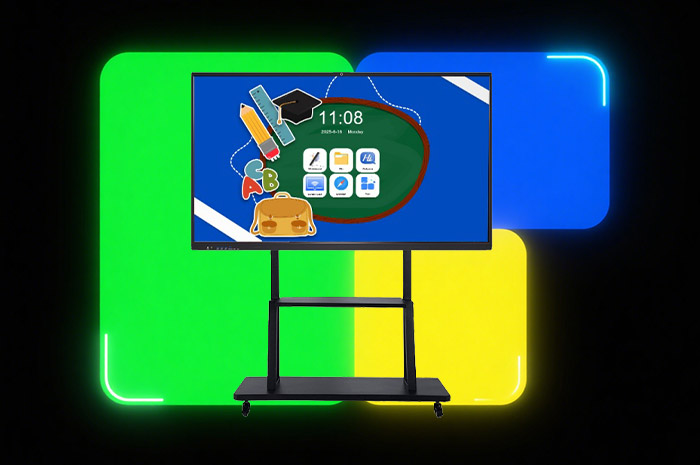
Whether you equip school classrooms or furnish enterprise conference spaces, your large display device needs to withstand daily heavy use, deliver clear visuals for hours of viewing, support group collaborative writing, simplify content sharing, accommodate remote team discussions, and run smoothly with large files and teaching resources. Many basic smart screens fall short in one or more of these critical areas. Our interactive flat panel integrates six fully polished core functions built around real daily usage demands. Each feature solves a common pain point teachers and office staff encounter repeatedly, turning tedious teaching and meeting workflows into simple, efficient operations.
Standard large-format displays often compromise resolution and panel quality to cut costs. Blurry text, washed-out color gradients and faint fine lines strain eyes after just one class or a two-hour meeting. Prolonged staring at low-definition screens leads to dry eyes, blurred vision and discomfort for both instructors and attendees. Physical safety poses another concern. Classrooms see frequent accidental bumps. Students lean against the screen surface. Objects occasionally tap the panel during group activities. Thin ordinary glass scratches easily and risks cracking upon impact, bringing costly downtime and replacement expenses for schools and businesses.
Our interactive panel features a native 4K resolution of 3840 × 2160 pixels. Every text character, mathematical formula, engineering diagram and image detail renders sharply across the entire screen area. Color saturation and brightness are calibrated to reduce visual fatigue during extended continuous viewing sessions. The front layer adopts thickened reinforced tempered glass after high-temperature strengthening treatment. The surface tolerates accidental knocks, palm taps and minor collisions that commonly occur in busy classrooms and open-plan meeting rooms. You no longer need to enforce overly strict screen protection rules or worry about accidental damage disrupting lessons and meetings. The durable glass also resists daily scratches from styluses and cleaning cloths, maintaining a smooth, clear viewing surface for years of heavy daily operation.
Traditional whiteboards and chalkboards come with persistent drawbacks. Chalk dust floats through the air, irritating respiratory systems and covering desks and learning materials. Board space fills up quickly during detailed subject explanations. Erasing content requires repeated physical wiping, and you cannot embed images, videos or reference charts directly alongside handwritten notes. Entry-level smart boards only support two to six touch points, limiting group participation severely. Multiple users cannot write side by side without input lag or misrecognition.
Equipped with advanced infrared touch sensing technology, this panel supports stable 20-point simultaneous touch input. Up to twenty participants can write, draw, annotate and solve problems on the same screen surface at one time. Group classroom assignments, team brainstorming sessions and design discussions proceed without waiting for turns. The writing response stays instant with no noticeable delay. You insert local images, stored videos and geometric graphics directly into your handwritten content with a few taps. Diagrams, explanatory clips and written notes combine seamlessly on one unified canvas. This fully replaces physical chalkboards and ordinary dry-erase whiteboards entirely, eliminating chalk dust and expanding creative teaching and discussion boundaries completely.
Older projection and screen casting systems create unnecessary barriers. You download dedicated casting software onto laptops and mobile phones ahead of time. Complex pairing steps waste minutes before each class or meeting. Wired HDMI connections restrict movement, tying users to fixed desks. Off-site staff who need to share documents remotely cannot push content to the main screen conveniently, slowing down cross-location team communication noticeably.
Our casting system removes all installation requirements. You mirror screens from Windows laptops, MacBooks, iPhones and Android smartphones directly without downloading any client applications. Local wireless casting connects instantly once devices share the same Wi-Fi network. The built-in cloud casting function delivers greater flexibility. No shared local network is required. You open a designated webpage on your personal device, log into your account, and push documents, slides and videos to the interactive panel from anywhere with internet access. Teachers upload pre-prepared course materials from offices before arriving at classrooms. Remote team members send report files to the meeting screen while traveling. Content sharing becomes effortless without complicated preparation work.
After lessons and meetings conclude, valuable handwritten content often gets lost. Teachers erase blackboard notes to prepare for the next class, leaving students with incomplete records. Office workers spend extra time copying meeting minutes onto notebooks or typing digital versions afterward. Manual transcription introduces errors and takes up extra personal time. Printing physical copies wastes paper and storage space for schools and enterprises over the long term.
Once you finish writing annotations, drawing diagrams or recording meeting agendas on the panel, a QR code pops up on the display with a single tap. Students and attendees open the camera app on their mobile phones, scan the code, and the full whiteboard content saves directly to their mobile devices in image or PDF format within seconds. You cut down paper consumption sharply. Learners review class knowledge anytime after school. Employees check detailed discussion records without relying on manually written notebooks. The panel also stores all historical board content internally for later preview and bulk export to USB drives or cloud storage for institutional resource archiving.
Conventional meeting setups require assembling multiple separate devices for remote calls. You purchase external webcams, standalone microphones and speaker systems, then complete wiring and debugging before each remote conference. Microphones pick up ambient noise easily. Camera resolution is low, making facial expressions and document details hard to distinguish. Compatibility issues arise frequently when installing different conference software, delaying the start of scheduled meetings repeatedly.
This interactive panel integrates premium conference hardware inside its frame. A high-resolution 4800MP wide-angle camera captures clear full-room visuals, ensuring remote participants see all on-site attendees and screen content distinctly. An 8-microphone array picks up human voices from every corner of the meeting space while suppressing background ambient noise effectively. You conduct smooth remote video calls without adding extra peripheral equipment. Pre-accessed Google Play Store lets you download mainstream conference platforms including Google Meet, Zoom and Microsoft Teams freely. The system maintains broad compatibility with nearly all popular video conferencing software available globally, supporting cross-regional teaching exchanges and multinational corporate team coordination steadily.
Single-system smart panels face obvious limitations. Devices running only Android struggle to launch large courseware files, complex teaching simulation software and multi-page engineering documents. Insufficient internal storage fills up quickly after saving videos, pictures and meeting records. System lag, freezing and sudden shutdowns interrupt ongoing classes and conferences frequently. Pure Windows models lack lightweight quick operation modes for temporary annotation and fast casting tasks.
The dual-system architecture combines the strengths of two operating systems. You switch between Android and Windows modes instantly through the onboard menu. The Android system delivers fast boot speed for quick annotations, screen casting and short teaching activities. The Windows system carries abundant memory and storage space to load oversized files, professional teaching software and heavy office programs without lag. Storage expansion reserves prevent system slowdown caused by accumulated resource files. You no longer encounter freezing or crashes triggered by insufficient memory capacity, balancing rapid daily use and high-load professional work perfectly for both educational and commercial scenarios.
| Function Item | Basic Low-End Interactive Screen | Our Interactive Flat Panel |
|---|---|---|
| Screen Resolution & Protection | 1080P resolution, ordinary thin glass, easy to scratch | 4K 3840*2160, thickened tempered impact-resistant glass |
| Touch Points Supported | 2–6 touch points, obvious writing delay | 20-point infrared multi-touch, instant response |
| Screen Casting Mode | App required, only local Wi-Fi casting supported | No app needed, local wireless + cloud remote casting |
| Content Saving Method | USB export only, no quick mobile acquisition | QR code one-click scan save + USB + cloud backup |
| Remote Conference Configuration | No built-in camera or microphones, need external peripherals | 4800MP camera + 8 array microphones pre-installed |
| Operating System | Single Android system, limited storage, prone to stalling | Android + Windows dual system, large memory, stable operation |
| Applicable Scenarios | Simple daily presentation only | Classroom teaching, enterprise meetings, remote seminars |
Q1: Does the 4K screen cause higher power consumption during long hours of daily operation?
The panel adopts energy-efficient LCD backlight modules with adaptive brightness adjustment. Power consumption stays controlled during full-day classroom and meeting use. The tempered glass surface also reduces light reflection loss, balancing clear display and energy efficiency effectively.
Q2: Will multiple people writing at the same time lead to touch misjudgment or overlapping lines?
The infrared sensing system independently tracks each touch point. Even with twenty users annotating simultaneously, the system distinguishes every handwriting path clearly without confusion or stray miswritten strokes.
Q3: Can cloud casting work smoothly under unstable internet connections?
The cloud casting protocol optimizes transmission for fluctuating network environments. Text and slide content remain stable with minor bandwidth changes. Video playback automatically adjusts resolution to avoid stuttering during remote document sharing.
Q4: What file formats are supported after scanning the QR code to save board content?
Saved files include standard JPG images and PDF documents. You open these files directly on mobile phones, tablets and computers for review, printing and resource sorting without format conversion.
Q5: Can the built-in microphone array pick up voices clearly for large-sized classrooms and meeting rooms?
The eight built-in microphones cover a wide pickup range and come with noise reduction algorithms. Voices from all seats get captured clearly while filtering air conditioning hum and distant ambient noise.
Q6: How quickly can users switch between Android and Windows dual systems?
System switching finishes within three seconds via the sidebar shortcut menu. No lengthy reboot procedures interrupt teaching or meeting progress when you need to switch operating environments.
Q7: Is the tempered glass surface easy to clean after long-term use with finger marks and dust?
The glass carries an anti-fingerprint coating. You wipe stains and dust away with ordinary soft cloths effortlessly. The coating maintains its effect after repeated daily cleaning cycles.
Q8: Can I install other third-party applications besides the mainstream conference software on the Windows system?
The complete Windows environment supports all compatible teaching software, office suites and design tools. You install professional subject simulation programs and enterprise office applications freely to meet personalized usage demands.
Every design detail of this interactive flat panel targets the real daily demands of educational institutions and corporate offices. The 4K durable screen protects eyes and withstands busy daily use. 20-point multi-touch enables smooth group collaborative writing. App-free local and cloud casting simplifies cross-device content sharing. QR code saving eliminates manual note-taking burdens. Integrated camera and microphone hardware supports seamless remote video collaboration. Android and Windows dual systems resolve storage insufficiency and system lag issues completely. If you seek a stable, comprehensive all-in-one large display solution to upgrade classroom teaching quality and boost internal meeting efficiency, this six-function integrated interactive panel delivers consistent practical value for long-term daily use.


 Floor 6, Building A, No. 3, North District, Shangxue Science and Technology City, Xinxue Community, Bantian Street, Longgang District, Shenzhen City
 info@szqunmao.com
 +86 15920011166
 +86 15920011166