English
 Español
 Português
 Français
 Русский язык
 Italiano
 Deutsch
 Nederlands
 لعربية
 한국어
한국어 Japanese
 ภาษาไทย
 Türkçe
 Tiếng Việt
 Bahasa Indonesia
 Hindi
Hindi kazakh
 Uzbek
Uzbek Thai
Thai Farsi
Farsi
Qtenboard IFPD | Boost Listening, Speaking, Reading & Writing for Language Classrooms
 2026-08-10
 1361
1361




2026-08-10
1361
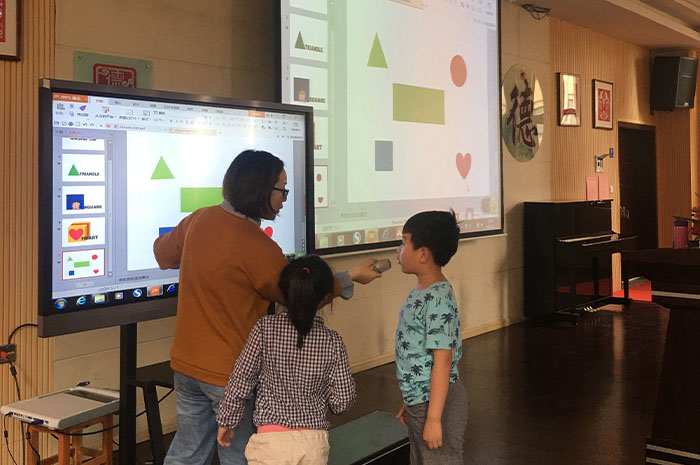
Global communication raises higher demands for practical language ability year by year. Most language classrooms still follow outdated routines. Teachers play audio clips, recite vocabulary aloud, assign reading passages and hand out writing homework separately. The four core skills never connect closely. Students absorb knowledge in isolation. Many learners spend months studying yet struggle to follow native speech, hesitate to open their mouths, lose focus during long reading sessions, or submit writing full of repeated grammatical mistakes with slow feedback. Qunmao Display Technology designs Qtenboard interactive flat panel (IFPD) specifically for language education scenarios. Built on years of display hardware and audio optimization, this interactive large screen merges listening input, oral practice, text reading and written creation into one unified classroom workflow. It turns passive knowledge receiving into active participation and helps teachers lift overall language learning efficiency steadily.
Effective language learning starts with solid audio input. Authentic speech speed, accents, tone shifts and contextual emotion cannot be captured fully via simple MP3 audio files. Qtenboard combines high-resolution visual display and tuned surround acoustic hardware to create a complete listening training system for daily classes.
Real-life scene restoration for immersive audio exposure. The ultra HD screen plays original film snippets, daily news broadcasts, casual street conversations and formal business negotiation footage smoothly. Matched surround sound delivers layered audio details. Students hear relaxed café small talk, quick-paced news delivery and deliberate formal dialogue clearly. They pick up variable speaking speeds, regional accents and emotional tone naturally instead of rigid textbook recorded audio.
Precise playback control and dynamic synchronized subtitles. Teachers tap the screen to replay key sentences, slow playback speed for beginner groups or raise speed for advanced learners. The exclusive dynamic subtitle feature highlights each word step by step following audio rhythm. Learners build direct links between spoken sound and written text instantly, which cuts confusion over pronunciation and spelling matching.
Real-time listening quiz data and targeted error sorting. The built-in voice recognition system records answers from listening exercises and compiles statistical data automatically. It pinpoints frequent weak points such as connected speech, weak forms and stressed syllables. Teachers mark these error categories directly on the large screen and design focused practice rounds to fix common weak points across the whole class.
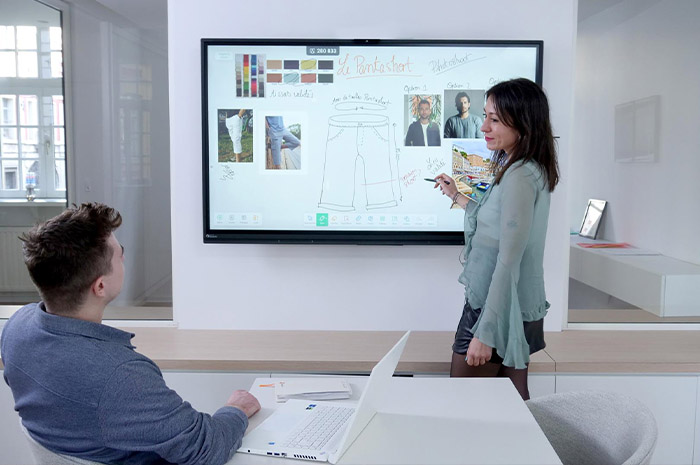
Fear of mistakes and unclear pronunciation hold most students back from speaking up in class. Traditional oral teaching only lets teachers listen and correct one by one. Limited class time means few students get detailed guidance each lesson. Qtenboard upgrades oral training with instant audio comparison, scene role-play and anonymous practice modes to lower psychological barriers completely.
Visual pronunciation comparison via waveform display. Students record their voice through classroom microphones. The system compares recordings against native standard audio libraries and generates waveform charts on screen. Differences in pitch, stress and syllable length show clearly. Specific flaws like insufficient tongue rolling for /r/ sounds or flat sentence intonation get marked directly. Teachers explain these visual cues to make corrections easy to understand and replicate.
Scenario role-play and whole-class shared review. The system provides preset virtual scenes including airport check-in, restaurant ordering, hotel consultation and campus communication. Groups take assigned roles and hold live dialogues. The screen records the full conversation. Teachers pause playback anytime to point out grammar slips, improper word choice or awkward sentence structures. Multi-screen sync technology sends dialogue content to every student screen for collective discussion and revision.
Timeline-based pronunciation archives and anonymous practice. All voice practice files save automatically in personal student folders. Teachers pull records from weeks or months apart to track improvement and craft customized oral plans. Shy learners activate anonymous submission mode. They submit recordings without displaying names and avoid public pressure while still receiving professional feedback.
Printed textbooks deliver text in fixed, flat formats. Students often scan words mindlessly without digging into sentence logic, vocabulary usage or author attitudes. Qtenboard’s large touchscreen turns reading from passive browsing into interactive exploration with annotation tools, instant word lookup and group collaborative sorting activities.
On-screen text marking and logical drag activities. Teachers project articles onto the display and use digital highlighters, text boxes and underlines to underline topic sentences and unpack complex clause structures. Students join interactive tasks by dragging paragraphs, arguments and evidence into correct positions on screen. Analyzing argumentative essays becomes straightforward when learners arrange claim and supporting details visually.
One-tap vocabulary and grammar resource access. A single tap on unfamiliar words pulls up detailed resources from Qunmao education library. Users view word classes, matching synonyms, real exam sentences and linked grammar mini-lessons. Complex grammar points like subjunctive mood trigger short explanatory clips instantly. Students resolve reading obstacles without interrupting the overall reading flow.
Group discussion aggregation and mind map generation. Small teams use tablets to note down viewpoints about author tone, core ideas and plot trends. All notes sync to the main IFPD screen. The system sorts scattered opinions and compiles them into structured mind maps automatically. Teachers guide the whole class to compare varying views and build critical reading judgment step by step.
Writing relies on repeated revision and targeted feedback. In conventional classes, students finish drafts and hand them in. Teachers spend hours marking stacks of papers before returning work days later. Learners forget original thinking by the time revisions arrive. Qtenboard rebuilds the whole writing cycle with shared outlining, real-time annotation and cloud file archiving.
Group outline co-creation and live teacher intervention. Team members draft essay frameworks together on the large screen. They drag paragraph modules to adjust narrative order and insert supporting cases whenever needed. Teachers enter any group’s editing space at will. Multi-color digital notes mark suggestions such as adding transitional phrases or swapping weak examples. All edits sync across devices the moment they are made.
Expert-designed writing frameworks and error prompts. The system stores writing templates developed alongside language educators. Argumentative essay structures, formal letter layouts and narrative outlines sit ready for quick reference. The tool offers synonym alternatives and flags tense errors during drafting. New language learners activate sentence filling mode, tapping to pick proper vocabulary and lower writing entry barriers.
Instant whole-class revision display and progress archives. After submission, teachers circle errors and attach voice explanations directly on screen. The revision process broadcasts to every student simultaneously for shared learning. Every draft version saves to cloud storage permanently. Students open historical files anytime to observe their writing improvement path clearly.
Hardware value exists only when it fits daily classroom routines well. Qtenboard links personal mobile devices, tablets and the central large screen tightly. It adds lightweight competitive learning activities and continuous data tracking to sustain long-term learning motivation.
Cross-device task delivery and adaptive assignment. Teachers send targeted tasks with one click. Students weak in listening receive focused audio exercises; advanced oral learners get debate preparation materials. Learners submit finished work via phones or tablets. The IFPD counts completion rates automatically, so teachers tailor future lessons to match each group’s actual level.
Light competitive language games for sustained interest. Built-in activities include spelling contests, grammar error spotting and scenario dialogue challenges. Students compete via touch operations. Real-time score rankings show on screen alongside gentle reward animations. Rigid memorization turns into enjoyable group competition that keeps students focused throughout the lesson.
Comprehensive four-skill ability radar charts. The system gathers continuous data from listening quizzes, oral recordings, reading tasks and written assignments. It generates personal ability radar graphs highlighting strengths and weak areas. Teachers and students review these charts together to set clear short-term learning targets.
| Comparison Item | Traditional Language Classroom | Qtenboard IFPD Classroom |
|---|---|---|
| Listening Input Form | Fixed textbook audio, limited scene variation | Native videos + surround sound, adjustable speed + dynamic subtitles |
| Oral Pronunciation Correction | Teacher one-by-one correction, limited coverage | Waveform comparison + anonymous practice + whole class review |
| Reading Learning Experience | Static text, no instant vocabulary support | Interactive marking, one-tap resource lookup, group mind map sorting |
| Writing Feedback Speed | Delayed correction, no revision archive | Real-time annotation, cloud version storage, shared revision demonstration |
| Student Learning Initiative | Mainly passive listening and note-taking | Role-play, group cooperation, competitive tasks |
| Learning Data Tracking | Manual record keeping only | Automatic four-skill data statistics + ability radar charts |
Q1: Does Qtenboard support multiple foreign languages besides English?
Yes. The system includes resource packs for English, French, Spanish, German and Japanese. Pronunciation comparison libraries, vocabulary databases and scenario dialogue scenes adapt to each language system fully.
Q2: Can teachers upload their own customized textbooks and audio materials to the screen?
Teachers import PDF textbooks, audio files and video clips via USB or wireless transmission. Uploaded content works with playback control, subtitle matching and annotation functions the same as built-in resources.
Q3: Will the system occupy large storage space after long-term accumulation of student voice and writing files?
Local storage holds recent files for quick access. Older archives back up automatically to cloud space. Users clear local cache regularly to free up room without losing student learning records permanently.
Q4: Is the pronunciation recognition accurate enough for middle and primary school beginners?
The algorithm adjusts recognition sensitivity for different age groups. It tolerates minor flaws for young learners and marks standard requirements clearly, avoiding excessive frustration during early oral practice.
Q5: Can multiple classes in one school share the same educational resource library?
School administrators set up a unified backend resource pool. All classroom Qtenboard devices access shared lesson plans, audio clips and writing templates, which reduces repeated resource preparation work for teachers.
Q6: Does the device run smoothly under daily continuous classroom use?
The hardware adopts industrial display chips and optimized heat dissipation structures. It runs steadily for full school days without lag or crash, suitable for daily all-class teaching cycles.
Q7: Is technical training provided for teachers unfamiliar with interactive large-screen operation?
Qunmao provides pre-installation operation training and concise video tutorials. Online remote support remains available after deployment to resolve operational questions quickly.
Language teaching no longer needs to split listening, speaking, reading and writing into isolated modules. Qtenboard IFPD from Qunmao Display Technology connects these four core skills through interactive screen technology, immersive audio input, visual pronunciation feedback, collaborative text exploration and real-time writing revision. It shifts classroom teaching from rigid knowledge delivery to interactive co-learning. Technology serves the core goal of language education: enabling students to use languages smoothly for cross-cultural communication. With ongoing technical updates and educational scene optimization, the integration of display hardware and language teaching will keep creating more efficient and vivid classroom experiences for teachers and students worldwide.


 Floor 6, Building A, No. 3, North District, Shangxue Science and Technology City, Xinxue Community, Bantian Street, Longgang District, Shenzhen City
 info@szqunmao.com
 +86 15920011166
 +86 15920011166