English
 Español
 Português
 Français
 Русский язык
 Italiano
 Deutsch
 Nederlands
 لعربية
 한국어
한국어 Japanese
 ภาษาไทย
 Türkçe
 Tiếng Việt
 Bahasa Indonesia
 Hindi
Hindi kazakh
 Uzbek
Uzbek Thai
Thai Farsi
Farsi
Qunmao Queuing System for Banks and Government Service Halls Kiosk, Window Display Carousel Screen
 2026-08-18
 1324
1324




2026-08-18
1324
Banks and government‑run service offices process huge volumes of visitor requests every single day. You face real pressure to cut long wait times and lift visitor satisfaction. Qunmao Display Technology Co., Ltd. builds full‑set queuing hardware to solve these on‑site pain points. This hardware bundle covers queuing kiosk, window display screen and carousel display screen. All three units work together to reshape daily public‑service workflows.
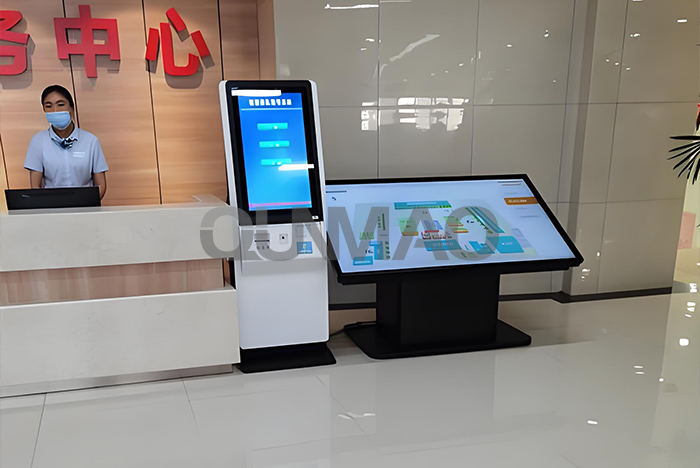
Crowded, jumbled physical lines used to fill many bank lobbies. That messy scene fades away once you place Qunmao queuing kiosk on site. Your visitors tap simple on‑screen options to pick the service they need. Savings account operations, credit business applications, financial consultation sit among available menu entries.
The kiosk prints a paper ticket right after selection. Each ticket carries a unique queue number and rough waiting time estimate. Visitors do not need to stand and shuffle between different counters. They can take seats inside rest zones instead. This simple shift cuts unnecessary physical standing for every person walking into your branch.
The touch UI keeps things uncomplicated. Elderly users or people with limited experience with digital devices can finish ticket fetching within two taps. No complicated menus or hidden sub‑layers confuse your visitors. Front‑desk staff spend less time guiding confused guests, and they can focus energy on core financial consulting work.
Quick ticket generation: new queue ticket prints in less than two seconds after service selection
Adjustable waiting‑time calculation, based on real‑time counter processing speed
Large‑font touch interface, high‑brightness screen works well under bright lobby indoor lighting
Multiple service categories editable, you add or remove service items without hardware modification
Paper roll shortage alert sends notice to your on‑site administrator terminal
Government‑affairs halls receive heavy foot traffic all through business hours. Citizens arrive to submit many different kinds of applications. Qunmao queuing kiosk brings visible order to these busy public spaces.
Visitors can view real‑time waiting volume for every service counter on‑site. Common service categories cover general acceptance, new business registration, construction project approval, housing provident fund handling, real‑estate registration, medical insurance and social security work. Citizens check queue status before they take their ticket. They can plan their personal schedule accordingly and sit in waiting areas instead of hovering near counters.
Some local government platforms publish remote queue data over web portals. Qunmao local‑hall hardware complements that online resource. People who show up in‑person get clear, immediate queue information directly on‑site. Site supervisors spend far less time handling crowd‑control issues. Disputes caused by out‑of‑order processing drop noticeably after you roll out this set‑up.
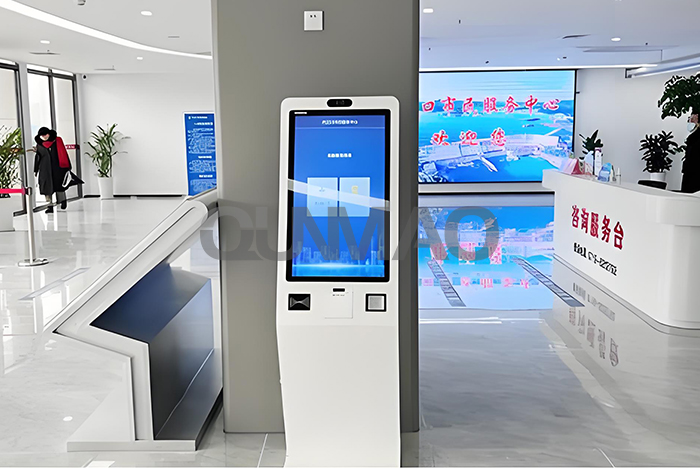
Window display screen acts as critical supporting hardware for your queuing kiosk. When staff call a queue number from their operation terminal, the matching window screen refreshes instantly. It shows the visitor number and corresponding service type in large readable characters.
Visitors spot their number quickly and move toward the correct counter. Mis‑routed guests decrease. You lose fewer minutes from miscommunication. These small time savings add up across hundreds of daily visitor cases. The screen supports adjustable text brightness, so content stays readable under strong lobby lamp light.
Instant sync with queuing host, number pop‑up completes within one second
High‑contrast character output, readable from over 8‑meter indoor distance
Supports counter‑idle status hint, so visitors tell which window is free
Wall‑mount compact design, takes very little counter‑top space
Carousel display screen runs rotating content for people staying inside waiting zones. Content sets differ between bank and government‑hall locations.
For bank branches, you can loop financial product introductions, basic financial safety knowledge and ongoing promotional events. Visitors absorb useful material while they sit and wait. For government‑service halls, the screen cycles policy explanations, business‑handling guides and updated procedural rules. Housing provident fund policy adjustments, medical insurance reimbursement rule changes can reach every waiting citizen without extra printed handouts.
You update picture and text content remotely. You do not need to walk to each screen unit to make edits. Old paper posters get replaced by digital rolling content, and you cut recurring printing cost year‑over‑year.
| Hardware Unit | Core On‑Site Job | Key Practical Features | Primary Deployment Spot | Typous User Benefit |
|---|---|---|---|---|
| Queuing Kiosk | Visitor ticket‑issuing, service‑category selection | Touch input, ticket printing, waiting‑time estimation, paper shortage alert | Hall entrance area | Visitors get queue ticket without manual staff help |
| Window Display Screen | Show called queue number and service type | Fast data sync, large‑font display, idle‑state prompt | Above each service counter | Visitors locate correct processing window fast |
| Carousel Display Screen | Rolling public‑information broadcast | Remote content update, picture‑text mixed playback, timed play list | Waiting‑area wall position | Deliver policy or product info during visitor waiting period |
Many buyers only look at hardware price tags. Real‑site conditions decide whether your queuing system runs smoothly day‑to‑day. These practical points come from many completed bank and government‑hall projects.
Count your service counters. You need one window display screen for every active processing window. Mismatched quantity causes call‑number display failure.
Check local power supply and network layout. Most deployments run stable over standard local LAN network. Confirm cable routes before you fix hardware onto walls.
Estimate daily visitor volume. High‑traffic halls need kiosk models with durable print modules, to handle large ticket print volume.
Sort out your service‑item list in advance. You hand this list over during pre‑sales phase, so technicians pre‑configure menu entries for you before shipment.
Reserve space for kiosk installation. Keep clearance around the touch screen. Blocked surfaces will interfere with normal visitor operation.
Arrange spare thermal paper stock. Heavy‑usage locations burn through paper rolls quickly, and running out of paper stops ticket output entirely.
If you plan tender projects or bulk procurement for bank branches or government‑service halls, share your counter quantity, average daily visitor count and site layout condition. Qunmao technical team can give you matched hardware quantity suggestion and point out potential installation risks ahead of time.
Does Qunmao queuing system work without internet access?
The whole local queuing set runs over local area network. Public internet connection is not required for basic ticket‑issuing and number‑calling function. Remote content push for carousel screens will need network access if you want to update content off‑site.
Can I add or delete service categories after hardware installation finishes?
Yes. You edit service‑item lists inside background management software. You add new business entries or hide unused items, no hardware replacement needed.
What happens if one window display screen stops working?
Other counter terminals and kiosk keep normal operation. Only that single window loses number‑show function. You can arrange replacement parts for the broken unit while remaining counters keep handling visitor business.
Can the queuing kiosk support multi‑language menu for mixed‑population service halls?
Multi‑language UI is available as configuration option. Tell sales team your required language list, and we set this up before goods leave factory.
How long does typical on‑site installation and debugging take for a full hall set?
For a standard hall with 8‑12 counters, installation plus full function debugging usually finishes within one working day. Complex large‑scale venues need longer on‑site time.
Does this system store visitor personal data?
Basic queuing workflow only generates serial queue numbers. No visitor identity information gets collected by default. If you need identity‑binding function, you need to turn on extra modules and follow local data‑protection rules yourself.
Can existing old queuing software connect with Qunmao display hardware?
Connection depends on communication protocol of your original system. Send us your old‑system technical document, our engineers check compatibility and tell you whether adaption work is needed.
Bank branches and government‑service halls face constant visitor flow pressure. Messy manual line management creates friction for staff and guests alike. Qunmao complete queuing hardware set covers ticket‑issuing kiosk, counter window screens and information carousel screens. These devices work together to build ordered waiting processes.
You cut disorder on‑site, lower staff workload and deliver clearer service experience to every visitor. When you plan your hardware purchase, look beyond unit price. Think about site layout, daily visitor volume, network environment and long‑term spare‑part supply. Contact our team, and we sort out matching hardware combinations for your real‑world venue conditions.


 Floor 6, Building A, No. 3, North District, Shangxue Science and Technology City, Xinxue Community, Bantian Street, Longgang District, Shenzhen City
 info@szqunmao.com
 +86 15920011166
 +86 15920011166