English
 Español
 Português
 Français
 Русский язык
 Italiano
 Deutsch
 Nederlands
 لعربية
 한국어
한국어 Japanese
 ภาษาไทย
 Türkçe
 Tiếng Việt
 Bahasa Indonesia
 Hindi
Hindi kazakh
 Uzbek
Uzbek Thai
Thai Farsi
Farsi
Qtenboard SmartDraw Interactive Whiteboard | Creative Early Childhood Drawing & All-Subject Classroom Teaching Display
 2026-08-14
 916
916




2026-08-14
916
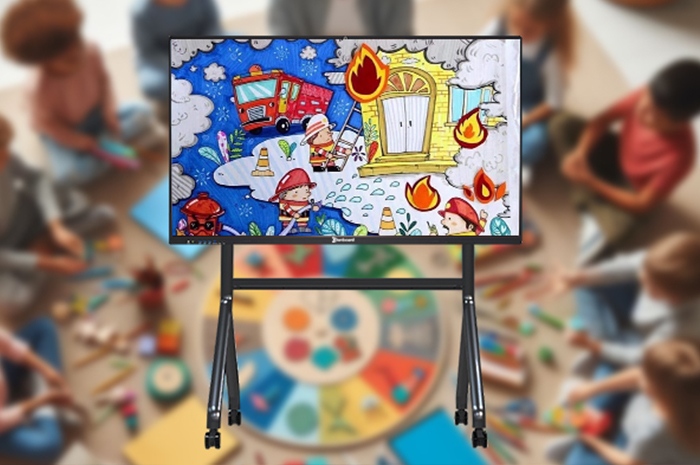
Teachers once relied entirely on chalk and blackboards to deliver lessons. Thick chalk dust filled the classroom air every single day. Lines and notes wiped away with a damp cloth vanished completely the moment class ended. Children raised their hands to share odd, wonderful thoughts that popped into their heads mid-lesson. Those fleeting ideas had no place to land. No way to sketch them out, save them, or build upon them together with classmates. Those small sparks of creativity faded fast before they could grow. Classroom learning stayed locked in one-way delivery. Teachers spoke, students memorized, and genuine exploration rarely happened. Qtenboard SmartDraw Interactive Whiteboard rewrites this outdated classroom routine entirely. Built exclusively for preschool, primary and elementary education, it acts as a boundless digital canvas. It lifts all the old restrictions on drawing, annotation, scene simulation and group creation. Children no longer hold back their ideas. Imagination finds a clear outlet each school day. Every lesson shifts from rigid knowledge recitation to lively creative exploration, reshaping what modern primary classrooms can accomplish for young learners.
Traditional classrooms follow a fixed rigid structure. A teacher writes content on the board alone. Students sit quietly and copy notes into exercise books. Few chances exist for kids to mark content, adjust diagrams or share personal viewpoints on the shared teaching surface. Peer discussion struggles to take shape. Most students remain passive observers throughout the whole class. SmartDraw changes this dynamic with three core built-in strengths: ultra-responsive high definition multi-touch, multi-layer canvas editing system, and a huge bank of educational animation, graphic and model materials. These features tear down the barriers between educators and learners, and between classmates themselves. Classroom interaction gains genuine depth and vitality.
History lessons turn into collaborative map drawing activitiesWhen teachers launch the Silk Road curriculum module, the entire trade route map appears on screen instantly. Children tap and drag official 3D camel caravan icons across the terrain. They trace spice transportation paths with golden digital strokes, outline silk spreading routes with bright red lines. Some pupils draw ancient traveling merchants, desert stars and oasis flags on independent overlay layers stacked above the base map. Fingertip gestures replace tedious textbook reading. Dry historical timelines and trade facts turn into hands-on collaborative creation. Each student adds small details from their own understanding. All these individual views combine into a complete, vivid group brainstorming result visible to everyone in the room.
Multi-layer canvas prevents drawing content from overlapping and messySeparate editable layers keep base maps, marking lines, hand-drawn illustrations and text notes fully independent. Modifying one section will not erase work done by other children. Teachers can lock the bottom courseware layer to avoid accidental shifts, while opening upper layers for students to edit freely. This setup lets large groups work simultaneously without chaos, a benefit plain chalkboards can never provide.
Mass preloaded educational material library cuts lesson preparation timeHistorical figures, ancient artifacts, geographical landforms, animal models and literary scene elements come preinstalled inside the system. Teachers no longer spend hours searching online for pictures or drawing simple graphics manually before class. They drag required elements directly onto the canvas to build lesson scenes quickly, reserving more time to design interactive links for students.
Geography contains countless invisible shifting principles. Climate change, ocean current movement and crustal plate movement cannot be observed directly. Textbooks rely solely on static printed pictures and text descriptions. Young learners find these concepts hard to grasp and easy to forget after class. SmartDraw’s built-in real-time data visualization engine solves this learning difficulty perfectly. It lets children adjust variables on screen and witness natural changes unfold step by step right in front of their eyes.
Climate regulation simulation helps kids grasp temperature and vegetation linksChildren open the global climate map module and slide the temperature adjustment slider up or down freely. When they lower temperatures sharply across savanna zones, virtual snowflakes spread across the grassland on screen. The surrounding vegetation gradually fades and changes shape. Students observe firsthand how temperature fluctuations alter plant growth and regional ecological conditions. They test multiple temperature ranges repeatedly and summarize climate rules on their own.
Dynamic fluid and crust simulation demonstrates geographic motion processesOcean current circulation and tectonic plate drift run as smooth animated simulations within the system. Students pause the animation at any moment to mark boundaries, add explanatory notes or draw deformation traces. Abstract geological knowledge no longer stays confined to textbook paragraphs. Visual repeated practice builds solid understanding of climate formation causes and the interconnectedness of global geographic environments.
Learned knowledge sticks far longer through experiential learningPassive memorization fades quickly after exams. Active exploration creates deeper memory impressions. When children discover geographic rules by adjusting parameters themselves, they connect cause and effect naturally. Curiosity drives them to ask more follow-up questions, letting knowledge and creative thinking strengthen each other continuously.
Cultivating artistic creativity demands loose, inclusive space and abundant creation tools. Fixed paper and paint sets limit children’s imagination within narrow boundaries. Once artwork finishes, it cannot be modified easily. SmartDraw serves as a flexible creation platform designed for long-term artistic enlightenment. Its comprehensive painting toolkit and cross-content search function seamlessly combine artistic creation with science, nature and engineering knowledge.
Rich painting toolkit brings diverse creative ideas to lifeCustom adjustable brush textures, real-time color mixing panels and lightweight 3D model import functions satisfy varied creation demands. During the Future City themed art project, students develop distinct urban designs. Some sketch streamlined flying transit vehicles with gradient color blending. Others line city streets with luminous vegetation, toggling brightness values to simulate daytime and nighttime shifts. More learners build rooftop vertical farms on skyscrapers, using stacked 3D layers to display internal irrigation pipelines and crop layouts clearly.
Embedded search function expands creation into interdisciplinary explorationWhen children wonder about the energy source powering rooftop cloud farms, they tap the built-in search shortcut directly on the canvas. The system pulls up introductory content on renewable energy and atmospheric power generation instantly. Classroom discussions stretch beyond pure art creation into meteorology, new energy materials and urban environmental design.
Layered storage preserves drafts for continuous revision and improvementAll creative drafts save automatically to local storage and cloud space. Students can reopen unfinished works the next art lesson to adjust colors, add architectural details or supplement functional designs. Creation becomes a gradual evolving process instead of a one-time finished product, nurturing careful thinking and iterative optimization habits in young children.
SmartDraw’s core value lies in translating obscure textbook knowledge into editable, interactive digital content. It shifts classroom learning from passive knowledge reception to active inquiry and exploration, fully carrying out the imagination-centered classroom teaching philosophy. Its applicable scope covers biology, English, language arts and multiple core elementary subjects beyond history, geography and art.
Biology lessons use virtual dissection to learn organism structuresStatic textbook anatomical diagrams get replaced with interactive virtual frog dissection courseware. Students tap to unfold organ layers, color different body parts with exclusive hues, and even add playful accessories such as space suits or diving equipment to the virtual specimen. They master internal organ distribution and physiological functions through imaginative interactive operations, removing the fear and discomfort associated with real specimen dissection.
English immersive role-play builds language sense quicklyOne tap on the scene switching button toggles classroom backgrounds between woodland, medieval castles, outer space and deep-sea environments instantly. The matched audio library plays ambient background sounds synchronously. Students perform dialogue scripts inside immersive scenarios. Rigid grammar rules get transformed into matching mini-games, and lengthy story plots split into sequential comic storyboards for easy comprehension.
Every curious question launches a brand new exploration journeyNo random thought or imaginative question gets overlooked anymore. Each “what if” from students turns into a starting point for group inquiry, drawing and discussion. The whiteboard provides stable technical support for all these spontaneous classroom activities.
| Comparison Items | Traditional Chalk Blackboard | Ordinary Projector + Whiteboard | Qtenboard SmartDraw Interactive Whiteboard |
|---|---|---|---|
| Writing & Drawing Experience | Chalk dust pollution, content erased irreversibly, limited color choices | Slow touch response, no multi-layer canvas, easy light reflection blurring screen | Finger multi-touch instant response, independent editable layers, anti-glare high-definition display |
| Courseware & Material Resources | All content hand-drawn manually, no preloaded teaching resources | Only static pictures, no 3D models or dynamic simulation modules | Mass preloaded educational graphics, 3D models, climate & geographic simulation engines |
| Student Group Participation Mode | Single teacher writing only, no simultaneous student operation | One person controls screen at a time, easy content overlap and confusion | Multiple students edit different layers together, independent creation without interference |
| Knowledge Presentation Form | Text and simple lines only, unable to display dynamic processes | Static pictures and PPT slides, no adjustable data simulation | Dynamic animation, parameter adjustment simulation, virtual interactive experiments |
| Work Saving & Storage Function | Content cannot be saved, all records lost after wiping | Hard to annotate on slides, no automatic cloud backup | Automatic local & cloud saving, artwork and course records exportable as images and videos |
| Interdisciplinary Teaching Support | No supporting conditions available | Basic content display only, no cross-subject expansion tools | Built-in search tool connects art, science, geography and language learning seamlessly |
| Daily Classroom Health Impact | Long-term chalk dust harms respiratory health of teachers and children | No dust hazard, but poor blue light protection | Zero dust, low blue light eye-care screen suitable for long-hour student use |
Q1: How many children can touch and draw on the screen simultaneously during group creation activities?
The screen supports 20-point simultaneous capacitive multi-touch. A whole class of students can take turns drawing and marking on different canvas layers without touch lag or misrecognition. Teachers can set operation permissions to avoid disorder during group tasks, which perfectly suits daily classroom collaborative creation sessions.
Q2: Can teachers upload self-made courseware and add personal exclusive teaching materials to the system?
You can import PPT, PDF, pictures and video files via USB flash drive or wireless transmission. After importing, you can annotate, split pages and overlay drawing layers on top of original courseware. Custom teaching content saves permanently to the system library for repeated use in subsequent classes.
Q3: Does the screen adopt eye-protection design for long-time daily student viewing?
The panel comes with low blue light filtering technology and anti-glare tempered glass surface. It reduces visual fatigue caused by prolonged viewing indoors. The screen automatically adjusts brightness according to ambient light conditions, avoiding overly dazzling or dim display effects in different classroom lighting environments.
Q4: Can classroom drawing records and student artwork be exported and archived for teaching evaluation?
All canvas content can be exported as picture files, PDF documents or complete lesson playback videos. Teachers save excellent student creations into class archives, use these works for term art assessment, or share artwork with parents to display children’s classroom learning outcomes intuitively.
Q5: Is the touch glass resistant to frequent tapping and accidental knocks by young children?
The surface uses strengthened scratch-resistant tempered glass with anti-fingerprint coating. Daily fingertip drawing and occasional light bumps will not leave scratches or affect touch accuracy. The infrared touch module maintains stable sensitivity after years of heavy daily classroom use.
Q6: Will the system receive regular updates to add new teaching simulation modules and material packs?
The official team pushes free system updates quarterly, adding new geographic simulations, biological virtual experiments, art brush packs and English scene materials continuously. Schools obtain richer teaching resources without extra payment after equipment purchase.
From tracing ancient trade routes during history lessons to colorful imaginative design in art class, from climate exploration in geography to vivid virtual experiments in biology and immersive English role play, Qtenboard SmartDraw always centers the learning needs of young children. It upgrades traditional teaching hardware with mature interactive display technology, turning vague imaginative thoughts into editable, expandable creative content step by step.
This interactive whiteboard is far more than a simple upgrade from chalkboards and projectors. It brings genuine shifts to overall educational thinking. It respects every child’s unique way of thinking, captures every fleeting flash of inspiration, and transforms classrooms from spaces meant only for memorizing standard answers into open skies where imagination can stretch and grow without restraint. When you select Qtenboard SmartDraw for your school classrooms, you build a reliable stage for children’s creative potential. Kids gain knowledge alongside joyful exploration, and classrooms become warm journeys filled with discovery and steady growth. These small seeds of curiosity planted today will grow into innovative thinking capabilities that benefit children for their whole lives.
Check detailed screen parameters, full-subject teaching cases and institutional bulk purchase policies on the official product page:Qtenboard SmartDraw Interactive Whiteboard Official Product DetailsRenew your classroom teaching mode now, and let imagination and knowledge grow side by side for every young learner.


 Floor 6, Building A, No. 3, North District, Shangxue Science and Technology City, Xinxue Community, Bantian Street, Longgang District, Shenzhen City
 info@szqunmao.com
 +86 15920011166
 +86 15920011166