English
 Español
 Português
 Français
 Русский язык
 Italiano
 Deutsch
 Nederlands
 لعربية
 한국어
한국어 Japanese
 ภาษาไทย
 Türkçe
 Tiếng Việt
 Bahasa Indonesia
 Hindi
Hindi kazakh
 Uzbek
Uzbek Thai
Thai Farsi
Farsi
Qtenboard Interactive Whiteboard | End Chalk Dust & Build Healthy Interactive Classrooms
 2026-08-14
 1175
1175




2026-08-14
1175
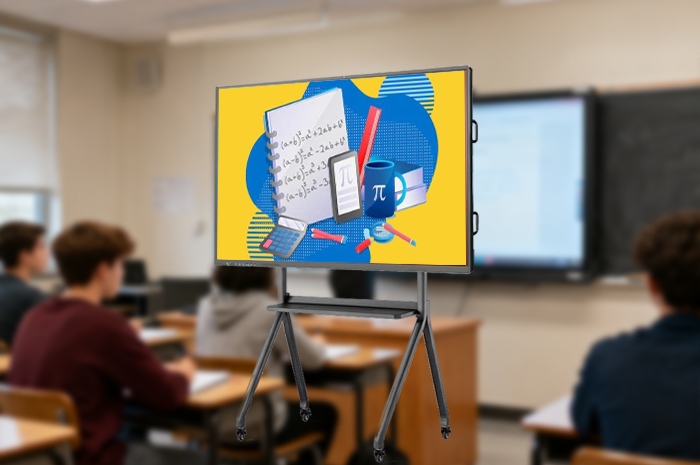
Picture a classroom from years past. You stand before a large blackboard, chalk gripped tight between your fingers. You fill the board line by line with formulas, text and diagrams until no empty space remains. The lesson draws to a close, and you grab the eraser to wipe the surface clean for the next class. Fine grey particles swirl upward through the air, drifting across every corner of the room like snow on a windy day. Students sitting in the front row pull their shirts up over their noses and mouths. They blink rapidly to keep dust out of their eyes, unable to focus fully on final takeaways before the bell rings.
This daily scene repeated across schools for generations carried hidden physical costs. Many teachers developed persistent dry throats, frequent coughs and mild nasal inflammation after years of breathing chalk dust each school day. Students with hay fever, mild asthma or sensitive respiratory systems suffered regular discomfort through long class hours. No small adjustments could remove this persistent hazard rooted in traditional teaching tools. Qtenboard Interactive Whiteboard has erased this long-running classroom trouble entirely. A full shift toward dust-free digital teaching has arrived in campuses everywhere.
Chalk comes with unavoidable drawbacks. Pieces snap off mid-writing, leaving uneven broken lines across the board. Ink fades quickly under classroom lights, forcing you to rewrite key sentences repeatedly. Erasing requires heavy back-and-forth scrubbing that tires your wrist over hours. All these small annoyances come paired with constant dust pollution. Qtenboard discards chalk entirely and relies on high-precision digital styluses for all on-screen creation.
Natural, fluid handwriting with customizable strokesA light touch against the screen produces crisp, stable text and shapes the instant your pen makes contact. You pick from dozens of colors and adjust line thickness with one quick tap before you start writing. Thin lines work for notes and minor annotations, while thick bold strokes highlight core definitions and exam-focused knowledge points. The texture matches the feel of writing on paper, so you face no learning curve switching from chalk to digital writing. Blurry faded text and cracked chalk fragments never appear on screen again.
One-tap correction, no physical scrubbing requiredMistakes happen naturally during live classroom explanation. With chalk, you scrub hard across the board surface, stirring up more dust each time you fix a word or formula. On Qtenboard, you select the eraser tool and tap the area you want to remove. The incorrect content vanishes cleanly in an instant. You rewrite the correct information right away without wrist strain or airborne particles lingering in the room. Partial erasure is also available, letting you adjust single characters without clearing entire blocks of text.
Fresh, clean classroom air all day longNo floating dust settles on desks, window sills, textbooks or student uniforms after each lesson. Classroom air stays clear from morning assembly until final dismissal. Teachers no longer deal with chronic throat irritation triggered by daily dust inhalation. Students prone to allergies sit comfortably through every period without covering their faces. Custodial staff spend far less time wiping dust residue from surfaces around the classroom each afternoon. Everyone inside the room gains a safer, more pleasant daily learning space.
Text and hand-drawn sketches on blackboards set clear limits on what you can show students. Complex spatial structures, historical scenes and physical movement processes cannot be conveyed clearly through static handwriting alone. Students memorize facts without grasping the logic behind them, and review work grows tedious and repetitive. Qtenboard expands classroom presentation methods far beyond written words alone. It supports seamless playback of images, short videos and vivid animations to turn abstract theories into observable scenes.
3D geometric animations simplify spatial math learningGeometry lessons once relied on flat chalk drawings. Students struggled to picture how cubes, cones and pyramids shift, fold or intersect in three-dimensional space. You launch built-in 3D models on Qtenboard during math class. You rotate the shapes freely, split open surfaces to display internal structures, and adjust angles to show different viewing perspectives. Students watch structural changes unfold step by step, and spatial reasoning builds naturally without confusing mental guesswork.
Historical imagery lets students observe the past directlyHistory textbooks pack dense timelines and text descriptions of ancient events. Printed photographs are small and limited in quantity. You pull up high-resolution archival pictures, documentary clips and scene restorations on the large screen. Students see clothing, architecture and daily lifestyles from past eras clearly laid out before them. Learning shifts from memorizing dates to understanding the context behind major historical developments.
Smart annotation plus automatic lesson storage for easy after-class reviewYou circle key phrases, underline formulas and add marginal notes on all displayed course material with the digital pen throughout class. Every annotation, written note and drawn graph gets saved to the system automatically once the period ends. You reopen the complete lesson file the next morning to continue teaching without rewriting all your content from scratch. Students scan a simple QR code after school to access the full annotated lesson content on their phones. They revisit confusing segments and replay animation clips to solidify knowledge at their own pace.
Traditional classrooms follow a fixed single direction. You stand at the front delivering lectures, and students sit quietly listening and taking notes. Rare chances exist for learners to voice thoughts, test ideas or display their understanding to the whole group. Passive listening lowers student focus over long stretches, and many children stay hesitant to raise hands even when confusion arises. Qtenboard reshapes this rigid teaching structure entirely and invites active student participation throughout each lesson.
Students come forward to operate and demonstrate ideas personallyYou invite volunteers to walk up to the large screen during practice sessions. Students use the digital pen to solve math problems, label geographic maps or draft short compositions right in front of classmates. The whole room watches their thought process unfold. You correct minor mistakes and offer guidance on the spot. Learners gain confidence from public demonstration, and classmates pick up alternative ways to tackle identical problems.
Group discussion results shared and revised collectivelyYou split the class into small teams for topic exploration. Each group sorts out viewpoints, drafts outlines and prepares discussion conclusions within set time limits. One representative from each team uploads their group’s content to the main whiteboard screen. All teams view every group’s ideas side by side. The whole class discusses differences, revises flawed logic and polishes final conclusions together. Learning becomes a shared collaborative process instead of isolated individual work.
Continuous real-time interaction shortens knowledge gapsYou launch quick in-class quizzes via QR codes whenever you need to check learning progress. Students scan the code on their phones and submit answers within minutes. Instant statistical results appear on screen, showing overall accuracy and commonly misunderstood questions. You adjust your teaching rhythm right away to address weak points before misunderstandings take root. Communication flows back and forth between you and students for the full duration of class.
| Comparison Item | Traditional Chalk Blackboard | Qtenboard Interactive Whiteboard |
|---|---|---|
| Classroom Air & Health Condition | Chalk dust suspended daily, triggers cough, nasal discomfort and allergy symptoms | 100% dust-free, clean air protects respiratory health for teachers and students |
| Writing Experience & Effect | Chalk easy to break, faint handwriting, limited color choices | Smooth digital pen, adjustable thickness and colors, clear consistent display |
| Erasing Operation | Manual scrubbing, labor intensive, generates more dust | One tap erase, effortless, no dust produced |
| Teaching Content Presentation | Text and simple hand drawings only, no dynamic multimedia support | Images, videos, 3D animations, historical materials all playable instantly |
| Classroom Teaching Mode | One-way teacher lecturing, rare student interactive chances | Student demonstration, group sharing, two-way real-time classroom communication |
| Lesson Content Preservation | All notes erased after class, no permanent record saved | Full lessons and annotations automatically stored for repeated use and review |
| After-Class Learning Support | Students rely solely on personal notebook records | QR code access to full lessons, animations and classroom notes anytime |
Q1: Do teachers need lengthy technical training to master daily operation?
The operation logic mirrors smartphones and tablets used every day. Tapping to open files, writing with the digital pen and adjusting display settings follow identical simple rules. We provide a two-hour onsite training session covering writing tools, multimedia playback, quiz creation and file saving. Most teachers handle all daily classroom operations proficiently after one full day of practice. Simplified operation guides are embedded inside the device for quick checking whenever needed.
Q2: Can the whiteboard run normally when campus internet is unstable or disconnected?
All core teaching functions operate fully offline without network connection. Digital writing, saved lesson files, preloaded animations and local courseware load directly from onboard storage. Internet access is only required when uploading new teaching resources or downloading supplementary materials. Schools located in areas with weak network signals complete daily teaching schedules without any interruptions.
Q3: Is the touch screen resistant to scratches from long-term student use?
The front panel adopts thickened anti-scratch tempered glass. Frequent pen taps, student touches and minor accidental bumps leave no permanent scratches or marks. Infrared touch sensors maintain stable sensitivity through years of daily classroom use. Daily cleaning only requires gentle wiping with a soft dry cloth to keep the screen clear and bright.
Q4: Does prolonged screen viewing cause eye fatigue for primary and secondary students?
The screen surface comes with anti-glare coating to block harsh reflections from ceiling lamps and outdoor sunlight. Brightness adapts automatically according to indoor ambient light levels. You can set fixed break reminders that pop up every forty minutes, complying with official student eye care standards to ease visual strain effectively during long school days.
Q5: Can I upload school-customized teaching materials to match local curriculum standards?
The system fully supports independent upload of courseware, worksheets, video clips and localized teaching documents. Built-in resource libraries align with official regional curriculum frameworks on chapter arrangement and knowledge point sequence. You add exclusive school teaching materials freely to adapt content to your campus teaching demands.
Q6: What warranty and after-sales services come with the Qtenboard interactive whiteboard?
The hardware carries a two-year official warranty covering the display screen, main control board and touch sensing components under normal classroom usage. The teaching system receives free functional updates for three years after purchase. Our technical team offers remote troubleshooting and periodic equipment maintenance guidance throughout the whole service cycle to resolve usage problems quickly.
Chalk dust plagued classrooms for generations, trading teacher and student health for basic teaching needs. Qtenboard wipes away this outdated compromise completely. It delivers dust-free digital writing to safeguard respiratory health for everyone inside the classroom. Multimedia and 3D visualization turn dull textbook knowledge into vivid observable content. The shift from one-way lectures to collaborative interaction raises student engagement and learning efficiency steadily.
Every upgrade serves two clear goals. You teach with less physical fatigue and better classroom control. Students learn in a clean comfortable space, take active part in discussions and grasp knowledge more firmly. From eliminating dust hazards to enriching classroom forms and rebuilding teacher-student interaction, Qtenboard covers every key link of daily schooling and defines the standard of modern smart education.
Check detailed hardware parameters, full function introductions and campus bulk purchase plans via our official product page:Qtenboard Interactive Whiteboard Official DetailsRenew your classroom environment today, and bring dust-free, lively and healthy smart teaching to every student.


 Floor 6, Building A, No. 3, North District, Shangxue Science and Technology City, Xinxue Community, Bantian Street, Longgang District, Shenzhen City
 info@szqunmao.com
 +86 15920011166
 +86 15920011166