English
 Español
 Português
 Français
 Русский язык
 Italiano
 Deutsch
 Nederlands
 لعربية
 한국어
한국어 Japanese
 ภาษาไทย
 Türkçe
 Tiếng Việt
 Bahasa Indonesia
 Hindi
Hindi kazakh
 Uzbek
Uzbek Thai
Thai Farsi
Farsi
Qtenboard Interactive Whiteboard | Solve Pain Points Of Traditional After‑School Tutoring
 2026-08-08
 1266
1266




2026-08-08
1266
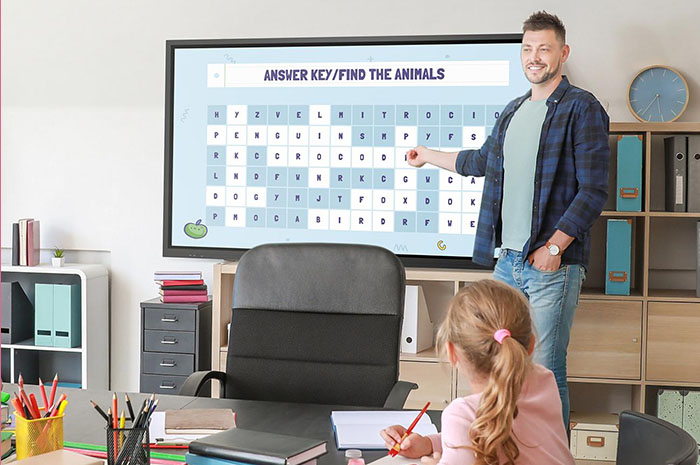
After‑school tutoring and homework guidance form a vital part of K‑12 campus work. Teachers stay after class to walk students through tricky exercises, correct thinking mistakes and consolidate knowledge learned during daytime lessons. But many schools still stick to old‑style offline tutoring modes. These workflows bring many real‑world headaches for both instructors and students. Heavy teacher workload, long student waiting time and unexpected class interruptions happen frequently. Qtenboard interactive whiteboard from Shenzhen Qunmao Display Technology Co., Ltd brings practical tools to tackle these typical pain points. It reshapes after‑school guidance workflows without abandoning familiar teaching logic.
In most traditional after‑school classrooms, one teacher stands at the podium while students sit at their desks and finish homework. Whenever a pupil meets difficult questions, he or she must raise a hand and wait for the teacher to come over. This simple setup creates multiple hidden bottlenecks when group size grows large.
Low tutoring efficiency for large‑size groups. Teachers walk back and forth between different desks to give one‑on‑one explanations. During peak periods, several students hold questions at the same time. Some learners sit idle for long stretches before getting attention. Teachers easily lose focus after repeated moving around. Overall tutoring output drops sharply even if every staff member works hard.
Easy disruption to planned teaching progress. If the teacher needs to leave campus for meetings, sick leave or temporary business, on‑site after‑school tutoring stops right away. No backup teaching material can take over in real time. Scheduled homework guidance sessions get postponed. Knowledge consolidation plans for that week fall behind schedule.
Hard to reuse high‑quality explanation content. Most teacher explanations happen verbally on‑site. Clear problem‑solving logic and blackboard writing disappear once tutoring ends. Other classes or future student groups cannot access those well‑polished explanations. Teachers repeat the same notes and reasoning over and over again for different batches of students.
Limited support for absent or slow‑progress students. Students who miss after‑school sessions have no way to review what was covered. Learners who need to go over examples multiple times cannot replay the teacher’s step‑by‑step thinking. They rely entirely on second‑hand notes taken by classmates.
Qtenboard interactive whiteboard combines high‑precision screen recording, multi‑format local playback and low‑latency remote interactive modules. These features do not replace teachers. Instead, they extend teachers’ influence beyond fixed after‑school time windows. Below are real‑school use cases that you can copy in your campus.
Teachers use the built‑in recording tool inside Qtenboard to produce targeted short video courses. These clips focus on single small knowledge points, typical error analysis and step‑by‑step problem solving. Content stays concise and points directly at common mistakes local students actually make.
After regular school hours, students can open these recorded videos on classroom screens or compatible student terminals. They replay segments as many times as they want. It works similar to having an on‑demand private tutor. Pupils pause, rewind and revisit confusing steps until concepts click.
Qtenboard’s recording module stands out in actual campus deployment. Operation steps stay simple for busy teachers who do not have extra time for complicated video editing software. Captured video delivers sharp picture quality together with clear synchronized audio. The system faithfully records every stroke of on‑screen handwriting, marking lines and key‑point highlighting. When students play files back, they follow the full thinking trail just like sitting inside a live lesson. This immersive viewing experience helps abstract logic become much easier to absorb.
Teacher absence creates one of the biggest risks for after‑school guidance plans. With Qtenboard, you store pre‑produced tutoring videos locally on the device. When the assigned teacher cannot show up, other on‑duty staff can launch these prepared courses with a few clicks. The after‑school session carries on as originally scheduled. Teaching rhythm will not break because of personnel changes.
Qtenboard handles mainstream video formats smoothly. Playback runs steadily without frame freezing, image distortion or audio‑video sync drift. Students watch recorded content with nearly the same feeling as receiving live face‑to‑face tutoring. Knowledge consolidation goals remain achievable even under unexpected staffing changes.
Built‑in network‑powered remote teaching capability expands tutoring boundaries further. Teachers do not need physical presence inside the after‑school classroom. They connect through Qtenboard and run live Q&A sessions from another office or remote location. Real‑time audio‑video link lets instructors interact, answer homework questions and give feedback. Learning continuity holds well even under special campus arrangements.
Shenzhen Qunmao Display Technology Co., Ltd puts heavy R&D work into remote‑interaction performance. The platform keeps interaction latency low and connection stability high. Teachers and students see each other’s responses without obvious delay. Instructors use real‑time annotation tools to mark and explain homework content shared onto the whiteboard. Students send instant feedback about whether they understand each step. Two‑way exchanges stay active, so remote tutoring avoids turning into one‑sided video broadcasting.
| Evaluation Item | Traditional After‑School Tutoring | Qtenboard Interactive Whiteboard Solution |
|---|---|---|
| Tutoring efficiency in large class | Teacher moves between desks, long waiting for students | Pre‑recorded resources + remote Q&A, reduce waiting pressure |
| Teaching continuity under teacher absence | Tutoring session gets interrupted or canceled | Play pre‑saved lessons locally, keep normal progress |
| Re‑use of high‑quality explanation content | Oral & blackboard content vanish after class | Full screen‑and‑audio recording, store and replay anytime |
| Remote real‑time tutoring possibility | Hard to implement without extra third‑party devices | Built‑in low‑latency remote teaching module |
| Review for absent students | Depend on classmates’ hand‑written notes | Watch recorded tutoring videos for self‑review |
| Teacher repeated‑work burden | Explain same problems many times for different groups | Record once, use repeatedly for multiple classes |
Q1: Do teachers need professional video‑editing skills to make tutoring recordings on Qtenboard?
No complex editing skill is required. You start and stop recording with simple on‑screen buttons. The system captures handwriting, slide content and voice automatically. You may use raw recorded clips directly in after‑school sessions without post‑production work.
Q2: Can recorded tutoring videos play normally without internet connection in classroom?
Yes. Once files save into local storage of Qtenboard, playback works fully offline. Network access becomes necessary only when you run live remote‑teaching sessions or sync files to cloud storage.
Q3: What network environment do I need for stable remote after‑school tutoring?
Stable campus wired network gives best performance. If you use Wi‑Fi, avoid heavy bandwidth‑consuming downloads running at the same time. Under proper network conditions, annotation sync and audio‑video interaction stay smooth for whole‑group tutoring.
Q4: How much local storage space do these tutoring recording videos occupy?
File size changes based on resolution and duration. Standard‑definition 40‑minute tutoring recording usually takes several gigabytes. You export finished files to USB drives and remove local copies regularly to free up device storage space.
Q5: Can students mark notes while watching pre‑recorded tutoring videos?
Yes. Teachers or on‑site pupils can open whiteboard overlay on top of playing video. They add hand‑written notes and key marks without modifying original recorded lesson files.
Q6: Is Qtenboard remote tutoring suitable for large‑size after‑school classes with over forty students?
It supports large‑group scenarios. Real‑time annotation and broadcast video‑audio work for full‑class audiences. For high‑frequency individual questioning, you can combine pre‑recorded resources plus spot‑check interactive links to ease system load.
Q7: Can recorded tutoring materials be shared to other grade levels inside the same school?
Yes. Export video files via USB storage. Other Qtenboard units on campus can read and play those exported tutoring resources. Good‑quality homework‑guidance content gets circulated across different classes and grades.
Traditional after‑school tutoring faces real‑world limits from personnel constraints and fixed time windows. Qtenboard interactive whiteboard from Shenzhen Qunmao Display Technology Co., Ltd does not replace teacher‑student face‑to‑face communication. Instead, it adds recording, local playback and low‑latency remote‑teaching capabilities onto existing campus workflows. Schools cut repeated teacher workload, keep tutoring running during staff absence and let students revisit key explanation content whenever they need. In the wave of educational informatization, Qtenboard helps schools build more stable, flexible and efficient after‑school tutoring ecosystems for both teachers and learners.


 Floor 6, Building A, No. 3, North District, Shangxue Science and Technology City, Xinxue Community, Bantian Street, Longgang District, Shenzhen City
 info@szqunmao.com
 +86 15920011166
 +86 15920011166