English
 Español
 Português
 Français
 Русский язык
 Italiano
 Deutsch
 Nederlands
 لعربية
 한국어
한국어 Japanese
 ภาษาไทย
 Türkçe
 Tiếng Việt
 Bahasa Indonesia
 Hindi
Hindi kazakh
 Uzbek
Uzbek Thai
Thai Farsi
Farsi
Interactive Flat Panel Display User Guide | Improve Classroom Teaching Efficiency For Teachers
 2026-08-08
 1733
1733




2026-08-08
1733
Digital‑based teaching keeps spreading across primary and secondary schools. Interactive flat panel displays step into countless classrooms and become daily working hardware for front‑line teachers. Shenzhen Qunmao Display Technology Co., Ltd delivers complete IFPD hardware and software packages for education sites. These devices make class activities more attractive. More importantly, they cut down extra work for lesson preparation and in‑class delivery. Many teachers get new hardware but still do not know how to tap full potential of this smart blackboard. This hands‑on guide walks you through core functions and real‑world classroom usage.
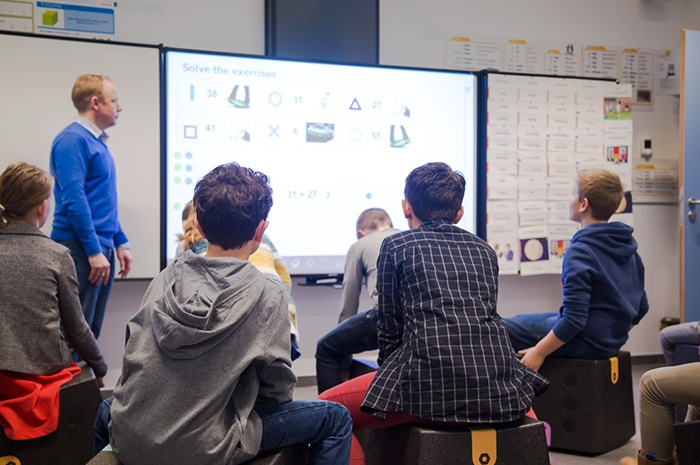
Qunmao interactive flat panel display combines multi‑point touch input, high‑definition multimedia playback and instant interactive feedback. All these modules sit inside one single screen unit. You do not need to switch among many separate devices during one lesson. Your lecture flow stays smooth without frequent hardware adjustment. Below are practical operations you can apply in ordinary classes.
Multi‑screen partition teaching for clearer knowledge structure. You can split the large screen into several working zones at the same time. Play courseware explanation materials on one area, write key summaries on another area. You may also place correct answers and typical wrong examples side‑by‑side on screen. This function helps students make direct comparison. Confusing knowledge points become much easier to understand. Subjects like math, physics and language arts gain obvious benefits from partition‑screen mode.
Real‑time annotation and on‑screen demonstration. Circle key paragraphs, draw auxiliary lines and add hand‑written notes directly over opened textbooks, pictures or presentation slides. It replaces chalk dust and disposable whiteboard markers. All annotated content can be saved locally or exported as files. Teachers can reuse these marked resources for next‑term review lessons. Qunmao optimizes writing latency so handwriting looks sharp and natural on screen surface.
Shortcut keys and touch gestures for compact class rhythm. Built‑in physical shortcut buttons and intuitive touch gestures let you finish common actions quickly. Turn lesson pages, zoom into chart details, start or pause video clips within seconds. You avoid complicated menu clicks in the middle of teaching. Students keep their attention focused on knowledge content instead of waiting for device response.
Many teachers report they save 15 to 20 minutes for each lesson preparation cycle after getting familiar with these functions. Re‑usable annotated courseware reduces repeated manual writing work before every class.
Old‑style lecture mode leaves students sitting and receiving information passively. Only a small number of pupils get chances to speak in front of the whole class. Qunmao IFPD builds convenient interactive channels. It encourages more students to take part and show their thinking process during class time.
Interactive answering and in‑class voting. Set quick‑response questions, true‑false judgment tasks or small‑scale surveys right inside system. Students can walk up to the large screen and give answers directly. They may also send responses through paired student terminals. Statistical results pop up on screen instantly. Teachers observe whole‑class mastering situation without waiting for paper exercise books. This method works well for knowledge check after new‑content teaching.
Multi‑person group collaborative display. Divide students into several learning groups. Each group finishes discussion tasks on separate whiteboard pages. When group discussion ends, switch pages to show every team’s output to the whole classroom. Group members explain their ideas facing classmates. This practice trains team cooperation and public expression skills for young learners. Group‑based projects for history, art and science subjects fit this function perfectly.
Pilot classroom data shows student active‑participation rate rises when teachers regularly run these interactive sessions. Quiet students who seldom raise hands also become willing to join screen‑based group work.
The value of interactive flat panel display does not end when class finishes. It collects teaching‑process records and learning‑behavior data. These materials support review for students and teaching reflection for educators.
Automatic recording of full teaching process. Start screen‑recording function before class begins. The device captures screen operations, handwriting annotations and audio input during the whole period. Save recording files for after‑class use. Absent students can watch playback to make up missed lessons. Teachers replay their own class videos to spot imperfect teaching links and adjust future lesson plans. File export options include common video and PDF formats for easy distribution.
Visual presentation of student‑performance data. Supported by the in‑class answering subsystem, IFPD gathers statistics about student participation frequency and answer accuracy. It generates readable data reports. You see which knowledge points bring common mistakes among learners. Based on these real records, you arrange targeted exercise and supplementary explanation instead of relying only on subjective feeling. It helps you carry out more suitable personalized guidance for different learners.
| Comparison Item | Blackboard + Projector Traditional Mode | Qunmao IFPD Smart Classroom Mode |
|---|---|---|
| On‑site annotation | Chalk or marker writing, content erased after class | Touch‑based writing, save and export annotated pages |
| Multi‑window partition display | Hard to achieve, needs extra equipment | Built‑in split‑screen function, one‑click activation |
| Student in‑class interaction | Limited hand‑raising answers only | Answering, voting and group co‑creation supported |
| Teaching‑process recording | Need separate video camera device | Built‑in screen recording, directly generate files |
| Student‑learning data statistics | Manual paper counting, heavy workload | Auto‑generate visual reports for class performance |
| Re‑use class resources | Hand‑written content cannot be preserved | Annotated courseware can be reused for review lessons |
| Environmental issue | Chalk dust pollution exists | Zero dust, cleaner classroom environment |
Q1: Can I import my existing PPT and PDF courseware into the IFPD system?
Yes. Common PPT, PDF and image formats can be imported directly. After opening files, you can add touch‑based annotations over original content and save modified versions.
Q2: Will screen‑recording function take up large storage space on device?
Video file size relates to recording length and resolution. You can export finished recordings to USB flash drive or cloud storage and delete local copies to free up internal storage space.
Q3: How many students can write and draw on screen at the same time for group tasks?
Education‑grade Qunmao IFPD supports 20‑point simultaneous touch input. Multiple students can operate on screen surface together for group‑class activities.
Q4: Can interactive answering and voting work without internet connection?
Local‑network mode supports answering and voting functions inside single classroom. Cross‑school resource sharing and cloud sync need stable internet access.
Q5: Are annotated whiteboard pages able to be sent to students’ mobile devices after class?
Yes. Generate QR code on screen. Students scan the code with ordinary phone cameras. They get snapshot files of class whiteboard pages for after‑school revision.
Q6: What should I do if touch response becomes slow during class?
Close unused background applications. Keep screen surface clean without heavy dust. Reboot device at proper break time if system runs under heavy load.
Q7: Is multi‑screen partition mode available for all subject teaching?
It fits most subjects. Math comparison exercises, language contrast reading and science case analysis gain obvious benefits. Adjust window layout according to your actual lesson objectives.
Mastering core operations of interactive flat panel display brings real improvement for your daily teaching work. Qunmao IFPD helps you optimize lesson preparation work, create more student‑participated class sessions, and complete data collection for after‑class review. It serves as reliable classroom assistant for modern‑day teachers. As smart classroom hardware becomes standard configuration in more schools, getting familiar with these practical functions will support your continuous professional growth.


 Floor 6, Building A, No. 3, North District, Shangxue Science and Technology City, Xinxue Community, Bantian Street, Longgang District, Shenzhen City
 info@szqunmao.com
 +86 15920011166
 +86 15920011166