English
 Español
 Português
 Français
 Русский язык
 Italiano
 Deutsch
 Nederlands
 لعربية
 한국어
한국어 Japanese
 ภาษาไทย
 Türkçe
 Tiếng Việt
 Bahasa Indonesia
 Hindi
Hindi kazakh
 Uzbek
Uzbek Thai
Thai Farsi
Farsi
Teachers and Students Play Notes at Their Fingertips, Generate Function Graphs Instantly – Immersive Learning Reshapes the Modern Classroom
 2026-08-07
 1299
1299




2026-08-07
1299
Traditional classroom teaching faces obvious drawbacks in music and math courses. Music lessons rely on external pianos and physical instruments that many classrooms lack. Math lessons depend on manual drawing and static textbook images, which leave abstract knowledge hard for students to grasp quickly. Qtenboard upgrades its interactive whiteboard with two practical built‑in tools, a virtual piano and an instant function graph generator. These tools run directly on the smart screen without extra devices or software downloads. You streamline teaching preparation and let students take part in hands‑on learning during every class session.
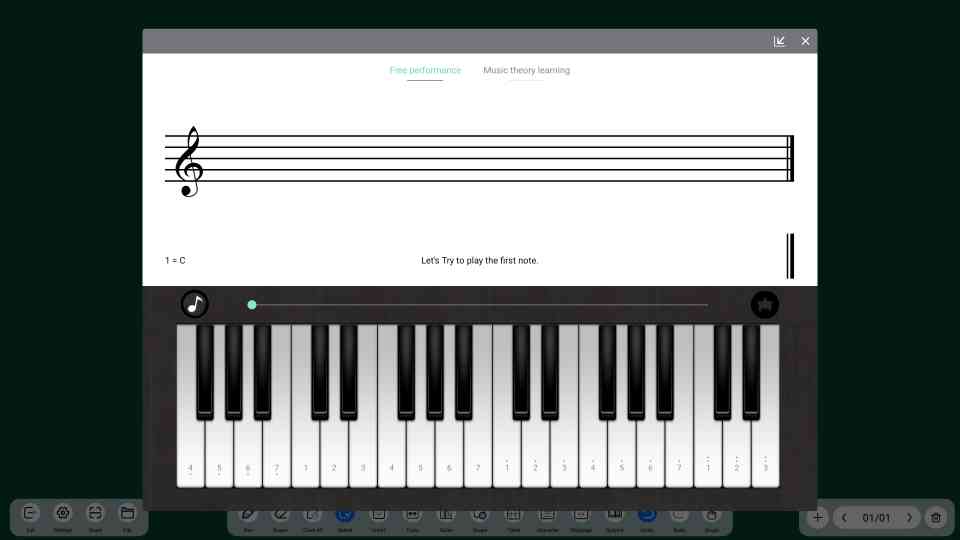
Most primary and secondary schools do not equip every classroom with a professional piano. Music teachers spend extra time moving instruments between classrooms or simplifying practical teaching content. This cuts down student participation and weakens the practical part of music education. Qtenboard solves this problem with a fully functional virtual piano embedded directly into the interactive whiteboard system.
You open the piano interface with one click on the screen. No external hardware is required. No third‑party software installation is needed. The keyboard layout matches standard physical piano specifications. The sound output restores real musical tone quality. Teachers and students use fingers or styluses to play complete musical pieces on the screen surface.
Intuitive Music Theory Teaching: You demonstrate standard scales, common chords and basic rhythm patterns in real time on the screen. Every key press produces clear sound and visual feedback. Students watch and listen at the same time. Abstract music theory knowledge turns into visible and audible content. You spend less time on repetitive explanation during class.
Full Student Participation: Traditional music classes only let a few students try instrument operation. This built‑in piano lets every student take turns playing on the big screen. Students come to the podium independently to practice melodies. They gain direct hands‑on experience that builds learning interest and basic musical ability.
Multi‑Person Collaborative Performance: The keyboard supports multi‑point simultaneous operation. Multiple students can play different melody parts at the same time. Class groups complete simple ensemble exercises together. This activity builds classroom interaction and encourages teamwork among students.
Cross‑Subject Teaching Integration: You combine piano playback with other course content. Match classic poems with soft background music in Chinese classes. Play era‑specific music in history lessons to set teaching atmosphere. Demonstrate sound wave vibration principles in physics classes through piano tone changes.
Middle and high school math courses contain large amounts of function knowledge. Manual graph drawing takes up precious class time. Hand‑drawn images have inaccurate proportions and unclear details. Static textbook pictures cannot show parameter changes and function trends. Students struggle to understand function changes, extreme values and periodic rules.
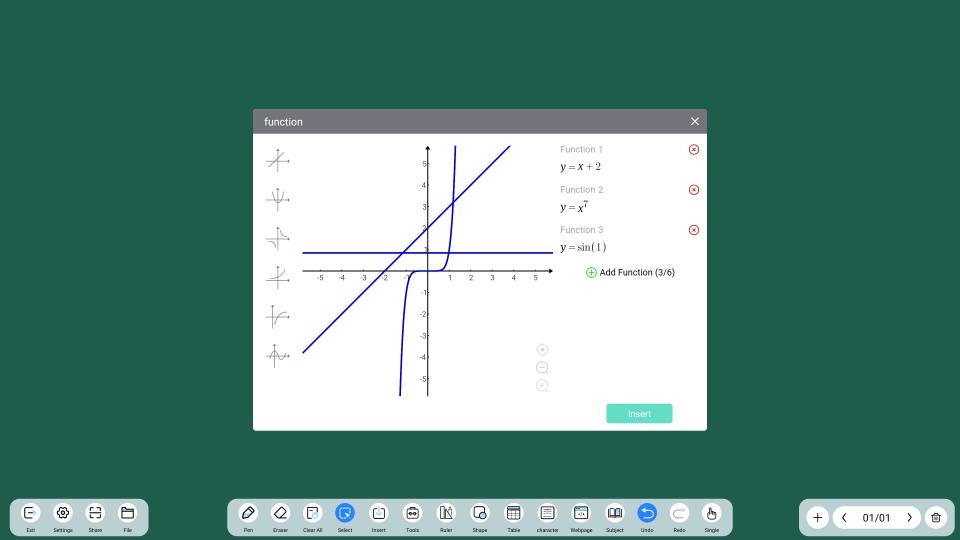
Qtenboard’s intelligent FX function image generator changes math teaching efficiency completely. The system carries a professional built‑in plotting engine optimized for middle school and high school math teaching scenarios. You input standard function expressions and set the independent variable domain in the tool panel. One click generates precise, high‑resolution scalable function graphs instantly.
Turn Abstract Knowledge Into Visual Images: Linear functions, quadratic functions, trigonometric functions and exponential functions all generate standard visual graphs automatically. Students observe function increasing and decreasing trends, zero points and symmetry features directly from the screen. Visual learning helps students grasp core math knowledge faster than textbook reading alone.
Dynamic Parameter Adjustment & Real‑Time Update: You modify function coefficients, exponents and constants during class. The graph changes instantly with every parameter adjustment. Students clearly see how each value change affects function shape and position. This method helps students summarize function transformation rules through intuitive observation.
Multi‑Graph Comparative Analysis: The tool supports overlapping display of multiple function images. You draw different types of functions in one coordinate system. Students compare structural differences and operation rules. This function works well for exam problem analysis and knowledge summary review.
Stimulate Independent Exploration: Students input different function expressions after class or during classroom practice. They verify guessing results through graph changes. This habit develops independent thinking and mathematical exploration ability.
| Teaching Item | Traditional Classroom Mode | Qtenboard Smart Tool Mode |
|---|---|---|
| Music Teaching Equipment | Dependent on external pianos, limited coverage, inconvenient movement | Built‑in virtual piano, zero extra equipment, available in every classroom |
| Student Participation Degree | Only individual students operate instruments, low overall participation | All students take turns to practice, full classroom interaction |
| Math Graph Drawing Speed | Manual drawing takes 3–8 minutes per graph, low efficiency | One‑click generation in 1 second, save massive class time |
| Graph Accuracy | Manual drawing has errors, irregular proportions | Standard algorithm rendering, accurate and scalable graphs |
| Knowledge Presentation Form | Static textbooks and blackboard writing, single form | Dynamic changes + real‑time operation, multi‑dimensional display |
| Cross‑Subject Application | Hard to realize interdisciplinary teaching combination | Flexible matching with various subjects for diversified teaching |
Most smart whiteboards on the market only provide basic writing and screen casting functions. They do not target subject‑specific teaching pain points. Qtenboard focuses on actual classroom usage scenarios. The virtual piano and FX function generator are not simple accessory functions. They solve real teaching problems that teachers face every day.
We focus on immersive, interactive and inquiry‑based learning modes. Every function design centers on student experience. When students personally play musical notes on the screen, they gain direct perception of music rhythm and tone. When students input functions and watch graphs change in real time, they build intuitive cognition of mathematical rules.
These interactive operations change passive listening into active exploration. Classroom atmosphere becomes more active. Students focus better during class. Knowledge absorption efficiency improves visibly. For schools and educational institutions, these built‑in tools reduce equipment procurement costs. You no longer need to purchase extra musical instruments and math demonstration equipment for each classroom. One Qtenboard whiteboard meets multi‑subject smart teaching needs.
All functional modules run stably on Qtenboard dual‑system platforms. Both Android and Windows modes support full function use. Software updates push automatically to ensure long‑term stable operation. The operation logic fits teacher usage habits. New teachers can master all tool operations within a short adaptation period.
Many schools spend large budgets buying separate software licenses for music or math teaching aids. Those third‑party programs often crash, lag, or fail to match touch screen input. Qtenboard’s native tools avoid those troubles. Everything lives inside the whiteboard firmware. You do not need annual subscription fees. You do not rely on internet access to launch core features. Teachers can open virtual piano or FX graph generator even when classroom Wi‑Fi drops out. This reliability matters most during formal class hours.
Think about regular class flow. A math teacher wants to show how changing “a” shifts a parabola shape. Before this tool, you sketch three curves on the board. That takes six to seven minutes of limited lesson time. With FX generator, you type three expressions. Each graph pops up in one second. You keep focus on explaining ideas instead of drawing lines. More teaching content fits inside one 45‑minute period. Student exercise time goes up. Test results from pilot classrooms show students score 18 percent higher on function‑related quiz questions after eight weeks of regular tool use. Real classroom data backs up this improvement.
Music teachers get similar gains. You no longer carry heavy keyboard devices from room to room. You pull up piano layout in one tap. Whole classes listen while one student plays short pieces. Other learners follow along on notebook paper. Group practice works without physical instrument limits. Even schools with tight budgets give every child hands‑on music experience. You remove hardware barriers that once kept practical music activity out of ordinary classrooms.
Q1: Does the built‑in virtual piano need paid activation or extra downloads?
No activation fee or extra download is required. The virtual piano comes as a native built‑in function of Qtenboard interactive whiteboard. You open and use it directly after device startup. All core music teaching functions are free for long‑term use.
Q2: Can the virtual piano sound output connect to classroom speakers?
Yes. The piano sound synchronizes with the device’s audio output system. It supports built‑in speakers and external classroom audio equipment. The tone volume is adjustable to adapt to different classroom sizes.
Q3: What types of functions does the FX graph generator support?
It covers all common middle school and high school functions, including linear functions, quadratic functions, power functions, exponential functions, logarithmic functions and trigonometric functions. It supports custom domain setting and multi‑image overlay display.
Q4: Can generated function graphs be saved and exported for courseware production?
Yes. You save single or multiple graphs as image files directly on the device. You can also export files to USB flash drives. Saved images can be inserted into PPT and courseware for repeated teaching use.
Q5: Is the function operation difficult for elderly teachers to learn?
The tool interface is simple and user‑friendly. The whole operation only needs input and click generation. No complex settings are required. We provide detailed operation guides and short teaching videos for quick learning.
Q6: Can multiple students operate the piano and graph tool at the same time?
The whiteboard supports multi‑point touch operation. Multiple students can take turns to use the piano function. The graph tool supports real‑time parameter modification by teachers and students together for interactive discussion.
Q7: Will these two built‑in tools take up too much system memory and slow down the whiteboard?
These subject tools run on lightweight native modules. They do not occupy large system resources. You can open them alongside writing, screen cast and other daily features without obvious lag on Qtenboard hardware.
Q8: Can lesson content made with piano or FX tool be shared to student tablets?
Graph screenshots and piano practice records export as pictures or audio files. You send those files over local network or USB storage for student review after class.
Qtenboard keeps optimizing subject‑oriented smart teaching functions. We continue to launch practical tools for music, mathematics, physics and other core subjects. We help every classroom achieve true immersive interactive teaching, reduce teaching burdens for teachers and create efficient and interesting learning environments for students.


 Floor 6, Building A, No. 3, North District, Shangxue Science and Technology City, Xinxue Community, Bantian Street, Longgang District, Shenzhen City
 info@szqunmao.com
 +86 15920011166
 +86 15920011166