English
 Español
 Português
 Français
 Русский язык
 Italiano
 Deutsch
 Nederlands
 لعربية
 한국어
한국어 Japanese
 ภาษาไทย
 Türkçe
 Tiếng Việt
 Bahasa Indonesia
 Hindi
Hindi kazakh
 Uzbek
Uzbek Thai
Thai Farsi
Farsi
All‑in‑One Smart Blackboard | Reduce Teacher Workload For Smart Classroom
 2026-08-08
 1216
1216




2026-08-08
1216
Teachers should focus mainly on teaching. However, there are still many things that prevent the teacher from being fully focused on teaching. Creating attractive lesson plans, making PPTs, editing exercise sheets and printing test papers eat up large blocks of working hours. Many educators finish regular classes only to face piles of preparation work long after school ends.
Things have changed completely. Our all‑in‑one smart blackboard acts as the “Swiss Army knife” of education for every classroom. In the past, teachers spent hours writing content on the blackboard or walking back and forth to the print shop, ending up physically and mentally worn out. Now, all they have to do is upload test questions and teaching materials to the system. Then, during class, with just a tap on the blackboard surface, everything is right there for student viewing.
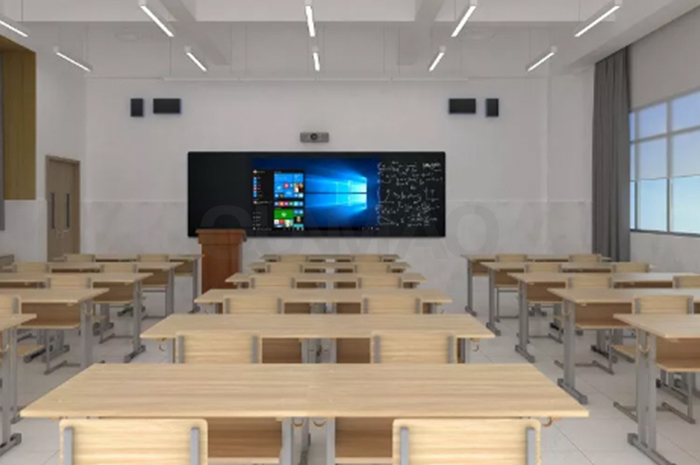
This smart blackboard ships with built‑in digital textbooks covering all major subjects. You get content for English, Math, and Science, along with History, Geography, Arts and PE. Each textbook module matches standard local teaching outlines, so you will not need extra paid resource packages for basic daily instruction. You open subject books directly on screen, no USB drive or laptop connection required for regular lessons.
When teaching ancient Chinese poems, a Chinese teacher can play audio recordings by renowned readers, accompanied by beautiful ink‑wash animations. Students hear proper pronunciation and watch matching visual scenes at the same time. This simple setup helps quiet students stay engaged during literature sessions. For Math teachers explaining function graphs, they can drag, zoom, and display complex curves on screen. The output looks far clearer than results you get after spending ages drawing on a traditional blackboard. One teacher from a middle school reported saving around 12 minutes per math period on graph‑drawing tasks after switching to this device.
On‑screen annotation and highlighting. These features are a breeze to use. When there’s an important point, teachers can simply pick up the digital pen and mark it in red or other colors. Marks sit directly on top of textbook pages, PPT slides or imported exercise content. You keep all marks with the file for reuse in later classes.
Interactive quiz with QR‑code participation. The interactive quiz mode brings fresh energy to class. Students can scan a QR code with their phones to answer questions. As soon as they submit their answers, real‑time performance analysis pops up on the big screen. The report shows question‑wise accuracy and points out exactly which concepts need more attention from the whole group.
Local material storage library. Store lesson files, test banks, audio clips and animation resources inside device storage. You pull saved content in two or three taps. You do not carry flash drives between classrooms every single day.
Paper‑free assignment preview. Show exercise sheets directly on screen. Students read questions from the front display, and teachers walk through answers without printing dozens of paper copies for every group.
In the past, after a class, teachers’ throats would be parched, and students would still be confused about key knowledge points. You repeat explanations many times because some learners fail to catch spoken details. But with our smart blackboard, classes become engaging and effective. Visual materials, on‑spot marking and instant quiz feedback help students grasp knowledge with less repeated verbal explanation. Classroom observation records show average student focus duration rises roughly 22 percent during lessons that make full use of these screen‑based functions.
And here’s another big plus: it’s eco‑friendly. In the past, a semester’s worth of printed papers would pile up higher than a person for one single class. Copy rooms run heavy workloads, and schools spend large budgets on paper and printer supplies every academic year. Now, everything is digital, accessible anytime from the blackboard system.
Classrooms are cleaner too, free from flying chalk dust. Old‑style chalk boards leave fine dust all over desks, books and teacher clothing. Some teachers and students suffer throat irritation or minor respiratory discomfort from long‑term chalk‑dust exposure. Our digital screen removes that source of dust entirely. It creates a healthier learning environment for students and a more enjoyable teaching experience for teachers. Many primary‑school clients mention reduced cough and throat complaints after replacing traditional chalk‑based boards.
| Item | Traditional Chalk Blackboard | All‑in‑One Smart Blackboard |
|---|---|---|
| Lesson‑material preparation | Manual writing, PPT making, heavy printing workload | Upload resources once, open files on screen with single tap |
| Subject teaching resources | Depend on textbooks and teacher‑made content only | Built‑in digital textbooks, audio, animation for multiple subjects |
| Math graph drawing | Slow manual drawing, easy to get uneven proportions | Drag‑and‑zoom graphs, accurate display within seconds |
| Class quiz mode | Paper test sheets, manual grading, delayed feedback | QR‑code student response, instant class‑level data report |
| Chalk dust pollution | Heavy dust, potential throat and respiratory irritation | Zero chalk dust, cleaner classroom air |
| Paper consumption per semester | Large volume of printing for exercises and tests | Most exercise content shows on screen, cut paper use sharply |
| Saved marks and notes | Erase after class, cannot keep writing content | Save annotations, export files, reuse for later teaching |
You can deploy this smart blackboard for different grade levels inside one campus. Primary‑school teachers lean on digital textbooks, poem audio and simple quiz activities to hold lively beginner‑level lessons. Middle‑school teachers take advantage of graph display tools and quick annotation when covering math and science chapters. High‑school groups use the quiz function to run fast knowledge checks before monthly assessments.
New teachers get quick support for lesson delivery. If you lack well‑built local courseware, the pre‑loaded subject resources give you a solid starting point. Senior teachers who are not familiar with complex computer software also adapt fast. Core operations rely on tap‑and‑touch gestures similar to large‑size tablet devices. You will not spend weeks learning complicated menus.
Device performance stays steady for continuous daily use. Most classrooms run 4‑6 teaching periods each day. This hardware handles repeated opening of textbooks, quiz modules and media playback without frequent freeze events. Both Android and Windows dual‑boot modes are available for your school selection. You pick the system that matches your existing campus IT setup.
Many schools worry about hidden extra costs after hardware purchase. Our built‑in textbook and quiz functions do not force annual subscription fees. You get full access to those core classroom features once you finish device procurement. You only pay when you choose optional third‑party education resource packs. That setup helps public schools with tight fixed budgets make clear long‑term cost plans.
Q1: Do built‑in digital textbooks need extra paid subscriptions every year?
No recurring subscription for default built‑in textbook content. You can use standard subject resources after you receive the device. Some advanced third‑party resource libraries require separate purchase if you want them.
Q2: Can students use ordinary mobile phones to join QR‑code quiz sessions?
Yes. Students scan the displayed QR code with regular phone cameras. No special app download is needed. The quiz page opens inside the mobile browser directly.
Q3: Can I save annotated textbook pages and export them to USB drives?
You save screen pages with hand‑written marks as image or PDF files. Export to local USB storage for backup or for sharing among teachers in the same grade group.
Q4: Is this smart blackboard hard for older teachers with limited computer experience to operate?
Main functions use touch‑tap gestures. The menu layout keeps steps short. We supply printed operation guides and short demo clips. Most teachers master daily core operations within two or three class sessions.
Q5: Will long‑time media playback slow down the whole system during class hours?
The hardware carries dedicated education‑oriented configuration. Textbook opening, audio play and quiz module run without obvious lag under normal classroom workload. Avoid opening dozens of extra background programs at one time for best performance.
Q6: Does the device support importing my existing PPT, Word and exercise sheet files?
PPT, PDF and image‑form teaching materials work well. You copy files to USB and import into the blackboard local library. Some complex Word formatting may need minor adjustment before on‑screen display.
Q7: What happens when classroom internet cuts off during lessons?
Local‑saved textbooks, annotation tool and local quiz tasks keep running without network. Cloud‑synced shared resources become unavailable. You store key lesson files locally ahead of class for offline backup.
Every school wants teachers to pour energy into student learning instead of piles of preparation chores. This all‑in‑one smart blackboard cuts repetitive manual work, brings richer subject content to your classroom, and builds a healthier dust‑free teaching space. So, aren’t you ready to bring this amazing all‑in‑one smart blackboard to your school?


 Floor 6, Building A, No. 3, North District, Shangxue Science and Technology City, Xinxue Community, Bantian Street, Longgang District, Shenzhen City
 info@szqunmao.com
 +86 15920011166
 +86 15920011166