English
 Español
 Português
 Français
 Русский язык
 Italiano
 Deutsch
 Nederlands
 لعربية
 한국어
한국어 Japanese
 ภาษาไทย
 Türkçe
 Tiếng Việt
 Bahasa Indonesia
 Hindi
Hindi kazakh
 Uzbek
Uzbek Thai
Thai Farsi
Farsi
Qtenboard Self Service Kiosks & Inquiry Terminals | For Retail, Hospital, Bank & Public Service Spaces
 2026-08-12
 1303
1303




2026-08-12
1303
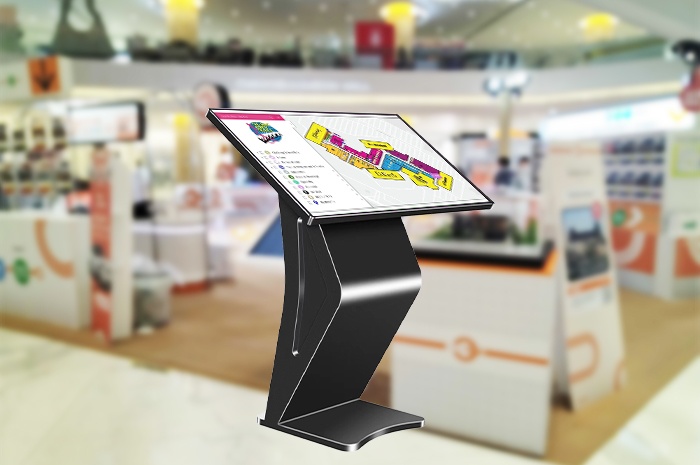
Long waiting lines, overloaded front desk staff, repeated simple enquiries and manual entry errors eat into your daily operational profits. Shoppers leave malls frustrated after slow checkout. Patients spend extra time queuing for registration. Bank visitors wait lengthy periods just to check basic account details. Qtenboard builds fully integrated self-service inquiry kiosks and interactive terminals tailored for commercial and public service environments. Each unit combines sturdy hardware, responsive touch screens and custom software systems. You cut labour pressure, reduce human mistakes and let customers finish routine tasks independently at their own pace. Below we break down our full kiosk lineup, real industry deployments, practical advantages and common questions for business buyers.
No two commercial spaces share identical layout and service goals. We design four core hardware styles to match narrow corridors, open lobbies, food courts and public service halls respectively. Each model carries distinct structural designs, screen sizes and functional configurations to fit targeted usage scenarios perfectly.
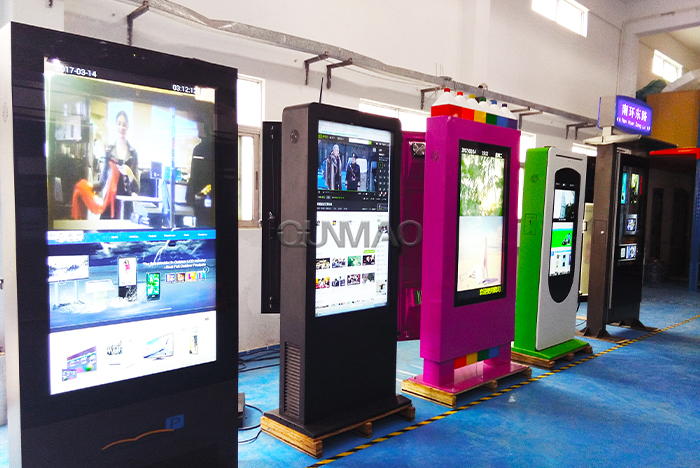
This slim vertical cabinet occupies minimal floor area. It stands steadily along mall walkways, building entrances and office corridors without blocking pedestrian flow. The tall vertical screen delivers clear information broadcasting, directory navigation and simple self-service transactions round the clock. Shopping centres run store directories, promotional discounts and event notices here. Office buildings set up visitor registration and building guide systems. Its space-saving frame works exceptionally well for locations with limited ground space.
Flat table-style touch terminals turn passive browsing into active group interaction. The wide horizontal surface lets multiple users tap, drag and browse content side by side. Luxury retail stores place these units for customers to scroll product catalogues, compare item specifications and view matching combinations together. Corporate reception areas use touch tables for company introduction, project case browsing and visitor information lookup. Museums and exhibition halls deploy them for exhibit detail queries. The unique desktop form creates relaxed interactive experiences no vertical screen can replicate.
Cafés, fast food chains and convenience stores face consistent pain points: peak hour order backlogs, misheard custom requirements and slow payment processing. Our desktop ordering terminals solve these issues completely. Customers browse menus, select food items, adjust flavour options, add side dishes and complete card or mobile payments on screen without cashier assistance. Manual order mix-ups drop sharply. Cashiers shift focus from repetitive order taking to food preparation and in-store customer care. Average order turnaround time shortens noticeably during lunch and dinner rushes. Small retail shops also adopt this model for self-checkout and membership point inquiries.
Long clustered queues damage service experience for banks, outpatient clinics, tax offices and community service centres. Visitors crowd together while waiting, and staff struggle to maintain orderly flow. Queue management kiosks let guests select service types, print waiting slips and disperse to seating areas comfortably. The system sends voice and screen reminders when their number approaches. Service windows process clients one by one in scheduled sequence. Staff workload eases, crowd congestion disappears, and users no longer feel anxious from endless standing waits.
Our self-service systems support customized software development, which allows seamless adaptation to the standard workflows of mainstream service industries. Each vertical field gets tailored functions to fix its most common operational bottlenecks.
Patients no longer line up manually for registration and appointment booking. They tap the kiosk to choose departments, select attending physicians, confirm visiting times and print registration slips. Users also access medical bill inquiries, payment services and test report printing independently. Front nurses escape endless repetitive consultation work and concentrate on patient guidance and emergency assistance. Hospital lobby congestion eases significantly throughout opening hours.
Basic banking operations shift to self-service terminals. Visitors check account balances, print transaction records, apply for debit cards and handle simple transfer requests without window appointments. Complex financial business remains handled by tellers. Branch efficiency rises, peak hour pressure reduces, and banks allocate human resources to wealth management and customer financial consulting instead of trivial daily tasks.
Travellers use kiosks to buy tickets, check real-time departure schedules, look up transfer routes and retrieve booked tickets. During holiday travel peaks, these terminals disperse crowds away from ticket counters. Passengers cut waiting time, and station staff focus on passenger guidance and emergency coordination rather than continuous ticket sales.
Large supermarkets deploy desktop self-checkout kiosks for customers to scan goods, deduct payment and finish checkout quickly. Mall corridors install vertical K-type machines for store navigation, promotional event display and membership point queries. Shoppers avoid long checkout queues on weekends and holidays. Retail businesses balance staffing costs while keeping shopping experience steady.
| Terminal Model | Core Advantages | Primary Applicable Industries | Main Functions |
|---|---|---|---|
| K-Type Vertical Floor Kiosk | Space-saving, tall display, stable cabinet | Shopping malls, office buildings, exhibition centres | Directory navigation, ad broadcasting, visitor registration |
| Smart Touch Table | Multi-user simultaneous touch, wide horizontal screen | Retail flagship stores, museums, corporate lobbies | Product browsing, group content interaction, exhibit inquiry |
| Self-Order Payment Kiosk | Compact desktop layout, integrated payment module | Fast food, cafes, convenience stores, supermarkets | Food ordering, custom options, self-checkout, payment |
| Queue Calling Machine | Orderly crowd scheduling, waiting slip printing | Hospitals, banks, government service halls | Service selection, queue number generation, call reminder |
Q1: Can we customize screen size, cabinet colour and built-in functions according to our store style?
We support full personalized customization. You pick screen sizes ranging from 21.5 inches up to 65 inches. Cabinet appearances include matte black, silver grey and white tones to match mall, hospital or corporate decoration styles. We add hardware modules such as card readers, printers, QR scanners and cash payment ports based on your actual service needs.
Q2: Is the touch screen durable enough for heavy daily public use?
All panels adopt industrial-grade capacitive touch glass with scratch-resistant and anti-fouling coating. The surface withstands frequent tapping from hundreds of users every day. Dustproof and waterproof casing designs adapt to busy mall and hospital environments, lowering long-term maintenance frequency.
Q3: Does the system support multi-language switching for international shopping malls and transport hubs?
The operating system carries English, Spanish, French, Russian and other mainstream language packs. You switch display text and interface languages with simple backend settings, suitable for areas with large numbers of foreign visitors.
Q4: How long is the service life of a complete kiosk unit?
With regular simple maintenance, the whole machine runs stably for 5 to 8 years. Core screen and motherboard components come with official warranty, and we supply spare parts and technical support throughout the equipment service cycle.
Q5: Can we remotely update advertisement content and service system programs?
Our backend management platform supports remote content release and system upgrade. You upload promotional posters, video materials and adjust service process settings online without onsite operation for each terminal, greatly saving management labour costs for multi-store chains.
Q6: Are ordering kiosks compatible with existing catering cash register and kitchen printing systems?
We reserve standard data interfaces to connect with mainstream catering POS systems and kitchen ticket printers. Order information placed on touch screens transmits to the kitchen instantly, keeping your original operational data unchanged while adding self-service channels.
Q7: Can queue terminals connect multiple service windows for unified calling management?
Yes. One main queue terminal links dozens of service counters. The system distributes waiting numbers reasonably according to window idle status, and all calling records get stored for later operational data analysis.
Qtenboard self-service terminals do not merely serve as hardware display devices. They reconstruct the whole interaction route between your business and customers. Manual repetitive work transfers to automated touch operation. Labour expenses drop, human error rates decline, and waiting frustration fades away for your visitors. Whether you plan to install scattered vertical kiosks across shopping corridors, equip catering outlets with ordering machines, optimise hospital registration workflows or renovate bank service halls, we tailor matched hardware and software packages for your site conditions and budget. Visit our official product page to check detailed hardware parameters, real installation cases and customized solution plans, and get in touch with our sales team to start upgrading your customer service system.


 Floor 6, Building A, No. 3, North District, Shangxue Science and Technology City, Xinxue Community, Bantian Street, Longgang District, Shenzhen City
 info@szqunmao.com
 +86 15920011166
 +86 15920011166