English
 Español
 Português
 Français
 Русский язык
 Italiano
 Deutsch
 Nederlands
 لعربية
 한국어
한국어 Japanese
 ภาษาไทย
 Türkçe
 Tiếng Việt
 Bahasa Indonesia
 Hindi
Hindi kazakh
 Uzbek
Uzbek Thai
Thai Farsi
Farsi
Qunmao Smart Interactive Touch Panel | Real-Time Quiz, Voting Data Analytics for Modern Smart Classrooms
 2026-08-10
 1234
1234




2026-08-10
1234
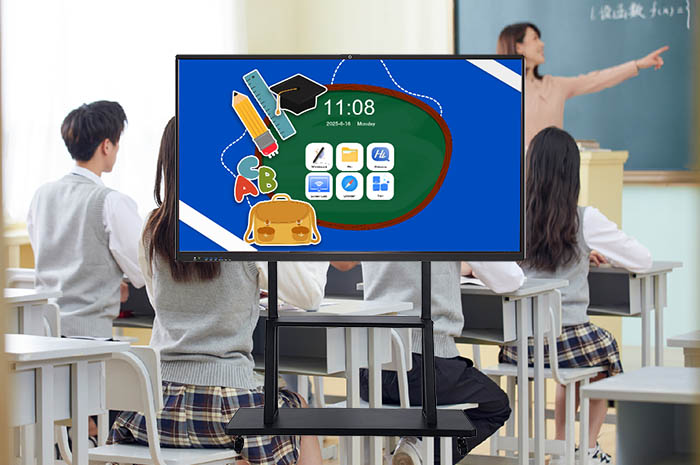
Traditional classroom teaching follows a fixed routine. Teachers deliver knowledge nonstop from the podium. Students sit quietly and listen passively. You finish a chapter of knowledge, yet you cannot tell how many students truly grasp core formulas, definitions and key theories right away. Many learners hide confusion to avoid being called on. Knowledge gaps pile up day after day. Late homework corrections and monthly exams become the only way to spot learning problems, which wastes precious teaching hours and makes remediation far less effective.
Modern smart education has completely rewritten this outdated teaching mode. Classroom interaction no longer stays limited to one-way knowledge delivery. Instant learning checks, real-time student feedback and personalized targeted tutoring turn into mainstream classroom standards. Shenzhen Qunmao Display Technology Co., Ltd., specialized in educational display hardware and smart classroom solutions, has embedded live quiz systems, real-time voting modules and visualized data statistics into our smart touch all-in-one devices. These practical functions break the barrier between teachers and students, raise overall classroom activity, and let you master the whole class’s learning status within seconds.
Paper quizzes take time to print, hand out and collect. Scoring stacks up heavy workloads for instructors. By the time you finish marking papers, the class has moved on to new lessons. You lose the best window to fix misunderstandings. Slow feedback widens the gap between teaching progress and actual student absorption.
Our built-in quiz tool lets you launch knowledge checks at any moment during class. You import pre-edited question banks, or type temporary questions directly on the screen. Question types cover single-choice, multiple-choice, true/false and short fill-in items suitable for primary, secondary and high school subjects. Students submit answers via mobile phones scanning the on-screen QR code. No extra handheld devices or hardware purchases are required for the whole class.
Answer submissions finish within one minute. The system counts results immediately. You see which knowledge points most students struggle with. You slow down your teaching pace to re-explain confusing concepts, or skip redundant content the whole class already understands. This timely adjustment closes the gap between taught content and acquired knowledge entirely. Meanwhile, each student views their personal answer results on their own phones. They spot their weak knowledge points clearly and take notes for review after class. This creates a positive loop: students test themselves while learning, correct mistakes through feedback, and consolidate knowledge steadily.
Conventional classrooms breed passivity. Most students stay silent even when teachers raise open-ended questions. A small number of outgoing learners dominate classroom dialogue. Introverted children never get the chance to voice thoughts. Classroom atmosphere turns dull, and teachers cannot collect comprehensive views from all learners.
The multi-scenario voting function changes this situation entirely. You launch interactive polls for diverse classroom needs. You set simple judgment questions for knowledge confirmation, multiple selections for topic discussions, or open polls to gather opinions on study plans and classroom activities. Every student casts votes anonymously through mobile devices. Shyness no longer stops them from sharing real thoughts.
Voting outcomes pop up on the large touch screen right after voting closes. You discuss the statistical results with the whole class, analyze different viewpoints, and guide in-depth classroom exchanges. Two-way communication replaces one-way lecturing completely. Classroom vitality rises visibly, and every student gains a strong sense of belonging and participation during lessons.
Before smart educational equipment existed, teaching evaluations relied heavily on subjective judgment. Teachers roughly judge learning levels based on homework and exam scores. School teaching research teams lack unified, continuous data to assess daily teaching quality. Targeted curriculum optimization and collective lesson preparation lack reliable reference materials.
All quiz records and voting data get converted into intuitive charts instantly on our panel. Bar graphs display overall question correct rates. Pie charts show answer distribution ratios for each option. Error statistics sort out frequently misunderstood knowledge points for the whole class. You glance at the screen and grasp overall learning conditions without manual counting and sorting.
You use these detailed statistics to design personalized tutoring plans for students with low accuracy rates after class. You rearrange key teaching segments for the next lesson according to common error types. School teaching and research departments export cumulative classroom data monthly. Teams analyze teaching effects across grades and subjects, adjust curriculum layouts, and optimize teaching methods in a scientific way. Subjective experience gives way to data-driven teaching management.
Interactive quiz and voting serve as core interactive upgrades. Our panel also retains and optimizes all essential daily teaching functions to meet full-range classroom demands. Ultra-high definition display delivers clear text and graphics for long hours of viewing, easing eye strain for teachers and students. Capacitive touch technology ensures smooth writing, no lag or jitter when annotating courseware and drawing teaching diagrams. One-click wireless screen casting connects laptops, tablets and student phones within seconds for resource sharing. Built-in digital whiteboard stores massive subject teaching tools to reduce lesson preparation burdens.
All functions coordinate closely together. You cast courseware first, launch quizzes midway, check visualized data afterward, and annotate error points on the whiteboard for explanation. One device fulfills the whole set of classroom teaching workflows seamlessly.
| Comparison Item | Traditional Chalk Whiteboard | Common Non-Interactive Display | Qunmao Educational Smart Touch Panel |
|---|---|---|---|
| Classroom Quiz Function | Paper tests only, slow scoring, delayed feedback | No quiz module available | QR code mobile submission, instant statistics, real-time feedback |
| Student Live Voting | Hand raising only, hard to count total opinions | No interactive voting capability | Anonymous mobile voting, full student participation |
| Learning Data Visualization | Manual statistics, no chart generation | Cannot collect and analyze classroom learning data | Automatic bar/pie charts, error rate & correct rate analysis |
| Classroom Participation Level | Low, dominated by a small group of active students | Passive listening, rare student interaction | High, all learners join classroom interaction equally |
| Teaching Adjustment Timeliness | Slow, adjustments rely on weekly homework & exams | No basis for timely teaching adjustment | Adjust lesson rhythm immediately based on real-time data |
| Basic Writing & Annotation | Chalk writing, chalk dust pollution, limited space | No touch writing function | Smooth capacitive touch writing, unlimited canvas space |
| Wireless Screen Casting | Not supported | Complicated wired connection only | One-click wireless casting for multiple devices |
Q1: Do students need to download dedicated mobile applications to take quizzes and cast votes?
No extra app installation is required. Students open the built-in scanner on mobile WeChat or browsers to scan the QR code displayed on the panel. They enter the interactive page directly to submit answers and votes, lowering usage barriers greatly for primary school students.
Q2: Can teachers import self-built question banks into the quiz system for long-term repeated use?
You upload question packs in common document formats to the backend management system. All categorized questions get saved permanently. Teachers retrieve and assemble test papers quickly before each class to cut daily lesson preparation time significantly.
Q3: Is the voting page anonymous? Will student personal information be recorded?
All voting operations adopt anonymous modes by default. The system only counts option proportions without collecting student names, protecting children’s willingness to express real thoughts freely without psychological pressure.
Q4: Can classroom learning data be exported for school teaching research and filing?
Quiz records, voting statistics and error analysis data can be exported as Excel files. Teaching research teams sort and analyze cumulative data across semesters to complete curriculum evaluation and teaching quality reports conveniently.
Q5: Does the system work stably when the whole class of 40 to 50 students submit answers simultaneously?
The interactive module carries optimized concurrent processing capability. It maintains smooth response when all students submit answers at the same time, with no crashes, delays or data loss during peak submission periods.
Q6: Is the panel suitable for all subjects including science, liberal arts and music art courses?
The quiz and voting systems adapt to all school subjects. Science courses test formula and concept mastery; liberal arts classes launch opinion polls for reading comprehension; art and music lessons collect preferences and feedback easily via voting functions.
Q7: Can schools deploy unified backend management for all classroom panels across the campus?
We provide exclusive campus cloud management backend. Administrators manage all classroom devices uniformly, synchronize question resources, collect overall teaching data and set system permissions to realize centralized smart campus management.
Q8: Will long-time use of interactive functions slow down the device running speed?
The system undergoes targeted memory optimization for classroom interactive scenarios. Concurrent quizzes, voting and data statistics run steadily without stuttering, ensuring smooth daily teaching use for multiple years.
Shenzhen Qunmao Display Technology always focuses on educational display hardware and smart classroom system development. We rely on continuous technological upgrades to resolve real classroom pain points. Our smart touch all-in-one panel transforms static one-way lectures into lively interactive learning environments. Instant quizzes check knowledge absorption in real time. Live voting mobilizes overall classroom enthusiasm. Visualized data supports scientific teaching decisions. Together with high-definition display, smooth touch writing and wireless projection, the whole set of solutions lightens teachers’ workload and improves learning efficiency for every student.
Looking ahead, we will keep exploring deeper educational informatization applications. We will upgrade interactive modes, expand data analysis dimensions and iterate hardware performance steadily. We keep developing more practical, humanized intelligent teaching equipment to assist schools in constructing comprehensive smart campuses and push modern education forward step by step. Contact our team to obtain detailed parameter lists, on-site demonstration arrangements and customized campus smart classroom planning schemes.


 Floor 6, Building A, No. 3, North District, Shangxue Science and Technology City, Xinxue Community, Bantian Street, Longgang District, Shenzhen City
 info@szqunmao.com
 +86 15920011166
 +86 15920011166