English
 Español
 Português
 Français
 Русский язык
 Italiano
 Deutsch
 Nederlands
 لعربية
 한국어
한국어 Japanese
 ภาษาไทย
 Türkçe
 Tiếng Việt
 Bahasa Indonesia
 Hindi
Hindi kazakh
 Uzbek
Uzbek Thai
Thai Farsi
Farsi
Qunmao New Android OS Upgrade Solution | Updated Interactive Flat Panel Features for Teaching Corporate Meetings
 2026-08-10
 1193
1193




2026-08-10
1193
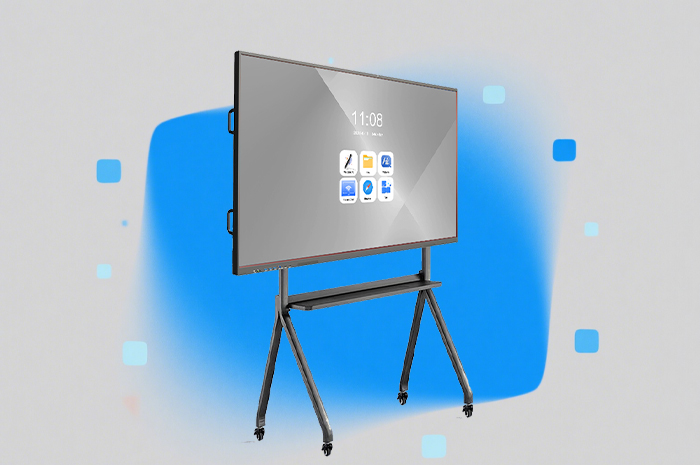
Classroom teaching standards and corporate meeting demands keep evolving month after month. Basic interactive panels with only simple annotation tools can no longer satisfy daily complex work. Teachers need dedicated teaching aids for different disciplines. Office administrators require stricter device access management to avoid data leakage and unauthorized changes. Staff hope to operate the large screen without walking up to the panel constantly. The biggest upgrade users crave lies in intelligent automation that cuts repetitive manual work during lectures and conferences. Qunmao has fully revamped the Android operating system framework for our interactive flat panels to match these real-world demands. Below we break down every core upgrade, how each feature solves your daily pain points, and the tangible improvements you will notice right after deployment.
Standard digital whiteboards only offer blank canvases and basic pen tools. Teachers spend extra time drawing planetary orbits, chemical molecular structures, geometric formulas and piano staff lines manually before each class. This preparation eats into valuable lesson time. Hand-drawn graphics often lack precision, confusing students when learning abstract knowledge. Art and music instructors also struggle with limited built-in resources for professional coursework.
Our updated whiteboard module embeds dedicated resource packs for mainstream academic subjects, ready for instant opening with one tap. The astronomy toolkit displays complete solar system models, planetary rotation tracks and lunar phase cycles. Students observe cosmic movement visually instead of relying solely on textbook illustrations. Chemistry modules store pre-set molecular structures, periodic table charts and experimental schematic diagrams. You pull up reaction equations and lab layouts within seconds. Mathematics covers geometric shapes, function curves, coordinate axes and statistical charts for middle school and high school coursework. The piano teaching section includes standard staff sheets, note markers and rhythm prompts for music lessons. All elements are editable on screen. You drag, adjust size, add annotations and combine multiple teaching materials on one unified canvas. This suite fully covers routine daily teaching tasks, cutting lesson preparation time noticeably and making abstract academic knowledge straightforward for students to grasp.
Unlocked ports and unrestricted access bring hidden risks for schools and companies. Students plug unauthorized USB drives into panels to install unknown software or copy internal teaching resources. External HDMI connections allow outsiders to cast unapproved content onto the screen during vacant periods. Random strangers can wake the screen and alter system settings without permission. Unregulated third-party application installs introduce malware that slows the system down or compromises stored documents. Many institutions face data safety troubles from these loose access permissions.
We have integrated five independent electronic locks across the entire device framework to build multi-layer protection. The HDMI lock disables video input ports to block unauthorized external screen casting. The USB lock restricts flash disk access, stopping data copying and malware transmission via portable storage. The main screen lock puts the display into a locked idle state; only verified staff can wake it for operation. Pattern lock adds personalized identity verification, replacing simple passwords for faster daily unlocking. The third-party APK installation lock closes off unknown app downloads entirely. Administrators toggle each lock separately through the backend management page. You enable all locks during non-working hours, or activate partial restrictions according to different usage scenarios. These safeguards let you deploy the panels in shared classrooms and public meeting spaces without worrying about resource loss, system tampering or unsafe content intrusion.
Traditional panel operation forces you to stand right in front of the display throughout lessons or meetings. When you walk around the classroom to check student assignments or move around the meeting room to communicate with team members, you cannot switch slides, write notes or adjust page content instantly. You must walk back repeatedly, breaking the natural flow of teaching and discussion. Presenters also lack convenient ways to annotate content while circulating among attendees.
Our mobile remote control removes this spatial limitation completely. You connect your smartphone and the interactive panel to the same local Wi-Fi network first. Scan the exclusive QR code displayed on the panel, then input the panel’s fixed IP address to complete pairing within ten seconds. Once linked, your phone turns into a portable control terminal. You flip presentation pages, adjust screen brightness and switch application interfaces remotely anywhere within the network coverage range. Most importantly, the remote mode fully supports the whiteboard writing function. You sketch diagrams, underline key content and jot down ideas on the panel canvas using your phone screen, no stylus or direct contact with the large display required. Teachers walk between desks and annotate course content simultaneously. Meeting moderators move around the room and record discussion viewpoints in real time. The whole process stays smooth and uninterrupted.
Manual transcription, repeated question searching, meeting note sorting and routine system operations consume massive time each day. Teachers write down student questions and classroom discussion content word by word after class. Office workers spend hours organizing lengthy meeting recordings into readable summaries. Users need to manually navigate menus to launch software, adjust volume or open files. Our built-in AI system bundles four practical functional modules to automate these repetitive tasks entirely.
Speech to Text Transcription
The system captures live voice audio in real time and converts spoken words into editable text instantly. During lectures, all explanations and student inquiries turn into legible text on screen automatically. You save the full transcript for students who need to review lessons afterward. In meetings, verbal discussions get transcribed continuously without human typing. The text file exports directly for later sorting and archiving.
Intelligent Q&A Assistant
This tool answers professional and general knowledge queries instantly. You ask academic concepts, formula explanations, industry terminology or daily planning questions aloud. The AI pulls accurate, concise responses tailored for classroom learning and workplace scenarios. It helps teachers resolve temporary knowledge questions during class and supports employees looking up professional information during project discussions.
Automatic Meeting Minutes Generation
Start this function before any team meeting. The system records all dialogue content throughout the session. Once the meeting concludes, it sorts topics, extracts core decisions, lists action items and compiles a structured concise summary automatically. You skip hours of manual note compilation and receive usable meeting records right after discussions wrap up.
Voice Smart Assistant
Similar to mainstream voice assistants, it responds to spoken commands to execute panel operations. You speak to open courseware, launch the whiteboard, adjust screen volume, switch system modes or close running applications. Your hands stay free during teaching and presentations, no need to tap the screen repeatedly for basic operations.
| Function Module | Old Generation Basic Interactive Panel | Qunmao Upgraded Android Solution |
|---|---|---|
| Whiteboard Application | Blank canvas only, no subject teaching resources | Astronomy, chemistry, math, piano dedicated teaching resource packages built-in |
| Device Security Control | No port locks or permission restrictions, fully open access | HDMI, USB, screen, pattern, APK installation five-way electronic lock management |
| Remote Operation Mode | No mobile remote control, must operate directly on screen | Phone remote pairing, remote page flip + remote whiteboard writing supported |
| Speech Transcription | No real-time voice-to-text capability | Live speech converted to editable text automatically |
| Knowledge Q&A Function | No built-in intelligent question answering system | AI knowledge query for academic and workplace content |
| Meeting Record & Summary | Manual note-taking required, no automatic sorting | Full recording + post-meeting structured summary generated automatically |
| Voice Assistant Control | No voice control, all operations rely on touch screen | Voice commands trigger system operations hands-free |
| Core Application Scenarios | Simple course playback and basic annotation only | Full subject teaching, corporate meetings, remote presentation, data security management |
Q1: Can the subject whiteboard resources be updated or expanded with custom teaching materials?
You upload custom course images, charts and courseware to the system backend. The new content syncs to the panel’s whiteboard library. We also push regular official resource updates covering new curriculum standards throughout the year.
Q2: Can administrators unlock each electronic lock individually instead of turning all locks on or off together?
Every lock switches independently via the admin console. You lock USB ports while leaving HDMI accessible for occasional presentations, or activate the screen lock only after school hours to fit your management rules.
Q3: Does mobile remote control work when multiple phones connect to one panel at the same time?
The system supports one primary control device to avoid conflicting operations. Additional phones may connect for viewing only, without permission to edit or annotate content.
Q4: What languages does the speech-to-text function support for transcription?
It covers mainstream global languages plus regional accents commonly used in classroom and business meetings. Text accuracy stays stable under normal indoor ambient noise conditions.
Q5: Can the AI meeting minutes be exported as PDF or Word files for internal filing?
Completed meeting summaries save locally on the panel. You export files to USB flash drives or share documents via email directly in PDF and editable Word formats for institutional archives.
Q6: Is the voice assistant able to recognize voice commands from across a large classroom or meeting room?
Built-in noise reduction microphones capture clear voice input within standard classroom and meeting room ranges. Background noise such as air conditioning and distant chatter gets filtered out automatically.
Q7: Will the upgraded Android system cause the panel to lag or slow down during multi-tasking?
The system has undergone memory optimization tailored for these four AI modules. Concurrent transcription, voice assistance and whiteboard operation run smoothly without noticeable stuttering or delays.
Q8: Can existing Qunmao panels be upgraded to this new Android system solution?
Most of our recent interactive panel models support official over-the-air system upgrades. Contact our sales team to confirm device compatibility and arrange the upgrade schedule.
This comprehensive Android system upgrade redefines what an interactive flat panel can deliver for education and corporate use. Subject-specific whiteboard tools simplify daily lesson planning for teachers. Multi-layer electronic locks secure devices and internal data for shared spaces. Smartphone remote control eliminates fixed operating positions and keeps teaching and meeting rhythms uninterrupted. The four built-in AI tools cut hours of repetitive transcription, note sorting and manual operations each week. If you want to upgrade your classroom or office display equipment for higher efficiency, tighter security and intelligent experience, reach out to our team. We send detailed parameter documents, functional demonstration videos and customized solution plans to match your actual site demands.


 Floor 6, Building A, No. 3, North District, Shangxue Science and Technology City, Xinxue Community, Bantian Street, Longgang District, Shenzhen City
 info@szqunmao.com
 +86 15920011166
 +86 15920011166