English
 Español
 Português
 Français
 Русский язык
 Italiano
 Deutsch
 Nederlands
 لعربية
 한국어
한국어 Japanese
 ภาษาไทย
 Türkçe
 Tiếng Việt
 Bahasa Indonesia
 Hindi
Hindi kazakh
 Uzbek
Uzbek Thai
Thai Farsi
Farsi
Qtenboard Retail Digital Shelf Strip LCD Screens Smart Retail Shelf Display
 2026-08-18
 687
687




2026-08-18
687
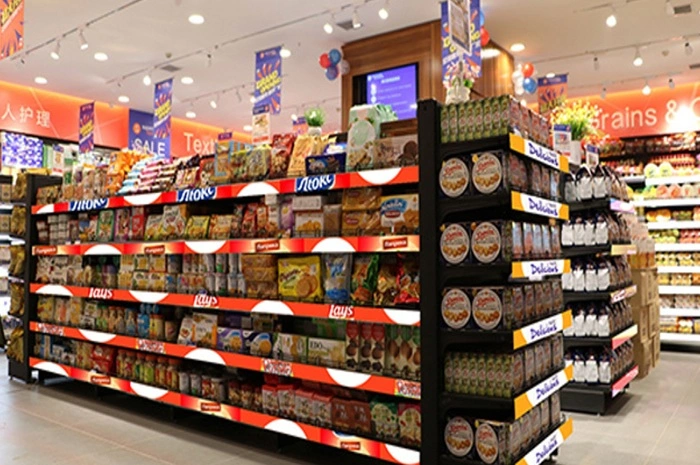
In the increasingly competitive retail industry, capturing customer attention and delivering accurate, real‑time product information have become core operational needs. Traditional paper price tags and static shelf labels come with clear drawbacks for modern store environments. Store staff print, cut, and place thousands of paper tags across shelf rows every month. Price changes, promotional events, and new product launches force repeated rounds of manual label swapping. Human error appears often in this workflow. Misprinted prices, misplaced tags, and outdated promotional text confuse shoppers and create friction for front‑line teams.
Many retail operators run multi‑location store networks. Price updates must roll out across every outlet. Paper labels cannot sync changes from a central point. Each shop completes label updates independently. This gap creates inconsistent pricing between branches. Customers spot mismatched prices and bring complaints to checkout counters. These small issues eat into staff hours and hurt shopper trust over time. Paper labels also consume large volumes of printing paper and ink. Ongoing material costs add up month after month for medium‑size and large‑format retail locations.
Qtenboard Retail Digital Shelf Strip LCD Screens serve as a purpose‑built hardware solution built for smart retail shelf scenarios. You replace stacks of printed paper tags with thin long‑form LCD hardware mounted directly along shelf edges and shelf headers. This hardware fits supermarkets, convenience stores, specialty retail outlets and chain shop layouts. You build a more efficient store environment while giving shoppers clearer product and pricing information at the point of purchase.
These slim, long‑strip displays are designed exclusively for shelf edges and headers, equipped with professional commercial‑grade LCD panels. Consumer screens cannot handle long‑hour retail opening cycles. Qtenboard shelf strip units use panels engineered for continuous in‑store operation. High brightness levels keep screen content readable under bright overhead retail lighting. Many retail spaces use powerful ceiling lamps, and ordinary screens show washed‑out visuals under these conditions. This strip hardware maintains sharp, legible text and graphics even under strong indoor store lighting. The ultra‑slim physical profile sits flush against shelf fronts. It does not block customer sight lines or take valuable shelf product space.
Unlike traditional printed labels, they support real‑time content updates and dynamic video playback. You push price adjustments, flash sale notices, bundle offers and new‑item announcements directly to shelf positions. Promotional timelines shift frequently inside retail. You set exact start and stop times for sale content without sending staff around to swap physical stickers. You can run static price tables, short product clips, brand graphic assets or limited‑time discount prompts on the same hardware. Every shelf position receives fresh information without manual hands‑on work at screen locations.
Six core hardware and operational features address real‑world retail pain points. Commercial‑grade high‑resolution panels deliver even colour and brightness across the whole strip surface. Units run 24‑hour non‑stop operation to match extended retail opening hours. Multiple standard physical sizes match common supermarket shelf dimensions. The ultra‑slim strip housing attaches cleanly to standard shelf frames. Connection options include USB, Wi‑Fi, LAN, and optional 4G modules. You pick network modes based on your store’s existing IT infrastructure. Centralised CMS software handles one‑click real‑time content pushes, scheduled content rotation, and price data management. You avoid typing price information one screen at a time. Hardware supports custom length, custom mounting fittings and surface branding prints to fit special store layout requirements. Moving away from paper cuts down printing material consumption. You lower recurring monthly spending on paper, ink and label stock across your store fleet.
Commercial LCD panels built for long opening‑hour retail environments, stable for round‑the‑clock store operation
Multiple standard physical dimensions plus custom‑length options for non‑standard shelf builds
Multiple connection choices: USB local input, Wi‑Fi, LAN cable, optional 4G module for locations with limited wired network
Central CMS platform schedules content, syncs pricing and rolls out updates across single or multi‑store networks
Custom mounting hardware and casing branding available for special retail project requirements
Reduces paper and ink consumption, lowers recurring operational expenses for label printing
Easy to operate, the screens are mounted with special brackets, connected to networks and managed via the CMS platform for automatic synchronous updates across all stores, ensuring information accuracy. Installation follows a clear workflow. Your on‑site team fixes dedicated mounting brackets onto shelf front edges or shelf header beams. You hook each strip screen onto the fitted brackets. Power supply units route behind shelf structures to keep front‑of‑house visuals neat. You connect each unit to store local networks. Once online, all hardware registers inside your CMS dashboard. You edit price tables, promotional graphics and video assets on the backend platform. Changes you submit go out to every assigned screen in your store or your whole chain network. Every shelf‑edge display reflects identical pricing and promotional material at the same moment. You remove the risk of human mistakes that come with manual paper tag replacement.
These strip screens fit several common retail zones. Shelf‑edge positions show item names, unit prices, discount rates and product feature prompts. Shelf header positions run brand clips, category‑level marketing material and store‑wide campaign announcements. Standard stocked sizes cover 600×60mm, 900×60mm, 1200×60mm. Custom length orders handle unusual shelf widths found in specialty shops or renovated retail spaces. Deployment happens in supermarkets, convenience stores, cosmetic retail, electronics accessory shops, grocery chains and large‑format hypermarket layouts.
You should think through several practical factors before you roll out shelf strip LCD screens across your retail locations. Network infrastructure forms one key consideration. Some older retail sites have limited Wi‑Fi signal near shelf rows. Wired LAN connections deliver more stable signal for heavy multi‑screen deployments. 4G modules work well for pop‑up retail spaces or temporary promotional zones where cable routing proves difficult. Power routing is another practical detail. Shelf structures rarely include built‑in power sockets along front edges. Install teams plan hidden power routes behind shelving to keep customer‑facing surfaces clean and free from loose cables. You also map each physical shelf position before ordering hardware. You record exact shelf lengths and measure available front‑mount space. This step prevents size mismatches once goods arrive at your store.
Many retail buyers compare digital shelf strip LCD screens against electronic shelf label (ESL) e‑ink tags. Each technology fits different store goals. E‑ink tags use very low power and focus mostly on static text and number data. They cannot play video or full‑colour graphic content. Qtenboard shelf strip LCD screens output full‑colour video, animated promotional content and rich brand visuals. They draw more power, but they add marketing value right at the shelf where shoppers make buying choices. You can mix both systems inside one large store. Use e‑ink tags for basic item price display, and deploy LCD shelf strips on high‑traffic category headers and promotional aisles to push marketing content.
Staff training requirements stay light. Store floor teams do not need direct access to the CMS backend. IT or marketing staff handle content creation and price sync work from back‑office workstations. In‑store teams only complete basic visual checks. They watch for offline screen status and report hardware faults back to your technical contact. No specialised retail IT background is needed for day‑to‑site oversight. This lowers barriers for chain retail operators rolling hardware across dozens of locations.
Hardware lifespan matters for retail project budgeting. Commercial shelf strip LCD units run for thousands of operating hours inside store environments. Dust, temperature shifts from store air‑conditioning systems and frequent power cycling form normal operating conditions. Consumer grade displays will degrade quickly under these conditions. Qtenboard retail shelf strip hardware undergoes testing for typical retail environmental stress. Planned hardware lifespan helps you calculate total‑cost‑of‑ownership over multi‑year project cycles. You compare one‑time hardware purchase expense against ongoing paper‑tag printing costs year over year. For multi‑store chains, cumulative savings on printing labour and materials become easy to quantify.
More than just digital tags, Qtenboard strip screens are core smart retail hardware that boosts operational efficiency, enhances brand image and maintains competitiveness in the digital age, serving as the perfect solution for building smart, future‑ready retail spaces from single stores to chain networks.
| Screen Dimension | Typical Mount Position | Suitable Retail Scenario | Recommended Connection Mode |
|---|---|---|---|
| 600 × 60 mm | Short shelf edges, small category headers | Convenience stores, compact specialty retail aisles | Wi‑Fi / USB for small‑quantity deployments |
| 900 × 60 mm | Standard supermarket shelf edges | Supermarket general‑goods aisles, grocery retail | LAN cable for stable large‑group management |
| 1200 × 60 mm | Long shelf edges, main category headers | Hypermarkets, large‑format retail flagship shops | LAN cable, mixed Wi‑Fi for partial zones |
| Custom length | Non‑standard shelf builds, special display zones | Renovated shops, custom retail project requirements | Match to on‑site network survey result |
| Evaluation Item | Traditional Paper Price Tags | Qtenboard Digital Shelf Strip LCD Screens |
|---|---|---|
| Price update workflow | Manual printing and on‑site replacement for every shelf | Central CMS one‑click push to all assigned screens |
| Promotional content capability | Static printed text and simple graphics only | Static text, images, short video, scheduled rotation |
| Cross‑store consistency | Hard to keep uniform across multiple branches | Synchronous roll‑out across your whole store network |
| Recurring material cost | Continuous spending for paper, ink and printing labour | Near‑zero recurring label‑material expense |
| Human error risk | High, misprinting and misplaced tags happen regularly | Low, price data comes directly from central backend |
| Adapt to shelf environment | Easily damaged by dust, moisture and customer contact | Commercial hardware built for retail on‑site conditions |
Q1: Do digital shelf strip LCD screens replace all paper price tags inside my retail store?
A1: You can deploy them for full shelf‑edge coverage, but many retailers run mixed setups. You place strip screens on main aisles, promotional zones and category headers. Small‑volume special‑position goods can still use small paper tags. You decide coverage range based on your project budget and store layout survey.
Q2: What network conditions do these shelf strip screens require for stable operation?
A2: LAN cable delivers most steady performance for large‑scale multi‑screen installations. Wi‑Fi works for smaller deployments. You check Wi‑Fi signal strength along shelf rows before purchase. 4G module options serve temporary retail zones or sites without easy wired network access.
Q3: Can I upload my own marketing video and graphic assets into the CMS platform?
A3: Yes. The CMS accepts common image formats and standard short‑video files. You create promotional material with your existing design tools. Upload files to the backend, assign them to target shelf‑strip hardware units and set playback schedules.
Q4: Is complicated shelf reconstruction needed for installation?
A4: No full reconstruction is required. Special matching brackets attach onto most existing standard retail shelf frames. Your install team checks shelf front structure and available mounting space. You avoid large‑scale building work for most supermarket and convenience‑store projects.
Q5: How do you handle price data sync for large chain retail networks?
A5: The CMS platform supports batch price import. You prepare price lists in standard data formats. Upload data files, map data fields and push updates out to screen groups. You separate screens by store, by aisle or by product category for targeted content delivery.
Q6: What is the difference between digital shelf strip LCD screens and e‑ink electronic shelf labels?
A6: E‑ink tags focus on static text‑based price information with very low power draw. They cannot play video or full‑colour marketing visuals. Qtenboard shelf strip LCD hardware outputs full‑colour graphics and video content. It targets marketing‑focused shelf‑edge communication, and works best on high‑traffic aisles and category headers.
Q7: Can these shelf strip screens keep running for long retail opening hours every day?
A7: Yes. These units use commercial‑grade LCD panels built for retail use. They support 24‑hour continuous operation to match extended store opening times. Consumer television panels cannot sustain this level of daily runtime and will show brightness drop quickly.
Q8: Can I order custom‑length sizes for non‑standard shelf dimensions?
A8: Yes. Apart from three standard stocked sizes, custom‑length production is available. You send over exact physical measurement data of your shelves. The technical team confirms mounting feasibility and produces matching hardware for your special layout requirements.
Q9: What training does store staff need to manage this hardware system?
A9: Back‑office marketing or IT staff operate the CMS platform. Short operational training covers content upload, scheduling and batch price update workflows. Floor‑level store staff only need to observe screen working status and report faults. They do not need to edit content directly on the hardware.


 Floor 6, Building A, No. 3, North District, Shangxue Science and Technology City, Xinxue Community, Bantian Street, Longgang District, Shenzhen City
 info@szqunmao.com
 +86 15920011166
 +86 15920011166