English
 Español
 Português
 Français
 Русский язык
 Italiano
 Deutsch
 Nederlands
 لعربية
 한국어
한국어 Japanese
 ภาษาไทย
 Türkçe
 Tiếng Việt
 Bahasa Indonesia
 Hindi
Hindi kazakh
 Uzbek
Uzbek Thai
Thai Farsi
Farsi
Qtenboard AI‑Powered Interactive Flat Panel Hybrid Meeting Efficiency Solution
 2026-08-19
 758
758




2026-08-19
758
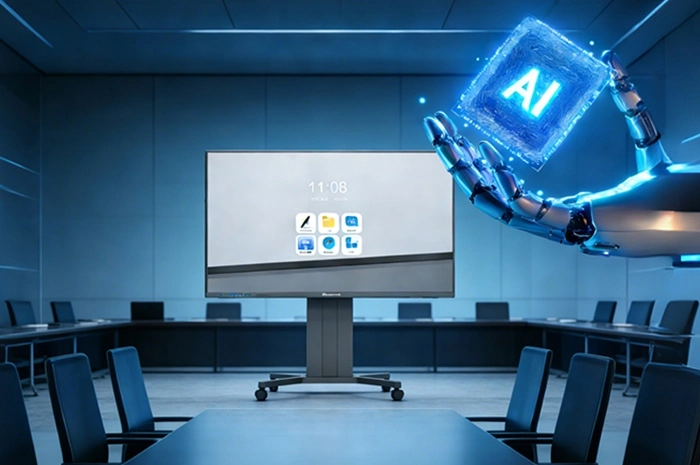
Digital office keeps evolving fast. Hybrid work and cross‑regional team collaboration become daily reality for most modern enterprises. Old‑style meeting workflows create obvious pain points. You waste time on manual note taking. Remote participants struggle with unclear audio. Switching between projectors, whiteboards and conference software eats into actual discussion time. Teams spend hours sorting out meeting minutes after each session. These small repeated tasks add up and drag down overall team output.
Qtenboard focuses entirely on intelligent video and conference hardware. We merge AI capabilities into interactive flat panels. Drawing from full‑chain R&D resources inside our factory, we build intelligent conference hardware built for real‑world office environments. Our hardware reshapes every step of your meeting workflow. You cut unnecessary manual work. Your team puts more energy into discussion and decision‑making. Your business sees lower long‑term office operating costs.
The core strength behind Qtenboard's Interactive flat panel comes from its new‑generation AI mainboard and office‑optimised large‑model integration. Four practical AI features solve real‑world meeting frustrations, no flashy unused functions. The built‑in AI voice assistant responds to spoken instructions. You pull up stored files, toggle system functions and trigger calendar reminders purely through voice. Meeting attendees stop tapping through layered menus. They stay focused on conversation content instead of device operation.
Voice control brings tangible convenience, but AI value stretches across the whole meeting timeline. Before sessions start, you call up agenda documents and adjust audio settings without touching physical buttons. During live discussion, core AI modules run in the background without disrupting screen display or touch response. Once the meeting closes, processing finishes within seconds and delivers actionable outputs for your team.
AI real‑time transcription captures every spoken word accurately. It separates speech streams and marks different speakers automatically. Five seconds after meeting end, the system outputs structured meeting summaries. It pulls out key discussion topics and lists pending action items clearly. Internal test data shows this feature reduces manual minutes‑sorting labour by over 75%. Your administrative staff no longer spend hours rewriting raw audio notes into usable documents. Exported content can go straight to shared drives or team chat platforms for follow‑up work.
Cross‑border projects face language barriers that slow down alignment work. Qtenboard AI real‑time translation supports bidirectional conversion among multiple commonly used business languages. Remote team members from different regions read translated text on screen as talks unfold. Misunderstanding caused by language gaps drops sharply. Global project teams move forward at a steady pace, even when participants do not share one native tongue.
Good conference hardware must balance built‑in intelligence and real‑world adaptability. Qtenboard merges AI modules with high‑precision touch, wireless screen casting and multi‑device sync functions. One single unit replaces separate computers, projectors and physical whiteboards. Your conference room setup becomes simpler. You own fewer pieces of hardware, and maintenance workload drops for your IT department.
Noise creates big headaches for remote video calls. Fan hum, keyboard tapping and surrounding office chatter leak into call audio. Qtenboard AI noise‑reduction algorithms filter out such background interference. Paired with high‑definition cameras and array microphones, remote participants pick up clear human voices. Local attendees also see sharp, well‑lit remote video feeds. This hardware works equally well for small group seminars and large‑scale multi‑site remote conferences. You do not need to swap devices when meeting scale changes.
Cut manual meeting note work by more than 75% with auto‑transcription and structured summaries.
Voice‑driven operations reduce physical screen taps and menu navigation during live meetings.
Multi‑language translation removes communication blocks for cross‑border project cooperation.
Integrated design cuts the number of separate devices inside meeting rooms, lowering hardware investment.
AI noise‑reduction plus high‑quality audio hardware lifts remote meeting experience for distributed teams.
Consistent hardware quality and full after‑sales support reduce unexpected device downtime for enterprise sites.
Behind these usable AI features sits solid technical foundation. Qtenboard holds hundreds of registered intellectual property achievements. Our in‑house R&D team carries out repeated hardware debugging, algorithm tuning and long‑duration reliability testing. We stick to quality‑oriented development principles. Every unit leaves factory after completing ageing cycles and function verification. You receive stable hardware together with complete after‑sales support resources.
This AI‑powered interactive flat panel represents more than one upgraded office gadget. It changes how enterprise teams handle collaborative work. Repetitive transcription and note‑sorting tasks shift over to machine processing. Human team members concentrate on idea exchange and decision‑making. Meeting outputs get properly saved and easy to trace. It demonstrates Qtenboard’s technical competence in intelligent office hardware. It supplies practical support for enterprises moving through digital office transformation.
| Feature Item | Specific Function Description | Visible Business Benefit | Applicable Meeting Scene |
|---|---|---|---|
| AI Voice Assistant | Voice‑trigger file access, function switch, schedule reminder, no manual menu clicking | Reduce operation interruption during discussion, keep meeting rhythm steady | All daily internal meetings, client face‑to‑face talks |
| AI Real‑Time Transcription & Summary | Speech‑to‑text, speaker distinction, structured summary & task extraction within 5 seconds post‑meeting | Lower manual minutes work by over 75%, accelerate meeting follow‑up progress | Project review meetings, management discussion, client negotiation sessions |
| AI Multilingual Real‑Time Translation | Multi‑language bidirectional translation, text display on panel screen | Remove language obstacles for overseas team cooperation | Cross‑border remote meetings, international client communication |
| AI Noise Reduction Audio Processing | Filter ambient office noise, preserve clear human voice for video conference | Remote participants hear cleaner audio, fewer repeated requests for restatement | Hybrid meetings, open‑plan office meeting spaces |
| Integrated Office Hardware | High‑precision touch, wireless screen cast, multi‑device sync, whiteboard function | Replace projector, physical whiteboard and partial peripheral equipment, simplify room layout | Small seminar rooms, standard corporate meeting rooms, large training halls |
| Meeting Scene | Recommended Screen Size | Most‑Used AI Functions | Key Deployment Suggestions |
|---|---|---|---|
| Small team seminar (4‑8 people) | 55 inch | Voice assistant, whiteboard, noise reduction | Focus on local brainstorm, short‑duration internal discussion |
| Standard corporate meeting room (8‑15 people) | 65 inch | Transcription, summary, wireless screen cast, remote video | Daily project reviews, regular department meetings, most common enterprise choice |
| Large training & conference hall (15‑30+ people) | 75 / 86 inch | Real‑time translation, transcription, noise reduction, multi‑participant video call | Company‑wide training, cross‑regional large‑scale remote conferences |
| Cross‑border hybrid client negotiation | 65‑75 inch | Multilingual translation, transcription, meeting summary export | Record negotiation content, generate traceable output for business project files |
Q1: Does the AI function of Qtenboard interactive flat panel require extra cloud subscription fees?
A1: Basic AI capabilities including voice assistant, real‑time transcription and meeting summary run on local mainboard resources. You do not need paid third‑party subscriptions for core meeting‑related features. Some extended advanced translation capacity may involve network access, and you can confirm details before placing orders.
Q2: Can transcribed meeting text and generated summaries be exported and saved?
A2: Yes. You can export meeting transcripts and structured summaries into common file formats. Files can store locally on device storage or push to your corporate shared storage according to permission settings. This makes post‑meeting hand‑over and project archiving straightforward for your team.
Q3: What network conditions do AI transcription and translation features demand?
A3: Core local‑side transcription works without high‑speed external internet. Multilingual translation modules need stable network connection. If your meeting room runs under restricted internal corporate network, you should check network access rules before formal deployment.
Q4: Is additional external camera or microphone hardware required to activate AI noise‑reduction and remote video?
A4: Standard models come with built‑in camera and microphone arrays to support AI noise reduction and regular remote meetings. For ultra‑large meeting halls with high participant numbers, you can connect external audio‑video accessories for better pickup range.
Q5: Can this interactive flat panel work with mainstream third‑party meeting software?
A5: It supports most widely used video conference applications. You launch software directly inside the panel system. AI noise‑reduction processing acts on audio output toward these third‑party applications, improving remote call quality for your existing tool stack.
Q6: Will AI functions slow down touch response or whiteboard drawing performance?
A6: The dedicated AI mainboard handles algorithm computation separately. Core drawing and touch‑sampling resources stay independent. You keep smooth writing experience even when transcription and translation run in background during meetings.
Q7: Can we customise AI function enablement for enterprise batch purchases?
A7: For large‑volume enterprise orders, we support function configuration adjustment. You can turn on or off certain AI modules to match internal data‑security policies. Talk with our sales‑technical team to sort out your exact configuration requirements.
Q8: What screen sizes are available for Qtenboard AI interactive flat panel?
A8: We supply 55‑inch, 65‑inch, 75‑inch and 86‑inch sizes. Each size carries the same set of core AI functions. You select size based on your meeting‑room area and usual participant quantity.
Q9: How do you handle data privacy for recorded meeting transcription content?
A9: Text data generated from meetings can stay stored locally on device. You control export authority. Data will not upload outward without your active operation. For strict‑security corporate environments, we can explain data‑processing mechanism for your IT security assessment.
Q10: What support do you provide after purchasing these conference panels?
A10: We deliver user documentation and remote technical guidance. Firmware updates optimise AI algorithm performance over time. Large‑volume project buyers can discuss training sessions for your IT administrators, to help them master device configuration and daily maintenance work.
Hybrid and cross‑regional collaboration will keep expanding for modern enterprises. The right conference hardware removes many small, repeated frictions inside daily teamwork. Qtenboard AI‑enhanced interactive flat panel puts practical AI capabilities into real meeting scenarios. It cuts administrative overhead, smoothes cross‑language communication, and simplifies your conference‑room hardware setup. Reach out to us if you want product specifications, project quotation or sample‑related information for your office upgrade project.


 Floor 6, Building A, No. 3, North District, Shangxue Science and Technology City, Xinxue Community, Bantian Street, Longgang District, Shenzhen City
 info@szqunmao.com
 +86 15920011166
 +86 15920011166