English
 Español
 Português
 Français
 Русский язык
 Italiano
 Deutsch
 Nederlands
 لعربية
 한국어
한국어 Japanese
 ภาษาไทย
 Türkçe
 Tiếng Việt
 Bahasa Indonesia
 Hindi
Hindi kazakh
 Uzbek
Uzbek Thai
Thai Farsi
Farsi
Qtenboard Interactive Whiteboard Cross-Scenario Remote Collaboration & All-in-One Teaching Office Display
 2026-08-14
 983
983




2026-08-14
983
You have felt the frustration countless times. Online classes stall halfway when teachers share courseware. Distributed team meetings waste half an hour waiting for files to load one by one. Remote collaborators take turns marking documents, waiting for others to finish edits before adding their own opinions. Distance splits conversations apart, turns smooth communication into fragmented, tedious back and forth. Traditional office and classroom hardware can never bridge these gaps fully. Qtenboard Interactive Whiteboard rebuilds collaborative and teaching workflows through integrated hardware and software design. It turns smooth, comfortable human-oriented interaction into daily reality, bringing tangible improvements to school education and corporate office work alike.
Distance used to create obvious barriers for cross-region work and learning. A teacher based in the main campus cannot draw diagrams live for branch campus students instantly. Corporate teams spread across different cities cannot annotate the same project plan side by side. File sharing, delayed text comments and pre-recorded videos cannot replace the efficiency of face-to-face discussion. Qtenboard eliminates these delays entirely with its built-in remote interactive system.
Live synchronized writing and annotation across all endpointsWhen you launch a remote session, every connected participant sees the screen content updated at the exact same moment. You jot down formulas, underline key paragraphs or circle revised sections on the main device, and these marks appear instantly on laptops, tablets and other Qtenboard units in different locations. Students in satellite schools follow live blackboard writing without lag. Remote team members point out flaws in plans as you draw layouts on screen. No more waiting for updated files to be sent back and forth after each round of revision.
One-click insertion of all common file formatsYou insert local images, course videos, PDF documents and slides directly into the collaborative canvas during sessions. The system adapts all materials to fit the large display automatically. A history teacher inserts scanned old photos and documentary clips for cross-city online lectures. A project manager loads architectural drafts and budget tables during cross-regional project meetings. Supplementary materials blend naturally with handwritten notes, keeping discussion content complete and structured from start to finish.
Multi-user concurrent operation opens true group collaborationUp to dozens of participants gain permission to write, draw and edit on the same canvas at the same time. Four branch office staff members mark different parts of a marketing plan simultaneously. Teachers assign small group tasks, letting remote students fill in mind maps and answer questions together on the shared screen. Traditional one-person control modes vanish. Cross-city communication proceeds without unnecessary restrictions, and overall communication speed rises noticeably for every long-distance team and teaching group.
Plain blank screens only meet basic writing demands. Diverse daily scenarios need targeted auxiliary tools to simplify operations and focus attention on discussion and knowledge delivery. Qtenboard packs a full set of commonly used interactive utilities inside the system, tailored for classroom teaching, corporate brainstorming and creative planning work.
Annotation tools for focused knowledge explanationHighlighter pens in multiple shades, adjustable straight lines and shape frames sit ready for instant use. Teachers trace mathematical curve trends, shade key text passages in textbooks and box off exam core knowledge during daily lessons. Color differentiation lets students distinguish definitions, formulas and precautions clearly at a glance. Plain black text on a static page cannot deliver this layered information effect.
Geometric drawing suite for math and design scenariosPre-set circles, triangles, rectangles and irregular polygon templates cut manual drawing time drastically. You drag and adjust sizes and angles with the stylus, no repeated redrawing needed for misaligned shapes. Math teachers construct stereoscopic geometry structures quickly. Design teams sketch preliminary layout frameworks during internal brainstorming sessions. Precise graphics take shape within seconds.
Mind map templates streamline logical sortingPre-built mind map frameworks let you expand branches with a single tap. Team members add viewpoints one after another during meeting brainstorming, sorting scattered ideas into clear hierarchical logic. Teachers build chapter knowledge frameworks together with the whole class, helping students sort out knowledge connections systematically. Fragmented thoughts converge into complete, retrievable content without messy handwritten drafts.
Many institutions purchase separate devices for classrooms, meeting rooms and design studios. Multiple sets of hardware occupy space, raise procurement costs and create incompatible file formats between different departments. Qtenboard adapts its functional modules to fit three major usage scenes seamlessly with no extra equipment required.
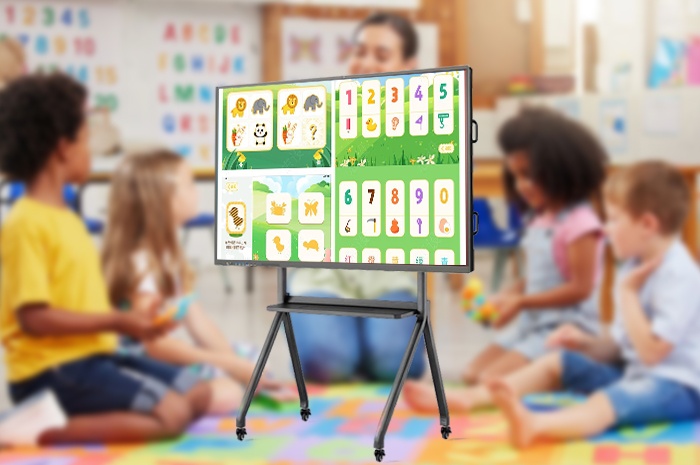
K12 and higher education classroom teachingTeachers load digital textbooks, play instructional animations and mark key content on screen each day. Abstract physical motion principles and geographic terrain structures turn into visible images on the large display. Students walk up to the screen to solve problems, share answers and join group discussions. Passive listening shifts to active classroom participation, and overall student focus and knowledge absorption improve steadily over semesters.
Enterprise internal office and team meetingsYou discard stacks of printed meeting agendas and paper drafts before each session. All plans, data tables and progress reports open directly on the screen. Team members revise content collectively, add supplementary opinions and adjust scheme details on the spot. After meetings, you export the full annotated records and share files to all participants in one step. Paper consumption drops sharply, meeting cycles shorten, and post-meeting arrangement work becomes far less cumbersome for administrative staff.
Design studio creation and client communicationGraphic, interior and product designers import preliminary drafts to the screen for presentation. They adjust line details, modify color blocks and revise structural layouts with the stylus while talking with clients. Clients point out adjustments directly on the display surface, and revisions take effect right away. Back-and-forth draft sending between designers and clients reduces greatly, and project iteration speed accelerates obviously for every design team.
Complex professional devices often demand weeks of training before users feel comfortable with daily operation. Busy teachers and office workers cannot spare abundant time to learn intricate system logic. Qtenboard adopts a flat, visualized interface, with operation habits consistent with mobile phones and tablets people use daily.
Basic functions mastered within minutesOpening files, writing with the stylus, switching tools and starting remote sessions rely on simple tapping and dragging actions. Most users finish familiarization within five to ten minutes without professional technical guidance. New teachers and newly joined company employees start using the device normally on their first workday. No lengthy training schedules take up teaching or working hours.
Multi-device linkage plus dual data storage guarantee safetyThe whiteboard connects stably to desktop computers, laptops and Android or iOS tablets via wired and wireless modes. You cast screen content from personal devices to the large display with one tap. All lesson records, meeting notes and design drafts save locally on the device meanwhile sync to encrypted cloud space automatically. Local files prevent access failures caused by network outages, and cloud copies avoid data loss from equipment faults or accidental deletion. Your work archives stay fully protected permanently.
Integrated hardware cuts procurement and maintenance spendingTraditional solutions need separate purchases of whiteboards, projectors, audio equipment and collaborative software subscriptions. You pay for multiple sets of hardware, regular software renewal fees and separate maintenance costs for each device. Qtenboard integrates all these modules into one single screen. Initial procurement expenditure falls, later routine maintenance workload reduces greatly, and overall communication efficiency rises noticeably. Schools and enterprises lower comprehensive operating costs while upgrading daily working and teaching conditions.
| Comparison Dimension | Traditional Projector + Whiteboard + Collaboration Software | Qtenboard All-in-One Interactive Whiteboard |
|---|---|---|
| Remote Cross-Regional Interaction | Serious screen lag, no simultaneous multi-person editing, file transmission delayed repeatedly | Real-time synchronous refresh, multi-user concurrent annotation, zero obvious delay |
| Built-In Auxiliary Tools | No unified toolkit, need to open separate software for mind maps and drawing | Highlighter, geometry tools, mind map templates all embedded inside the system |
| Applicable Scenes | Single fixed scene only, hard to switch between classroom, meeting and design use | Suitable for teaching, corporate meetings and client design communication flexibly |
| Learning & Operation Threshold | Multiple devices need coordination, take hours to get proficient fully | Smartphone-style logic, basic functions mastered within 10 minutes |
| Data Storage & Security | Files saved dispersedly, easy loss, no automatic cloud backup | Local storage + encrypted cloud sync, double protection against data loss |
| Comprehensive Procurement & Maintenance Cost | High initial investment, separate maintenance fees for each hardware and software subscription | One-time integrated purchase, low later maintenance expenditure, no recurring software fees |
| Paper Consumption | Mass printing required for agendas, drafts and teaching materials | Digital distribution entirely, paper usage cut down drastically |
Q1: Will remote interactive sessions become unstable under poor network conditions?
The system adopts adaptive stream compression technology. When network bandwidth drops, the system lowers non-essential image resolution slightly to guarantee writing and annotation synchronization remain smooth. Core interactive actions never experience severe stalling. All preloaded courseware and meeting materials open normally offline beforehand. You start sessions with local files first, and network only serves real-time cross-region synchronization after the session begins.
Q2: What types of files can be imported and displayed on the whiteboard?
It fully supports PDF, PPT, Word, Excel, common image formats and mainstream video files. You import local documents directly via USB flash drive, wireless transmission or cloud space. The system adapts layout automatically without format distortion. You add handwritten notes and graphical marks on top of all imported content freely during teaching or meetings.
Q3: How many people can join the same collaborative session simultaneously?
The standard version supports up to 32 concurrent participants for synchronous viewing and editing. It meets daily needs for whole-class remote teaching and medium-sized enterprise cross-city meetings. Custom expansion options are available for large-scale seminars and enterprise annual conferences with more participants upon request.
Q4: Can stored meeting records and lesson files be exported for later sorting?
You export complete session content as PDF, image packs or video recordings after each session ends. Send exported files to team members or students via QR code scanning and email in one click. All annotated content and discussion traces retain intact, making post-session sorting, review and filing extremely convenient for administrative staff and teachers.
Q5: Is the touch screen durable enough for frequent multi-scene daily use?
The screen surface uses strengthened anti-glare tempered glass, resistant to scratches from stylus writing and frequent tapping. Infrared touch sensors maintain stable response speed after years of daily heavy use. Daily cleaning only needs a soft dry cloth to wipe the surface, no special maintenance products required.
Q6: What after-sales services and warranty policies are provided?
The main hardware enjoys a two-year official warranty covering display screens, touch modules and main control boards under normal usage. Built-in teaching and office system functions receive free online updates for three years after purchase. Our technical team provides remote troubleshooting guidance and regular equipment inspection suggestions to solve usage issues quickly.
Distance no longer creates barriers for knowledge delivery and team communication. Fragmented hardware combinations are replaced by integrated single-screen equipment. Qtenboard breaks the boundaries between classrooms, corporate meeting rooms and design studios. Smooth remote interaction, abundant built-in interactive tools, simple operation logic and obvious overall cost advantages solve multiple long-standing pain points for educational institutions and enterprises.
Teachers deliver engaging online and offline lessons without equipment troubles. Office teams complete cross-city project discussions efficiently with less paper waste and shorter meeting cycles. Designers communicate revision details with clients intuitively to speed up project progress. Every link of daily work and learning becomes more orderly and relaxed with the support of integrated interactive hardware.
Check detailed hardware parameters, multi-scene application cases and bulk purchase policies on our official product page:Qtenboard Interactive Whiteboard Official Product PageUpgrade your classroom and office collaborative experience now, and let efficient cross-space interaction become your daily standard.


 Floor 6, Building A, No. 3, North District, Shangxue Science and Technology City, Xinxue Community, Bantian Street, Longgang District, Shenzhen City
 info@szqunmao.com
 +86 15920011166
 +86 15920011166