English
 Español
 Português
 Français
 Русский язык
 Italiano
 Deutsch
 Nederlands
 لعربية
 한국어
한국어 Japanese
 ภาษาไทย
 Türkçe
 Tiếng Việt
 Bahasa Indonesia
 Hindi
Hindi kazakh
 Uzbek
Uzbek Thai
Thai Farsi
Farsi
Qtenboard Interactive Whiteboard: A Digital Canvas to Ignite Students' Imagination
 2026-07-29
 900
900




2026-07-29
900
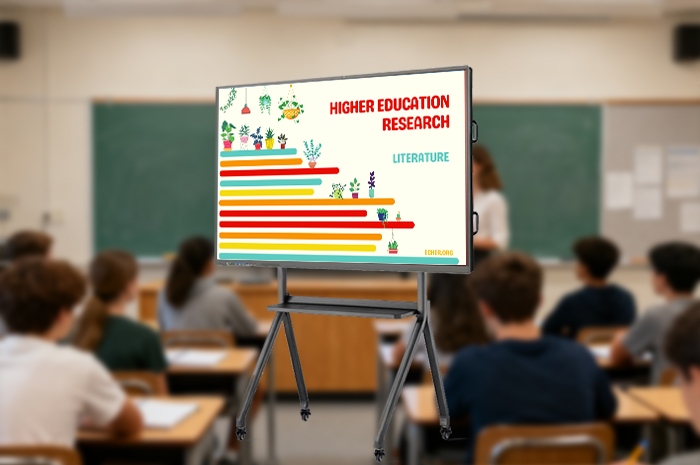
Gone are the days when students erased their "what if" ideas with chalk erasers on traditional blackboards. Every creative sketch, bold hypothesis and interesting imagination written on the blackboard would disappear once wiped. Many valuable student inspirations vanish instantly, leaving teachers and students no way to preserve, review or expand these precious ideas. For decades, this unavoidable regret has troubled educators around the world. Today, this dilemma is completely transformed by the Qtenboard Interactive Whiteboard.
Acting as an infinite digital canvas for classroom creativity, Qtenboard keeps all brainstorming content permanently. It lets students’ suppressed ideas flourish freely and turns every class into a springboard for sparking imagination. Different from one-way knowledge infusion in traditional classrooms, this intelligent interactive device rebuilds the teacher-student interaction logic. It encourages students to put forward bold assumptions, participate in collaborative creation, and explore diversified possibilities behind knowledge. In the wave of global education reform focusing on quality-oriented education and creative thinking training, interactive whiteboards have become standard configuration for future-oriented smart campuses.
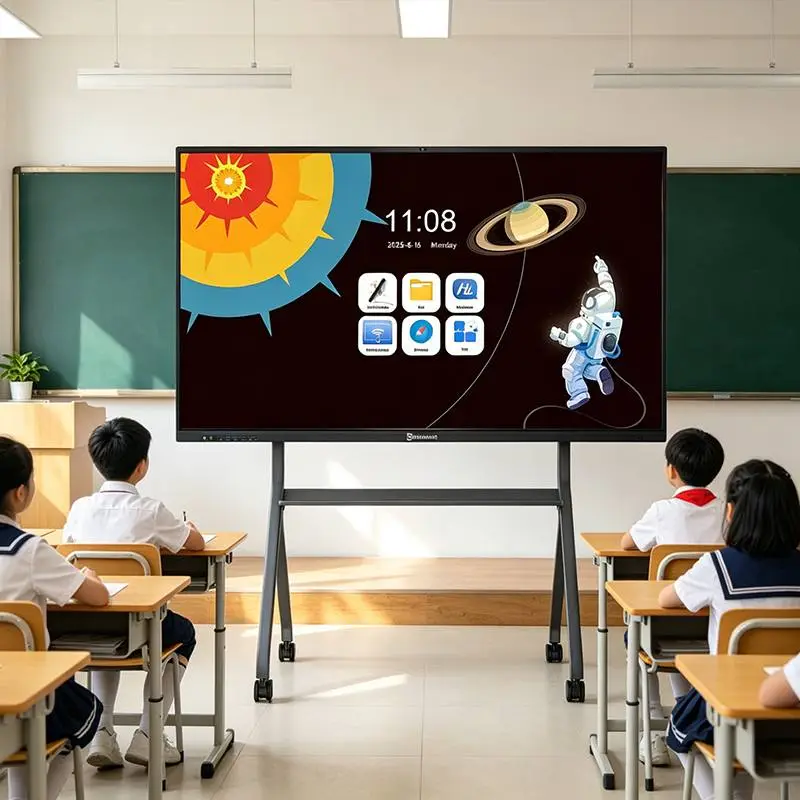
Many schools have purchased basic touch screens, yet most devices only realize simple courseware display and basic annotation functions. They fail to support multi-person collaborative creation, scene simulation and interdisciplinary extended exploration. Qtenboard is developed centered on creative teaching scenarios. Rich built-in teaching tools, open drawing functions and multi-terminal linkage capability provide comprehensive support for inquiry-based learning, project-based teaching and group cooperation, bringing revolutionary changes to classroom mode.
Qtenboard breaks the rigid one-way learning model, turning ordinary classrooms into active stages for idea collisions. Each discipline can adopt brand-new interactive teaching methods with the support of this interactive whiteboard, helping students get rid of mechanical memorization and understand knowledge through visualization and creation.
In history class, boring chronological knowledge can be transformed into vivid interactive scenes. Students bring the Silk Road to life with Qtenboard: dragging camel icons, marking the spice route in gold, tracing trade paths in red, and even drawing flying celestial bodies on virtual murals. Students can add merchant teams, relay stations and cultural exchange landmarks on the map. The complicated historical evolution is no longer rigid text in textbooks, but an interactive picture jointly created by the whole class. Students naturally understand the value of ancient trade and cultural communication during the creation process.
Geography class becomes an interesting scientific lab. Kids adjust temperature curves on Qtenboard, "draw" snow on savannas, simulate seasonal rainfall changes, and grasp climate science principles intuitively through repeated practice. Teachers can call up global terrain maps, allow students to mark volcano distribution, ocean current directions and vegetation zones. Abstract geographical concepts are visualized, greatly lowering learning difficulty for teenagers. Every bold idea raised by students can be displayed instantly on the large screen, converging into a lively in-class brainstorm.
Language, chemistry, politics and other subjects can also gain huge benefits. Chinese lessons restore ancient poetry scenes through hand-painting; chemistry classes simulate molecular combination and chemical reaction changes; art courses provide infinite canvas for free creation. The cross-subject application capability makes Qtenboard suitable for primary schools, middle schools, high schools and vocational education institutions.
When it comes to nurturing creativity, Qtenboard excels at capturing surprising moments generated spontaneously in class. Classroom inspiration is often transient. Traditional teaching tools cannot record and expand sudden creative ideas efficiently, while Qtenboard perfectly solves this pain point.
Take the "Future City" art project as an example. Students use Qtenboard to design flying buses, glow-in-the-dark plant lamps, rooftop cloud farms and underwater residential areas. When teachers guide students to discuss, "What technology powers the cloud farms?" classroom discussions naturally extend to meteorology, new energy and materials science. Students connect artistic design with natural science knowledge. Interest twists around knowledge like vines, eventually bearing the fruits of independent exploration. This interdisciplinary exploration mode is exactly the core goal of modern quality education.
Group cooperative creation function is one of its highlights. Multiple students can touch and draw on the screen at the same time. In group projects, different members are responsible for scene layout, character design and function description. All creation content can be saved as pictures, PDF or whiteboard files after class. Works can be projected again for display, evaluation and discussion in the next lesson. Compared with handwritten paper drafts which are difficult to preserve and display, digital creation greatly improves the efficiency of project teaching.
Qtenboard reshapes learning logic with the core concept of "imagination first". It encourages students to break routine thinking and combine knowledge with unrestrained imagination, rather than only memorizing standard answers in textbooks.
Biology class is no longer limited to static textbook dissection diagrams. Students color frog organ structures and add interesting spacesuit elements on Qtenboard. In the process of free creation, they memorize the distribution and function of various organs easily amid their whims. Teachers can further expand discussion: if amphibians migrate to outer space, what physiological changes will happen? Open-ended questions guide students to carry out scientific reasoning.
For English oral role-play teaching, a light tap on the screen quickly switches background scenes from dense forests to space stations, deserts or ancient castles. The built-in audio library provides matching background music and sound effects. Students immerse themselves in language scenarios, effectively improving oral expression and situational communication ability. Abstract language knowledge becomes editable interactive tools, making learning an active adventure instead of passive recitation. Every "what if" question raised by students can open a new journey of knowledge exploration, all thanks to powerful interactive support from Qtenboard.
Multi-point simultaneous touch: Support 20-point writing, allowing multiple students to create on screen simultaneously for group cooperation
Infinite whiteboard canvas: Scroll freely up, down, left and right without space limit, break the boundary of traditional blackboard area
Rich built-in resource library: Maps, geometric graphics, biological models, music sound effects, teaching animation materials for all disciplines
Diversified file export: Save creation content as image, PDF and special whiteboard file for permanent storage and secondary editing
Wireless screen casting & cross-device transmission: Mobile phones and laptops can quickly push materials to the interactive whiteboard
Timeline playback function: Record the whole process of drawing and annotation, teachers can replay thinking process for review
Low blue light anti-glare screen: Protect students’ eyesight under long-time classroom use
Support dual-system switching: Android built-in whiteboard software, compatible with Windows system for more teaching software
| Evaluation Item | Qtenboard Interactive Whiteboard | Chalk Blackboard | Ordinary Single-Touch Display Screen |
|---|---|---|---|
| Content Preservation Ability | All creations can be saved and exported permanently | All content erased after class, unable to retain | Simple screenshot saving, lack of professional whiteboard tools |
| Multi-student Collaborative Creation | Support multi-point simultaneous writing and drawing | Only one student can write on the blackboard at one time | Usually support limited touch points, poor cooperative experience |
| Creative Expansion Space | Infinite scrolling canvas, rich teaching material library | Limited fixed area on blackboard wall | Fixed display range, single function |
| Interdisciplinary Teaching Support | Powerful built-in resources suitable for all subjects | Depend on teachers’ manual drawing, low efficiency | Mainly used for courseware playback |
| Classroom Dust Pollution | Zero dust, clean and environmentally friendly | A large amount of chalk dust, harmful to health | No dust pollution |
| Stimulate Students’ Creativity | Highly open creation environment | Limited operation space, easy to be erased | Lack of open creative tools |
Daily Classroom Teaching: Primary, middle and high school regular subject teaching, realize interactive and visualized classroom
Creative Art Courses: Art creation, hand-drawing design, aesthetic education and group artwork evaluation
Project-based Learning: Theme research, group brainstorming, interdisciplinary inquiry activities
Open Classes & Teaching Research: Teaching demonstration, lesson observation and teacher training exchange
Extracurricular Interest Clubs: Science popularization activities, robot programming, literary creation workshops
Preschool Early Education: Kindergarten enlightenment teaching, picture interaction and game learning
Q1: Can the content drawn by students on Qtenboard be saved and viewed again after class?
A1: Yes. All hand-drawn content, annotations and group creation works can be saved locally on the device. Files can be exported as pictures, PDF or whiteboard format, copied to U disk or transmitted to teachers’ mobile phones for archiving, display and review in subsequent courses.
Q2: How many students can write and draw on the interactive whiteboard at the same time?
A2: Qtenboard supports up to 20-point multi-touch. Multiple students can stand in front of the screen to create simultaneously, which meets the needs of group cooperative learning in classroom teaching.
Q3: Is the screen easy to reflect light? Will long-time watching hurt students’ eyes?
A3: The screen adopts anti-glare tempered glass and low blue light display technology. It effectively reduces light reflection from indoor lighting, relieves visual fatigue, and conforms to school classroom eye protection standards for long-term teaching use.
Q4: Can the built-in whiteboard software be used without connecting the internet?
A4: The core writing, drawing and basic material functions can work normally offline. Mass extended resource library and cross-device file transmission functions need stable Wi-Fi network support.
Q5: What sizes are available for school classroom installation?
A5: Qtenboard interactive whiteboard provides complete size options including 55inch, 65inch, 75inch, 86inch and 98inch. Small classrooms can choose 65/75-inch models; large multi-functional lecture rooms recommend 86-inch or 98-inch large-size interactive panels.
Q6: Can we install third-party education software commonly used by local schools?
A6: The Android system allows installation of mainstream education APPs. Under Windows dual-system mode, all teaching software running on ordinary computers can be normally used, bringing high compatibility for school existing teaching resources.
Q7: Do you support OEM customization for educational project bidders and system integrators?
A7: We accept bulk order OEM & ODM customization services, including customized boot logo, UI interface, exclusive pre-installed software and outer packaging scheme. Contact our business team to get detailed project quotation and technical documents.
When schools purchase interactive whiteboards, they need to comprehensively consider classroom area, number of students, installation height and later maintenance conditions. For ordinary classrooms with less than 45 students, 65-inch or 75-inch equipment is cost-effective. Multi-functional lecture halls suitable for more than 60 students prefer 86-inch and above large screens.
During installation, adjust the screen height according to the average height of students, to ensure teenagers can reach the writing area conveniently. It is recommended to reserve stable power supply and network wiring. If the school carries out large-scale smart classroom renovation, priority can be given to purchasing models with dual-system configuration to realize seamless docking of existing teaching resources. In addition, schools can organize simple teacher operation training after equipment delivery, to help teachers make full use of creative functions of Qtenboard and maximize classroom teaching effect.
Traditional blackboards only record fixed knowledge, while an excellent interactive whiteboard records unlimited imagination. The Qtenboard Interactive Whiteboard turns students’ vague dreams into tangible, continuously expandable creative ideas. It completely changes the dull knowledge instilling mode in traditional classrooms.
By building an open digital creation platform, Qtenboard energizes every classroom, lets every child’s creativity soar freely, and truly makes learning a fun, creative exploration journey. As more and more educational institutions focus on cultivating students’ innovative thinking, interactive whiteboards represented by Qtenboard will become essential intelligent hardware for future smart education, helping educators realize high-quality creative-oriented teaching.


 Floor 6, Building A, No. 3, North District, Shangxue Science and Technology City, Xinxue Community, Bantian Street, Longgang District, Shenzhen City
 info@szqunmao.com
 +86 15920011166
 +86 15920011166