English
 Español
 Português
 Français
 Русский язык
 Italiano
 Deutsch
 Nederlands
 لعربية
 한국어
한국어 Japanese
 ภาษาไทย
 Türkçe
 Tiếng Việt
 Bahasa Indonesia
 Hindi
Hindi kazakh
 Uzbek
Uzbek Thai
Thai Farsi
Farsi
Qunmao LCD Video Wall Project for Huadian Power Supply Company Jintan Changzhou
 2026-08-20
 975
975




2026-08-20
975
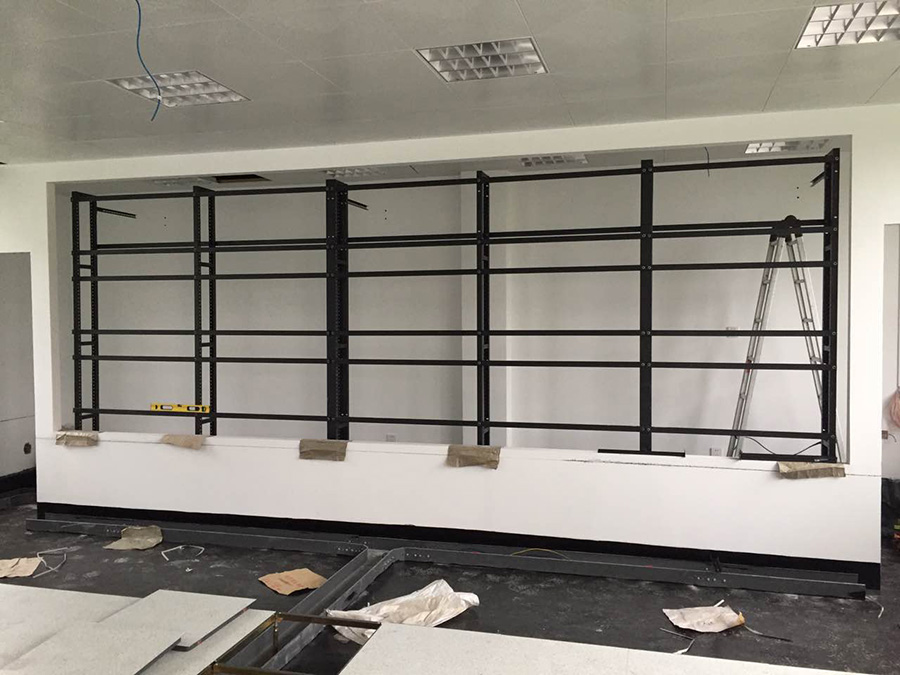
splicing screen installation
Huadian Power Supply Company in Jintan City, Changzhou City, Jiangsu Province partnered with our team for a large‑size LCD splicing screen deployment. Qunmao field installation engineers completed full on‑site assembly, wiring and hardware adjustment. The complete system passed multi‑item acceptance tests and entered regular daily operation.
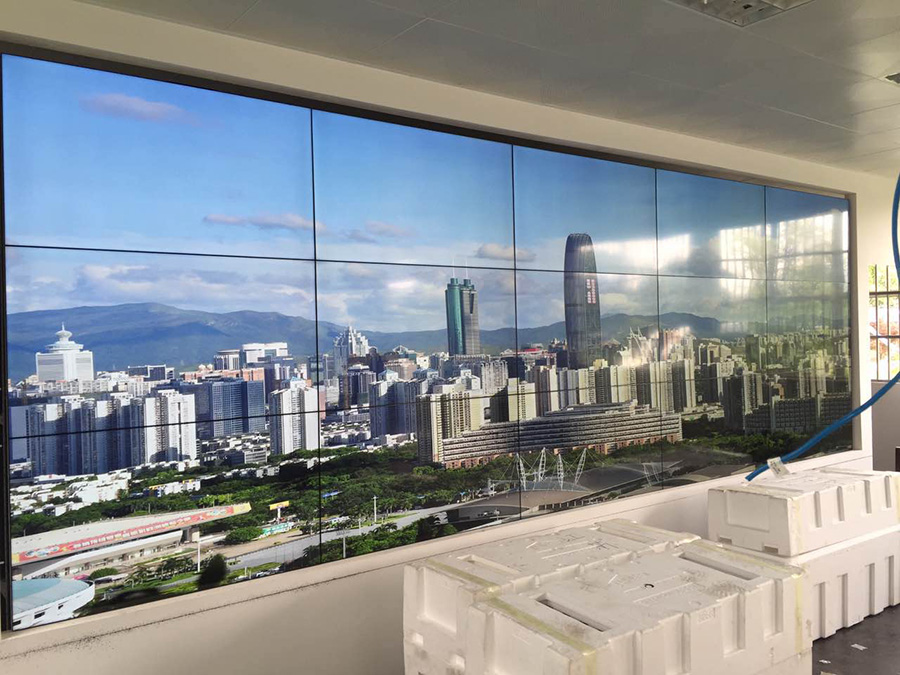
Installed and put into use
Power‑supply enterprises manage critical public infrastructure. Substation status, power‑line operating data, on‑site camera feeds and real‑time alarm messages need continuous observation inside the control room. Operators must spot abnormal signals fast and issue response instructions without delay. Old‑style scattered small monitors force staff to switch attention across many separate display units. This slows reaction speed during unexpected grid events.
More monitoring‑focused industrial sites adopt LCD splicing screen hardware. These video wall systems deliver large‑area high‑definition picture output. They hold steady under long‑hour running cycles and bring solid cost‑level benefits for enterprise‑grade projects. Huadian Power Supply Company Jintan planned to upgrade its central monitoring‑room display hardware. The organization selected Qunmao large‑size LCD splicing screen solution for its on‑site control‑room space.
Before project kick‑off, the customer shared clear demands built from their daily power‑grid monitoring workflow. Every requirement ties directly to on‑site power‑safety management and dispatch‑room work.
Build a unified large‑size display canvas inside the central control room. Operators view substation camera streams, grid‑operation data and alarm notifications from one fixed observation position.
Support flexible display modes. Single‑panel split view for separate signal channels, merged full‑wall view for key‑area emergency observation during grid faults.
Accept multiple signal inputs from existing SCADA systems, NVR recording devices and data servers. The new video wall must connect with current utility hardware without full‑scale system replacement.
Handle long continuous running hours. The monitoring room stays active around most working days. Hardware should keep stable picture output without frequent manual restarts or screen flicker.
Deliver sharp visual details. Operators read numeric grid‑data values, equipment status text and surveillance‑camera footage clearly across the whole video wall.
Neat on‑site cable arrangement. Control‑room space keeps tidy, and cables stay easy to reach for later inspection work.
Simple operation for internal dispatch staff. Most operators do not hold specialized display‑system training. Layout switching and signal source selection should take only a small number of clicks.
Contain predictable later‑stage maintenance burden. Replaceable separate modules help hold down long‑term operating spending for the utility enterprise.
Our technical team visited the customer‑site control room. We measured wall dimensions, checked wall load‑bearing capacity, counted available signal ports and mapped existing power‑monitoring equipment. We locked in industrial‑grade 55‑inch LCD splicing panels plus matching video wall processor, mounting frame and power distribution accessories. Below table lays out core configuration and practical value for power‑grid monitoring usage.
| Configuration Item | Parameter Specification | Practical Value For Power‑Utility Control‑Room |
|---|---|---|
| Panel Size | 55‑inch industrial‑grade LCD splicing panel | Matches standard power‑enterprise control‑room viewing distance. Operators spot small numeric data and surveillance‑image details. |
| Physical Bezel Width | Bilateral 3.5 mm | Balances hardware cost and visual continuity, widely selected for utility‑monitoring deployments. |
| Single‑panel Native Resolution | 1920 × 1080 | Delivers sharp output for grid‑data dashboards and surveillance camera feeds. Operators identify text and numeric values without visual blur. |
| Panel Brightness | 500 cd/m² | Maintain readable picture under normal indoor control‑room lighting, avoid screen reflection interference for long‑shift operators. |
| Video Wall Processor | Industrial multi‑channel input splicing processor | Realize single‑screen display, multi‑window split, floating window adjustment and fast switching between SCADA data and camera signals. |
| Installation Structure | Back‑maintenance heavy‑duty wall‑mount metal frame | Reserve rear space for heat dissipation, cable arrangement and later‑period hardware inspection and component replacement. |
| Supported Signal Input | HDMI, DVI, VGA, network signal | Directly link with existing SCADA hosts and surveillance NVR equipment inside Huadian Power control‑room environment. |
Power‑enterprise control‑room projects carry high‑safety requirements. Installation work cannot interrupt normal power‑grid monitoring duties. Our field engineers follow standardized steps for utility‑customer projects.
Pre‑installation site re‑check. Re‑measure wall dimension, verify wall load‑bearing capacity, confirm stable power‑supply position and reserved signal‑cable access points. Arrange construction time to avoid interference with daily dispatch‑room shifts.
Goods arrival inspection. Customer‑side technical staff and our engineers check panels, processor and mounting accessories. Confirm zero transport scratches or hardware damage before mounting work starts.
Mounting‑frame installation. Fix heavy‑duty wall‑mount frame and fine‑tune flatness. Frame flatness directly controls gap consistency across all splicing panels.
Panel hanging and adjustment. Install each 55‑inch panel one‑by‑one. Adjust position so gaps between adjacent panels stay uniform across the whole video wall.
Cable sorting and connection. Lay power lines and signal cables inside rear maintenance space. Group cables neatly, mark each signal channel for easy future troubleshooting.
System hardware debugging. Complete signal‑line access, set output resolution, configure each input channel coming from SCADA and surveillance NVR devices. Test signal‑switch response speed repeatedly.
Multi‑dimensional function test. Run single‑panel split display test, open multiple floating monitoring windows, switch different data and camera signal sources, check picture color consistency for the full wall.
Customer acceptance. Huadian Power’s technical and dispatch representatives verify picture performance, display‑mode switching and long‑time continuous‑running performance. The project passes acceptance and goes into official daily use.
After deployment, this large LCD splicing screen serves the power‑enterprise’s daily grid‑monitoring and dispatch work. Control‑room operators switch working modes based on real‑time grid‑site conditions.
Split multi‑window monitoring. Assign each panel or sub‑window to one independent signal channel. Operators watch substation camera feeds, grid‑load dashboards and system‑alarm lists all at the same time.
Merged full‑wall display. Combine multiple panels or the complete video wall into one large canvas. Staff use this mode when focusing on one key substation area during abnormal‑event handling or emergency drills.
Flexible floating‑window adjustment. Resize and drag monitoring windows. You can place high‑priority alarm feeds in central viewing positions without cutting off other signal sources.
Link with existing utility monitoring system. Pull SCADA data streams and surveillance video onto the video wall. No need to discard already‑working monitoring recording devices.
Long‑hour continuous operation. Panels keep stable picture output through long dispatch‑room shift cycles. Operators do not face frequent screen blackout or flicker events.
Replace scattered small monitors. All key grid‑site data and camera feeds converge onto one unified large‑size display surface inside the control room.
Flexible split‑screen and merged‑screen modes match routine monitoring and emergency‑response scenarios for power‑grid events.
Connect with pre‑existing SCADA and surveillance hardware, which cuts extra equipment‑replacement spending for the utility enterprise.
Back‑maintenance mounting frame supports convenient later‑period inspection and part‑replacement work.
Simple operation logic lowers learning burden for on‑site dispatch‑room operators.
Your control‑room wall space, signal‑source quantity and main monitoring purposes decide suitable splicing layout. The table below gives practical reference for utility‑project purchasers.
| Splicing Layout | Common Panel Size | Best‑Fit Power‑Utility Scenarios | Key Practical Reminders |
|---|---|---|---|
| 2×2 | 49‑inch / 55‑inch | Branch‑station small monitoring room, local power‑supply sub‑control point | Fits limited wall area, works for fewer concurrent data and camera channels. |
| 3×3 | 55‑inch | City‑level power‑supply enterprise central monitoring room (similar to Huadian Power Jintan case type) | Balanced display area, widely chosen for utility‑monitoring projects. |
| 4×4 | 55‑inch | Regional power‑grid main dispatch control room, multi‑substation joint‑monitoring center | Supports large numbers of simultaneous signal inputs. Need higher‑grade multi‑channel video processor. |
| Custom layouts above 4×4 | 55‑inch / 65‑inch | Provincial‑level grid command‑and‑monitoring hub | Must complete strict wall load‑bearing evaluation. Plan enough rear‑side maintenance‑operation space. |
Q1: What site preparation should a power‑utility finish before video‑wall installation engineers arrive?
A1: Confirm wall load‑bearing meets total hardware weight requirements. Reserve stable and reliable power supply near installation location. Finish pre‑buried signal‑cable layout for SCADA and NVR devices. Clear on‑site construction zone. We can send a pre‑installation checklist for your internal technical‑team reference.
Q2: Can LCD splicing screens connect with our existing SCADA power‑monitoring system?
A2: Yes. Our industrial‑grade video wall processor accepts mainstream signal formats. Tell us your SCADA output‑interface types during early‑stage communication. We match proper access modules so you keep using your current power‑monitoring hardware.
Q3: Can the video wall run long continuous hours for power‑dispatch‑room use?
A3: Our industrial‑grade panels support long continuous running cycles. Still, you should arrange reasonable rest cycles whenever possible. This slows backlight aging and extends overall usable life for the whole system.
Q4: How many independent signal windows can one splicing‑screen system open at the same time?
A4: Window quantity depends on your selected video‑wall processor hardware capacity. Share your approximate signal‑source count with our sales team. We assign matching processor specifications for your control‑room project.
Q5: Back‑maintenance or front‑maintenance mounting frame, which option fits power‑utility control‑room better?
A5: Back‑maintenance frame needs reserved rear‑side space for engineer access. It delivers tidy front‑wall visual effect. Front‑maintenance structure lets you pull panels forward from the front side, good for sites without available rear‑operation space. We suggest you confirm wall‑structure condition before you make your final choice.
Q6: If one single panel fails, must we replace the full set of splicing‑screen units?
A6: No. Each LCD panel works as an independent module. When one unit breaks down, you replace only that faulty panel. Remaining panels keep working normally. This helps utility customers cut later‑period repair spending.
Q7: What daily maintenance work should utility IT or dispatch staff complete for LCD video wall?
A7: Keep control‑room environment dry and lower dust accumulation. Do not spray liquid cleaning agent directly to screen surfaces. Inspect power‑supply and signal‑cable connections on a regular basis. Follow standard power‑on and power‑off operating sequences.
Q8: What causes color difference between different panels on a splicing video wall?
A8: Original panel brightness deviation, installation accuracy and long‑time operation can bring color inconsistency. Our engineers finish brightness and color calibration during on‑site debugging. You can schedule recalibration work after one‑two years of continuous use.
Q9: LCD splicing wall or LED display, which one suits power‑dispatch‑room scenarios better?
A9: LCD splicing screens deliver sharp static data and surveillance‑feed details with lower upfront project cost. LED displays perform better under high‑brightness ambient‑light conditions but carry higher total investment. You need to compare your viewing distance, picture‑detail requirement and project budget before you decide.
Q10: Do you provide on‑site installation service for overseas utility buyers?
A10: For domestic China projects, our own field engineers handle installation and debugging work. For overseas customers, we supply complete installation documents and remote technical guidance. You arrange local technicians to finish physical on‑site deployment work.
This real‑world deployment at Huadian Power Supply Company Jintan shows how large‑size LCD splicing‑screen hardware delivers practical value for power‑utility control‑monitoring rooms. Multi‑window split monitoring, compatibility with existing SCADA and surveillance equipment and stable long‑time performance solve real‑pain‑points for on‑site dispatch‑room operators. If your power‑supply enterprise, substation or grid‑monitoring center plans to build or upgrade a control‑room video‑wall system, send us your control‑room wall size, signal‑source quantity and signal‑interface conditions. Our technical team will give targeted configuration suggestions and project‑related reference materials for you.


 Floor 6, Building A, No. 3, North District, Shangxue Science and Technology City, Xinxue Community, Bantian Street, Longgang District, Shenzhen City
 info@szqunmao.com
 +86 15920011166
 +86 15920011166