English
 Español
 Português
 Français
 Русский язык
 Italiano
 Deutsch
 Nederlands
 لعربية
 한국어
한국어 Japanese
 ภาษาไทย
 Türkçe
 Tiếng Việt
 Bahasa Indonesia
 Hindi
Hindi kazakh
 Uzbek
Uzbek Thai
Thai Farsi
Farsi
Qunmao LCD Splicing Screen Project Case: Fujian Quanzhou Tong Shipping Group 3×4 55‑inch 3.5mm Bezel Unit
 2026-08-19
 934
934



2026-08-19
934
Shipping and logistics companies process large volumes of real‑time data every working day. Vessel schedules, cargo tracking data, port status updates and internal meeting materials need to show clearly on large‑format display hardware. Many older display setups suffer from limited split‑screen capability, low brightness and unstable signal output. Fujian Quanzhou Tong Shipping Group searched for a reliable video‑wall solution to upgrade their in‑house display system. The group reached cooperation with Qunmao Display for a complete LCD splicing screen deployment project.
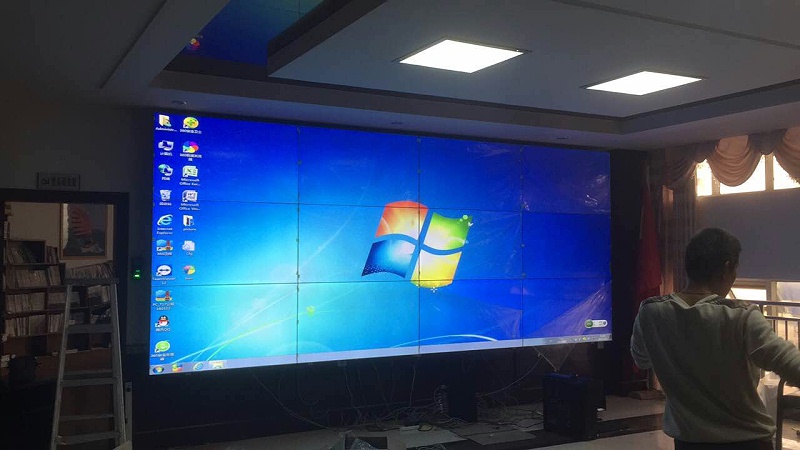
This project adopts a 3×4 layout, using 55‑inch LCD panels with bilateral 3.5mm bezel specification. Qunmao’s on‑site installation team completed full hardware assembly, wiring, controller configuration and signal debugging. After multi‑item function testing, the whole system passed acceptance and went into formal daily operation. The new splicing wall delivers obvious improvement over the previous display setup. Operators can open multiple independent screen windows at the same time. They drag, resize and reposition each display window freely according to current business needs.
Fujian Quanzhou Tong Shipping Group runs shipping‑related business across regional ports. The company maintains an internal operation hall for staff monitoring and daily team briefings. The old display hardware could not satisfy growing business demands. The customer listed clear practical requirements before project launch.
Build a large continuous display surface inside the operation hall for real‑time business monitoring.
Support multi‑window split display. Different data sources should run on separate windows without mutual interference.
Allow operators to adjust window size and position quickly for different work scenarios.
Keep narrow physical gaps between panels to reduce visual interruption when showing large‑scale charts and maps.
Stable long‑time running status. The display wall needs to work for long daily working hours.
Complete on‑site installation, wiring and system debugging provided by supplier’s professional engineers.
Simple later‑stage maintenance steps for the enterprise’s internal technical staff.
Qunmao technical team evaluated the customer’s site space, signal source quantity and daily usage habits. The team confirmed 3 rows × 4 columns total layout, 12 units of 55‑inch LCD splicing panels. Each panel carries bilateral 3.5mm bezel design. Matching splicing controller, input signal interfaces, power supply modules and mounting frame are included within the whole solution.
| Item | Parameter Details | Purpose In This Shipping Enterprise Project |
|---|---|---|
| Panel Model & Layout | 55‑inch LCD, 3 rows × 4 columns, total 12 panels | Matches wall space of enterprise operation hall, provides enough display area for shipping‑related data |
| Bezel Spec | Bilateral 3.5mm | Narrow gap lowers visual breaks when showing vessel route maps and large data tables |
| Single Panel Resolution | 1920 × 1080 | Clear text and graphics for cargo forms, schedule lists and monitoring picture feeds |
| Brightness | 500 cd/m² | Guarantee readable screen content under normal indoor office lighting environment |
| Core Controller | Professional splicing video processor | Realize multi‑window split screen, window resizing, window floating and position adjustment |
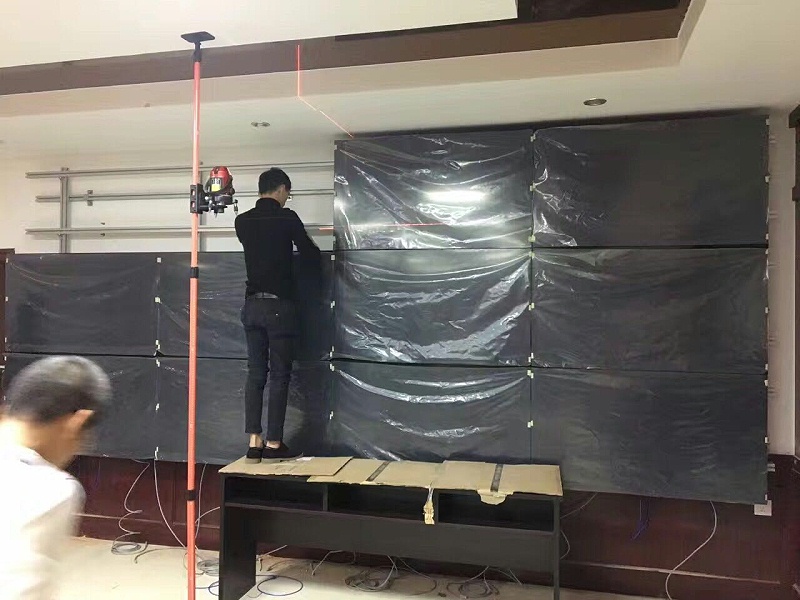
| Installation Structure | Wall‑mounted heavy‑duty metal frame | Safe fixed installation on operation hall wall, reserves rear space for heat dissipation and cable arrangement |
| Signal Input Support | HDMI, VGA, network signal access | Connect enterprise internal servers, monitoring NVR, office host computers and other signal sources |
Qunmao assigned experienced field installation engineers for this project. Engineers followed standard working steps from site survey to final hand‑over.
Site recheck: Measure wall size, check wall load‑bearing capacity, confirm reserved cable holes and power supply position on customer side.
Hardware entry inspection: Check each LCD panel, controller and accessories for transport damage before installation work starts.
Mounting frame fixing: Install and level the wall‑mount frame. Frame flatness directly affects final splicing gap effect.
Panel installation: Mount 12 LCD units onto the frame one by one. Fine‑tune position to keep uniform gaps between adjacent screens.
Cable layout: Arrange power lines and signal cables in order. Avoid messy wiring inside the rear maintenance space.
Controller debugging: Complete hardware connection of splicing processor, set output resolution, configure each signal input channel.
Function test: Verify full‑screen splicing display effect, open multiple split windows, drag and resize windows, switch different signal sources repeatedly.
Quality acceptance: Customer representatives check picture quality, split‑screen functions and equipment running status. The whole system passed acceptance test and went into official use.
After putting into use, the splicing wall serves two main work scenarios inside the shipping enterprise: real‑time business monitoring and internal staff meetings. Multiple practical functions bring direct value to daily work.
Multi‑window simultaneous display. Operators can show vessel schedule tables, cargo tracking data, surveillance camera feeds and meeting presentation content on separate windows at the same time. You do not need to manually switch whole‑screen signal sources back and forth.
Free adjustment for each window. You drag window borders to change size. You drag whole windows across different screen areas to adjust display position. When business focus shifts, you reorganize screen layout within short time.
Full‑screen splicing mode. When the team holds internal briefings, you combine all 12 panels into one huge single screen for showing large maps, enterprise reports and PPT materials.
Signal source flexible switching. Switch between server data output, monitoring video and office host signal according to current work demands.
Stable continuous operation. The hardware runs for long hours during enterprise working days without obvious color drift or abnormal shutdown events.
One large unified display surface replaces several scattered small monitors inside the operation hall.
Multi‑window function lets staff observe multiple sets of shipping business information in one view.
Adjustable window layout adapts to monitoring work and internal meeting use alternately.
Narrow 3.5mm bezel reduces visual interruption when viewing large‑size route maps and data charts.
Professional on‑site installation and testing removes customer’s burden of hardware deployment work.
Enterprise customers pick different splicing layout according to wall dimension, participant quantity and business type. Below table lists typical layout choices for reference.
| Splicing Layout | Common Panel Size | Fit Enterprise Scenarios | Key Reminder |
|---|---|---|---|
| 2×2 | 49‑inch /55‑inch | Small monitoring room, small meeting room | Suitable for limited wall space, fewer signal sources |
| 3×3 | 55‑inch | Medium‑size monitoring center, enterprise exhibition hall | Balanced total area, widely used for general commercial projects |
| 3×4 (This case) | 55‑inch | Shipping operation hall, logistics monitoring hall, large briefing room | Wider horizontal display area, good for charts and multi‑window data monitoring |
| 4×4 and above | 55‑inch /65‑inch | Large command center, port‑level monitoring platform | Needs strict wall load‑bearing assessment, larger controller capacity requirement |
Q1: What preparation work should our enterprise finish before LCD splicing screen installation team arrives?
A1: Confirm wall load‑bearing meets mounting frame weight requirement. Reserve enough power supply sockets. Pre‑embed signal cables if possible. Clear the installation site to leave operating space for engineers. Qunmao can provide pre‑installation check list for your technical staff.
Q2: 3.5mm bezel or 1.7mm bezel, how do we choose for shipping and logistics monitoring scenarios?
A2: 1.7mm gives narrower visual gap but raises project total cost. If you mostly view text data and split multi‑window content, 3.5mm bezel like this shipping case delivers acceptable visual effect and controls project budget well. Pick 1.7mm mainly when you frequently play large‑scale map and video materials in full‑screen mode.
Q3: How many signal sources can one splicing processor support for multi‑window display?
A3: It depends on processor hardware grade. The processor used in this 3×4 project supports multiple signal inputs, you can open several independent windows at the same time. Tell our sales team how many signal devices you need to connect, we will match proper processor model for you.
Q4: Can we adjust window size and position by mouse or software, do we need professional technical staff every time?
A4: You operate window layout through supporting control software. Ordinary office staff can finish daily adjustment after simple short training. Complex parameter modification still needs technical personnel operation.
Q5: How to handle heat dissipation for wall‑mount LCD splicing wall?
A5: Wall‑mount installation must keep enough rear maintenance space. Air circulates through reserved gap behind panels. Do not block rear ventilation area during later‑stage decoration or equipment stacking.
Q6: If one single LCD panel fails, do we need to replace the whole splicing wall?
A6: No. Each panel works as independent unit. When one panel breaks down, you only replace that single faulty unit. Other panels can keep running normally. This brings lower later‑stage repair cost for enterprise users.
Q7: What daily maintenance work should the enterprise carry out for LCD splicing wall?
A7: Keep environment dry and dust‑reduced. Do not spray liquid cleaner directly onto screen surface. Check power supply and cable connection termly. Shut down equipment following standard power‑off sequence. Avoid long‑term static still picture staying on screen for too many continuous hours.
Q8: Can this set of 3×4 splicing wall switch between monitoring mode and meeting mode quickly?
A8: Yes. You can save preset layout schemes inside controller. One click calls monitoring multi‑window layout or full‑screen meeting layout. It fits enterprises that use the same video wall for both monitoring work and internal conferences.
Q9: What is the difference between wall‑mount installation and cabinet‑type installation for splicing screen?
A9: Wall‑mount saves front‑to‑back space, relies on wall load‑bearing. Cabinet‑type integrates frame, power and cooling structure, no high requirement for wall strength, but occupies more room depth. This shipping project selects wall‑mount solution according to site actual condition.
Q10: Does Qunmao provide on‑site installation service for overseas orders?
A10: For domestic projects inside China, our own engineers complete on‑site installation and debugging. For overseas customers, we supply detailed installation guide documents and remote technical guidance. You can arrange local construction personnel to finish physical installation work.
This real‑world case from Fujian Quanzhou Tong Shipping Group shows how LCD splicing wall solves display demands for shipping‑related enterprises. Multi‑window flexible layout, stable long‑time running and professional on‑site deployment bring practical value for daily monitoring and internal briefing work. If your team plans similar video‑wall procurement, send us your site wall size, expected layout and signal source quantity. Our technical team can work out targeted configuration suggestion and project reference for you.


 Floor 6, Building A, No. 3, North District, Shangxue Science and Technology City, Xinxue Community, Bantian Street, Longgang District, Shenzhen City
 info@szqunmao.com
 +86 15920011166
 +86 15920011166